 Owner’s manual




How can I tell if my Maytag dryer is under warranty?
Your Maytag dryer model LDG7304AAE is under warranty if the purchase date (or installation date, if required) falls within the warranty time period listed in your warranty section and the issue is a covered failure. Start by matching your model and serial number to the warranty terms in the LDG7304AAE owner's manual.
Quick ways to confirm warranty coverage
- Find your model and serial number on the data plate (typically in the lower right corner of the door opening).
- Check the Warranty section in the manual for coverage length and what parts are included.
- Locate your proof of purchase (receipt, invoice, delivery ticket) to establish the start date.
- Confirm the dryer is installed in the United States or Canada, since coverage terms can differ by location.
- If you need help interpreting coverage or choosing next steps, contact Sears PartsDirect support.
What information you should have ready
| What to gather | Why it matters | Where to find it |
|---|---|---|
| Model number: LDG7304AAE | Confirms the exact product | Door opening data plate |
| Serial number | Identifies production details | Door opening data plate |
| Purchase date | Establishes warranty start | Receipt or invoice |
| Symptom details | Speeds up service and diagnosis | Notes, photos, error behavior |
Why it matters
Warranty coverage can reduce your out-of-pocket cost for covered parts, but many warranties still leave the owner responsible for items like labor or other non-covered costs. Checking the warranty terms first helps you choose the right next step before ordering parts or scheduling repair.
Last updated: March 2026
How to clear error code on Maytag dryer?
To clear an error code on your Maytag dryer model LDG7304AAE, start with a basic reset: unplug the dryer (or switch off the breaker) for 1 to 5 minutes, then restore power and try a cycle again. Use the steps in the LDG7304AAE owner's manual for model-specific operation and care.
Quick reset steps (safe first checks)
- Turn the dryer OFF.
- Unplug the power cord (or turn the circuit breaker OFF).
- Wait 1 to 5 minutes so the control can fully reset.
- Restore power.
- Run a short timed cycle and watch for the code returning.
If the code comes back: what to check next
Many “error-like” symptoms on dryers are caused by airflow or heat issues rather than the control itself.
- Clean the lint filter before every load (restricted airflow can cause long dry times and overheating). The manual specifically calls out cleaning the lint filter after each load.
- Check the exhaust venting: use 4-inch metal duct, keep it short, and limit elbows; long or plastic/flexible venting commonly causes poor drying and heat problems.
- Avoid mixed loads (heavy items with lightweight items) because it can make cycles behave inconsistently.
- If the dryer is noisy, check for foreign objects (coins, buttons, nails) inside the drum area.
Common symptoms and likely causes
| What you notice | Common cause | What we recommend |
|---|---|---|
| Long dry times | Lint screen or vent restriction | Clean lint filter; inspect and clear venting |
| Heat seems inconsistent | Airflow restriction or burner/heat component issue | Verify venting first; then test heat components |
| Timer/dial seems “stuck” | Normal timer behavior on some cycles | Let the cycle run; dial may advance faster near the end |
Parts that often relate to heat or ignition problems (gas dryers)
If your LDG7304AAE runs but does not heat, heats briefly, or fails to ignite, these model-compatible parts are commonly involved:
- Gas igniter 4391996 (ignites the gas)
- Gas sensor WP338906 (radiant sensor that helps control ignition)
- Second coil 279834 (gas valve coil used during burner operation)
- Dryer gas valve WP306176 (opens to allow gas flow)
Why it matters
Clearing the code is useful, but fixing the underlying cause prevents repeat shutdowns, long dry times, and overheating. On this Maytag dryer, airflow basics (lint filter and venting) are the fastest, most reliable first steps.
Last updated: February 2026
What if I can't find my part on Sears PartsDirect?
If you can’t find the exact part for your Maytag LDG7304AAE dryer, we can still get you to the right replacement by confirming the model number, locating the part on the exploded-view diagrams, and matching the correct part number or substitute listed in the LDG7304AAE owner's manual.
Quick steps to find the right part
- Confirm the full model number on the dryer’s ID tag: LDG7304AAE (letters and numbers must match exactly).
- Use the parts diagrams to identify the part by location (front panel, drum, burner, blower housing).
- Search by the manufacturer part number if you have it (often printed on the old part).
- Check for common “bundle” replacements (for example, gas valve coils are often sold as a kit).
- If the part name is unclear, match by function and where it mounts (screws, brackets, harness connectors).
Common “hard to name” parts and what to search
| What you see | What it’s often called | Example from this model’s parts |
|---|---|---|
| Dryer runs but no heat (gas) | Gas valve coil kit / coils | Second coil 279834 |
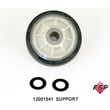
| Loud thumping or rumble | Drum support roller | Roller w/bea 12001541 |
| No ignition after clicking | Gas igniter | Gas igniter 4391996 |
| Squeal, scraping, or air leak at drum | Drum felt seal | Dryer drum felt seal WP314820 |
Why it matters
Ordering by appearance alone can lead to the wrong fit, especially on older Maytag gas dryers where similar-looking rollers, thermostats, and burner parts vary by revision. Using the model number plus the diagram callout is the fastest way to get the correct part the first time.
Last updated: February 2026





