Installation guide
 Owner’s manual



Is there a reset on Maytag dishwasher?
Yes. On the Maytag MDB7759AWS2 dishwasher, the most common “reset” is canceling the current cycle and restarting it; if the START/RESUME light is blinking, press START/RESUME and close the door firmly within 3 seconds to resume or restart operation. See the MDB7759AWS2 owner's manual for the exact button sequence for your control panel.
Quick reset steps (most common)
- Press CANCEL (or CANCEL/DRAIN) to stop the current cycle.
- Wait for the dishwasher to drain (you may hear the drain pump running).
- Select a new cycle.
- Press START/RESUME.
- Close the door firmly within 3 seconds if the START/RESUME light is blinking.
If the dishwasher still will not run
These checks solve most “needs a reset” complaints on this model.
- Confirm the door is closed and latched.
- Check the home breaker/fuse; a tripped breaker can look like a control problem.
- If the unit is not draining after canceling, check the drain path and consider inspecting the dishwasher drain hose WPW10545278 for kinks or clogs.
- If the dishwasher is not draining well and you have a drain air gap, clean the air gap.
- If multiple lights are blinking and the unit will not run, service is typically needed.
What “reset” means on this dishwasher
| Situation | What to do | What you should see |
|---|---|---|
| Cycle is stuck or you want to stop it | Press CANCEL (or CANCEL/DRAIN) | Unit drains, then stops |
| START/RESUME light is blinking | Press START/RESUME, close door within 3 seconds | Cycle starts or resumes |
| No power or dead controls | Check breaker/fuse, then try START/RESUME | Lights return, unit responds |
Why it matters
A proper cancel and restart clears an interrupted cycle and forces the control to re-check the door latch and fill sequence. That prevents repeated pauses and helps you avoid replacing parts like the electronic control board when the issue is simply an interrupted start.
Last updated: January 2026
What is the average lifespan of a Maytag dishwasher?
A Maytag undercounter dishwasher like model MDB7759AWS2 typically lasts 10 to 12 years. With correct installation, normal household use, and routine cleaning, it’s common to reach the high end of that range and sometimes longer.
What affects dishwasher lifespan most
- Water quality (hard water and high iron can increase buildup and staining)
- How often you run it (heavy daily use wears pumps, seals, and hinges faster)
- Cleaning and loading habits (clogs and poor spray patterns strain the circulation system)
- Heat and drying performance (weak heating can leave moisture that contributes to odor and residue)
- Installation quality (drain routing and electrical connections matter)
Maintenance that helps you get the full 10 to 12 years
We recommend these habits for MDB7759AWS2-STYLE Maytag dishwashers:
- Clean the filter area and remove debris from the sump regularly
- Check spray arms for blocked holes and clear them
- Use the right detergent amount to prevent over-sudsing and residue
- Run hot water at the sink before starting a cycle to improve wash temperature
- Inspect for small leaks early; replace worn seals before they cause bigger issues
Common “end-of-life” symptoms vs. fixable problems
| Symptom | Often fixable? | Common parts involved |
|---|---|---|
| Won’t drain or drains slowly | Yes | Drain hose, drain pump |
| Poor cleaning, gritty dishes | Often | Filter, circulation pump, spray arms |
| Door drops open or won’t stay up | Yes | Door balance link, hinge |
| No heat or poor drying | Often | Heater circuit, thermal fuse |
If your dishwasher won’t drain, a frequent repair path is checking the drain line first, then testing the pump. For this model, the dishwasher drain pump WPW10348269 is a common replacement when the motor hums but water does not evacuate.
Why it matters
Knowing the typical lifespan helps you decide whether to repair or replace. If your MDB7759AWS2 is under about 10 years old, repairs like a drain pump, door balance link, or heater component often restore full performance at a reasonable cost.
For model-specific use and care guidance (including cycle behavior and indicator lights), follow the MDB7759AWS2 owner's manual.
Last updated: January 2026
What is the most common problem with a Maytag dishwasher?
For the Maytag MDB7759AWS2 dishwasher, the most common customer complaints are poor cleaning, not draining, and leaks. In many cases, the fix is basic maintenance or correcting loading and detergent use; when symptoms persist, the drain system, inlet valve, or dispenser can be the root cause (see the MDB7759AWS2 owner's manual).
Quick checks we recommend first
- Confirm the door closes and latches fully; the dishwasher will not run correctly if it is not latched.
- If the unit is not draining well and you have a drain air gap, clean the air gap.
- Make sure large items (cookie sheets, cutting boards) are not blocking the detergent dispenser from opening.
- Avoid overcrowding; blocked spray paths cause poor wash results.
- Use fresh detergent and run hot water at the sink before starting a cycle to improve wash temperature.
Common symptoms and the most likely causes
| Symptom | Most common causes | Parts to consider (if checks fail) |
|---|---|---|
| Dishes still dirty | Blocked spray, low water temp, loading issues | Detergent dispenser assembly, circulation system |
| Water left in tub | Clogged air gap or drain path, drain pump issue | Dishwasher drain pump WPW10348269, drain hose |
| Leaking | Door seal wear, loose hose connections, tub gasket issues | Door seal, hose, clamps |
When it points to a part (MDB7759AWS2)
If basic cleaning and loading changes do not help, these are the parts most often involved in the “big three” complaints:
- Drain problems: drain pump, drain hose routing, air gap restriction
- Fill problems (poor wash): water inlet valve not opening fully
- Detergent issues: dispenser door blocked by dishes or dispenser mechanism failing
Why it matters
Poor cleaning and standing water are often early signs of restricted water flow or drainage. Catching it early helps prevent repeat cycle failures, odor, and unnecessary wear on the pump and heater.
Last updated: January 2026
What does F8 mean on a Maytag dishwasher?
On a Maytag MDB7759AWS2 dishwasher, an F8 error code is commonly tied to a water or draining problem, such as the dishwasher not filling correctly, not draining correctly, or sensing an abnormal water condition during the cycle. We recommend checking the drain path and the fill supply first using the steps in the MDB7759AWS2 user manual.
What to check first (fast, no parts)
- Press CANCEL and let the dishwasher attempt to drain; listen for the drain motor running.
- Check the sink drain and garbage disposal connection (a blocked disposal inlet can stop draining).
- If you have a drain air gap, remove the cap and clean it (a clogged air gap can cause poor draining).
- Make sure the drain hose is not kinked, crushed, or routed too low.
- Confirm the door is fully closed and latched; some cycles pause or stop if the door is not latched.
Drain and fill checks that solve most F8 situations
If the tub has standing water, focus on draining. If the tub is empty but the cycle stops early, focus on filling.
| Symptom you see | Most likely area | What to do next |
|---|---|---|
| Water left in bottom after cycle | Drain path restriction | Clean air gap, check hose routing, clear disposal inlet |
| Dishwasher hums but drains slowly | Drain pump or blockage | Inspect sump area for debris; consider drain pump testing |
| No water entering at start | Water supply issue | Verify shutoff valve is open; check inlet screen |
| Stops mid-cycle with odd water behavior | Sensor or control input | Check for suds, correct detergent, then run a reset/drain |
Parts that are often involved
If the drain path is clear and the dishwasher still will not drain, these model-compatible parts are common suspects:
- Dishwasher drain pump WPW10348269 (pump runs during drain; failure can leave water in the tub)
- Dishwasher drain hose 8269144A (kinks, internal blockage, or poor routing can restrict flow)
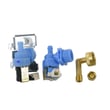
- Dishwasher water inlet valve W10648041 (if the issue is filling, not draining)
Why it matters
An F8-related water or drain fault can leave dirty water in the tub, reduce cleaning performance, and cause the dishwasher to stop before completing the wash and dry portions of the cycle.
Last updated: January 2026