Owner’s manual
 Error Codes







What is the capacity of Samsung DV220AEW?
The Samsung DV220AEW dryer has a 7.3 cu. ft. capacity, which is designed to handle larger loads like towels, jeans, and bedding in fewer cycles. For cycle and load guidance specific to your dryer, use the DV220AEW owner's manual.
What 7.3 cu. ft. means for everyday loads
A 7.3 cu. ft. drum is considered a large-capacity dryer. In practical terms, it typically handles:
- A full mixed load of everyday laundry
- A bulky load like towels without overpacking
- Medium bedding items (avoid stuffing the drum tight)
- Fewer total loads per week compared with smaller-capacity dryers
How to load for best drying performance
Capacity is only helpful if airflow stays strong. We recommend:
- Fill the drum loosely; stop when items can tumble freely
- Mix similar fabric weights (heavy towels with heavy items)
- Clean the lint screen before every load
- Use the correct cycle for fabric type (sensor cycles for most loads)
- Check that the exhaust vent is clear and not crushed behind the dryer
Quick guide: capacity vs. common symptoms
| What you notice | Likely cause | What to do |
|---|---|---|
| Long dry times | Overloading or restricted venting | Reduce load size; clean venting |
| Clothes still damp | Load packed too tightly | Re-load loosely; use a sensor cycle |
| Dryer shuts off early | Airflow or temperature sensing issue | Check venting; inspect temperature sensors |
Why it matters
Using the right load size for a 7.3 cu. ft. Samsung dryer helps maintain proper airflow across the heater and moisture sensors, which improves dry times, reduces wrinkles, and helps prevent overheating conditions.
Last updated: February 2026
What's the average lifespan of a Samsung dryer?
Most Samsung dryers, including the Samsung DV220AEW, typically last 10 to 15 years with normal household use and proper venting, cleaning, and maintenance. Heavy use, restricted airflow, and overheating shorten dryer life.
What affects dryer lifespan the most
- Airflow and venting: Crushed or lint-clogged ducts make the dryer run hotter and longer.
- Lint control: A clogged lint screen or blower housing increases heat stress.
- Load habits: Overloading strains the drum belt, motor, and drum support surfaces.
- Heat system health: Weak heating components can cause long dry times and extra wear.
- Electrical stability: Loose connections at the terminal area can cause intermittent operation.
Quick maintenance checklist (best ROI)
- Clean the lint screen every load.
- Check the vent path for restrictions; keep the run short and smooth.
- Vacuum lint from the cabinet and blower area periodically (power off first).
- Avoid overloading; large loads increase belt and motor strain.
- Use cycles appropriately; sensor dry helps prevent over-drying.
Common wear items vs. what they usually cause
| Part area | What you notice | Example part on this model page |
|---|---|---|
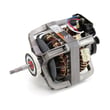
| Drum drive | Squealing, thumping, drum not turning | Samsung dryer drum belt 6602-001655 |
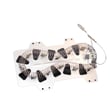
| Heating | No heat or weak heat, long dry times | Samsung dryer heating element DC47-00019A |
| Overheat protection | Dryer stops heating, may stop mid-cycle | Dryer high-limit thermostat DC47-00018A |
Why it matters
A dryer that is forced to run hot or run long (usually from poor airflow) wears out heating parts, thermostats, and the drive system faster. Keeping airflow strong is the simplest way to reach the full 10 to 15 year lifespan.
For model-specific use and care details (cycles, capacity, venting cautions), follow the DV220AEW owner’s manual.
You can order replacement parts for your DV220AEW from the parts list for this model, or search by model number on Sears PartsDirect.
Last updated: February 2026
How to tell if Samsung dryer thermal fuse is bad?
If your Samsung DV220AEW dryer runs but won’t heat, or it won’t run at all after an overheating event, a failed thermal fuse is a common cause. The most reliable way to tell is to unplug the dryer and test the fuse for continuity with a multimeter; a “bad” fuse reads open (no continuity). See the DV220AEW owner's manual for electrical safety and access guidance.
Quick symptoms that point to a bad thermal fuse
A blown thermal fuse is a safety device that opens when the dryer overheats. You’ll often notice one or more of these:
- Dryer won’t start (motor won’t run)
- Dryer runs but produces no heat
- Dryer shuts off before the load is dry
- Dry times suddenly get much longer
- Burning smell or very hot cabinet before the failure
How we test it (safe, practical steps)
- Unplug the dryer (or switch off the breaker). Do not use an extension cord.
- Access the fuse location (commonly on the heater housing or blower housing area, depending on design).
- Pull the two wires off the fuse terminals.
- Set a multimeter to continuity (or lowest ohms).
- Touch a probe to each terminal:
- Good fuse: continuity (near 0 ohms)
- Bad fuse: open circuit (no continuity)
What to replace and what to check at the same time
A thermal fuse usually blows because airflow is restricted or the dryer overheats. Fix the cause so the new fuse lasts.
| What you find | What it usually means | What we recommend next |
|---|---|---|
| Fuse tests open | Safety device tripped | Replace the fuse and correct airflow restriction |
| Fuse tests good | Fuse is not the issue | Check venting, heat circuit parts, and power supply |
| Lint buildup or crushed vent | Overheating risk | Clean lint filter, duct, and outside hood |
Related heat-protection parts on this model that are commonly checked/replaced with overheating issues include the dryer thermal cut-off fuse, 320-degree f DC47-00015A and the dryer high-limit thermostat DC47-00018A.
Why it matters
The thermal fuse is designed to stop the dryer from operating unsafely when temperatures get too high. Replacing the fuse without fixing venting or lint buildup often leads to repeat failures and longer dry times.
Last updated: February 2026