Installation guide
 Owner’s manual






How many cubic feet is a Kenmore Model 79048913410 microwave?
The microwave in Kenmore Elite model 79048913410 is typically listed as about 1.7 cubic feet of capacity. For the exact capacity tied to your unit’s configuration and features, confirm it in the 79048913410 use and care guide.
How to confirm the capacity on your exact unit
We recommend verifying capacity using the model-specific documentation and the appliance ID label.
- Check the specifications section in the 79048913410 use and care guide
- Match the full model number 79048913410 on the serial plate before ordering parts
- Look for the serial plate along the interior side trim (visible when the lower oven door is opened)
- If your microwave performance seems off (uneven heating, long cook times), confirm settings and power level first
- Use the model number when selecting microwave parts such as a door switch, fuse, or control board
Common capacity ranges (for context)
Most built-in microwave units in wall oven/microwave combos fall into a narrow range; 1.7 cu. ft. is a very common size.
| Microwave type | Typical capacity range | What you notice most |
|---|---|---|
| Wall oven/microwave combo (built-in) | 1.5 to 2.0 cu. ft. | Fits most dinner plates and medium casserole dishes |
| Countertop microwave | 0.7 to 2.2 cu. ft. | Wider variation in footprint and turntable size |
Why it matters
Capacity affects what cookware fits, how evenly food rotates on the turntable, and which accessories are compatible. It also helps when troubleshooting heating issues that can be related to airflow, door alignment, or electrical components.
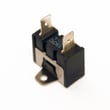
If you are diagnosing a microwave that will not run or stops when the door moves, a common related part is the microwave door interlock switch 5304493153.
Last updated: February 2026
How to reset a Kenmore Elite microwave?
For the Kenmore Elite 79048913410 microwave (in the wall oven/microwave combo), the most reliable reset is a power reset: turn the unit off at the breaker for about 1 minute, restore power, then reset the clock and any cooking settings per the 79048913410 use and care manual.
Quick reset options (start here)
- Breaker reset (best overall): Switch the oven/microwave combo circuit breaker OFF for ~60 seconds, then ON.
- Stop/Clear reset: Press Stop/Clear once to cancel a cooking cycle; press again to clear the display (if your keypad has this button).
- After a power outage: When power returns, reset the clock and oven function (the manual notes the appliance can resume operation if it was not turned off during a power failure).
Step-by-step: breaker reset
- Make sure the microwave is not running.
- Turn OFF the dedicated breaker for the wall oven/microwave combo.
- Wait 60 seconds.
- Turn the breaker ON.
- Set the clock, then test a short heat cycle (for example, 30 seconds with a cup of water).
If it still will not reset (common causes)
A “won’t start” or “dead display” symptom after resetting is often a door-safety or power-supply issue.
- Check that the door closes firmly and latches normally.
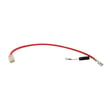
- If the unit is completely dead, a blown fuse is common; see microwave fuse 5304480634.
- If it acts like the door is open when it is closed, a failed interlock is common; see microwave door interlock switch 5304493153.
What to expect after a reset
| Reset method | What it fixes | What it does not fix |
|---|---|---|
| Breaker reset | Frozen control, glitchy display, odd beeps | Blown fuse, failed door switch, failed control board |
| Stop/Clear | Cancels a cycle, clears input | Power loss issues, hardware failures |
Why it matters
Resetting correctly helps clear control glitches safely. If the microwave resumes operation after a power interruption, resetting the clock and functions helps prevent unexpected heating and restores normal operation.
Last updated: February 2026
How to unlock a Kenmore Elite oven?
On Kenmore Elite wall oven/microwave combo model 79048913410, the control lock uses the OVEN LOCK pad. To unlock the oven, press and hold OVEN LOCK for 3 seconds, then wait for the DOOR LOCKED message and lock indicator to stop flashing before you pull the door open.
Unlock the oven door lock (model 79048913410)
Follow the same sequence the control uses to lock and unlock:
- Press and hold OVEN LOCK for 3 seconds.
- If DOOR LOCKED flashes, the latch is moving; wait.
- Open the door only after the lock indicator turns off.
- If the oven is hot, allow time for the door lock to release after cooling.
- If the keypad does not respond, restore power at the breaker, then retry the 3-second hold.
What the display is telling you
| Display or indicator | What it means | What to do |
|---|---|---|
| DOOR LOCKED flashing | Door latch is moving | Wait; do not pull the handle |
| Lock indicator on steady | Door is locked | Hold OVEN LOCK 3 seconds |
| No response to keys | Control not accepting input | Reset power, then retry |
If the door still will not open
These steps address the most common causes of a stuck lock:
- Let the oven cool completely; the lock can stay engaged until temperatures drop.
- Turn the circuit breaker OFF for 1 minute, then ON.
- Press and hold OVEN LOCK again for 3 seconds.
- Avoid forcing the door; forcing can damage the latch or hinges.
Why it matters
The door lock motor and latch need time to travel. Waiting for the flashing DOOR LOCKED message to stop helps prevent damage to the door lock mechanism and keeps bake and broil functions operating normally.
For the control pad descriptions and the Oven Lock feature details, use the 79048913410 owner's manual.
Last updated: February 2026
What is a combo wall oven?
A combo wall oven is a built-in appliance that combines a traditional electric wall oven with a second cooking cavity, commonly a microwave, in one cabinet cutout. For Kenmore model 79048913410, it is designed for wall installation and uses dedicated electrical supply and grounding.
What you get in a wall oven/microwave combo
Most combination units like the Kenmore Elite 79048913410 are built to save space while giving you two separate cooking functions.
- A full-size electric oven for baking and broiling
- A microwave cavity for fast heating and cooking
- Separate controls and safety interlocks for each cavity
- A single built-in frame designed to fit a specific cabinet cutout
- Installation requirements that differ from a freestanding range
Installation basics that define a “combo” unit
A combo wall oven is not just two appliances stacked together; it is engineered and listed as one built-in product with specific cabinet and electrical requirements.
| Feature | Combo wall oven/microwave | Separate appliances |
|---|---|---|
| Cabinet cutout | One matched cutout | Two independent cutouts |
| Electrical | One dedicated branch circuit (sized by wattage) | Often two circuits |
| Mounting | Single built-in chassis | Separate mounting systems |
| Approval | Not approved for stackable or side-by-side installs | Depends on each unit |
For this model family, the installation instructions specify the combination oven is not approved for stackable or side-by-side installation; it must be installed as designed in the cabinet cutout. See the 79048913410 installation guide.
Why it matters
Knowing you have a combo wall oven helps you order the right parts (Kenmore Elite wall oven/microwave combo parts are model-specific) and prevents cabinet, wiring, and fit issues during replacement or remodel planning.
Quick tip before ordering parts
- Match the full model number: 79048913410
- Use the wiring diagram and cutout specs in the 79048913410 installation guide
- Confirm whether your issue is in the oven side or microwave side before troubleshooting
Last updated: February 2026
What is the highest rated wall oven?
“Highest rated wall oven” depends on what you value most (baking performance, reliability, features, or price), but premium brands like Wolf, Miele, Thermador, and Gaggenau are commonly rated at the top overall; for day-to-day value, GE Profile and KitchenAid are often strong picks. If you are comparing to your Kenmore Elite 79048913410 wall oven/microwave combo, use the feature list and installation specs in the 79048913410 owner’s manual to match capabilities and fit.
How we recommend choosing the “highest rated” wall oven
Ratings vary by reviewer, but the best wall oven for you is the one that matches your cooking style and kitchen constraints.
- Cooking results: even baking, strong broil performance, consistent temperature control
- Convection system: true convection (fan plus element) vs standard fan convection
- Controls and features: touch controls, guided cooking, WiFi (if you want it)
- Serviceability: parts availability (sensors, control boards, door switches)
- Fit and install: cutout dimensions, electrical requirements, cabinet support capacity
Quick brand positioning (typical market view)
| Brand tier | Brands often rated highly | What they’re known for |
|---|---|---|
| Premium | Wolf, Miele, Thermador, Gaggenau | Build quality, performance, long-term satisfaction |
| Upper mainstream | KitchenAid, GE Profile | Strong features and performance for the price |
| Value focused | Many standard lines across brands | Lower cost, fewer premium features |
How your Kenmore Elite combo compares (what we can confirm)
Your Kenmore Elite 79048913410 is a wall oven/microwave combo with features that typically matter in ratings, including a convection fan and element system, a broil element, a hidden bake element, and a glass touch control panel (features vary by model). For installation planning, the 79048913410 installation guide provides cutout and product dimension tables and notes about cabinet support requirements.
Why it matters
“Highest rated” ovens can still disappoint if they do not fit your cabinet cutout, do not match your preferred cooking modes (convection vs standard bake), or are costly to service. Comparing features and installation specs first prevents expensive surprises.
Last updated: February 2026
Where is the fuse on a Kenmore Elite microwave?
On the Kenmore Elite 79048913410 wall oven/microwave combo, the microwave fuse is typically mounted behind the control panel area, on or near the microwave’s internal wiring, and it is accessed from the front after removing the trim and control panel (not from inside the cooking cavity). Use the 79048913410 use and care manual for safety steps and access guidance.
What to check first (safe, quick steps)
- Confirm the unit is completely dead (no display, no interior light, no fan).
- Reset the home breaker fully OFF then ON (microwave circuits can look “on” when tripped).
- If the display works but it will not start, focus on door safety switches instead of the fuse.
- If it is dead after a power reset, the fuse is a common next check.
- Disconnect power before removing any panels.
Where the fuse is located and how it’s usually accessed
In most Kenmore Elite built-in microwave sections like model 79048913410, the fuse sits in a small fuse holder on the line (power-in) circuit near the control compartment. Access is usually:
- Shut off power at the breaker.
- Remove the oven/microwave combo trim (if applicable).
- Remove the microwave control panel mounting screws and carefully tilt the panel forward.
- Locate the fuse holder on the wiring side of the control area.
If the fuse is blown, we recommend also checking door interlock operation because a failing interlock can cause repeat fuse failures.
| Symptom | Most likely area to inspect | Related part for this model |
|---|---|---|
| Completely dead, no display | Fuse, power connections | Microwave fuse 5304480634 |
| Display works, will not start | Door interlock system | Microwave door interlock switch 5304493153 |
| Starts then stops when door moves | Latch alignment, interlocks | Microwave door latch hook 5304470547 |
Why it matters
The microwave fuse is a safety device designed to open the circuit during an overload. Replacing a fuse without correcting the underlying cause (often a door interlock issue or wiring problem) can lead to another failure.
Last updated: February 2026
Where is the model number on a Kenmore Elite stove?
On Kenmore Elite model 79048913410, the model and serial number are printed on the serial plate located along the interior side trim, and you can see it when you open the lower oven door. This is the fastest way to confirm the exact model for parts and service.
Where to look (quick checklist)
- Open the lower oven door on the wall oven/microwave combo
- Look along the interior side trim (the vertical trim just inside the oven frame)
- Find the serial plate label with both model and serial numbers
- Write the numbers down for future reference (parts lookup, service calls)
- Use the exact model number formatting when ordering parts (for example, 79048913410)
What the label typically includes
| Label item | What it’s used for | Why you need it |
|---|---|---|
| Model number | Identifies the exact Kenmore Elite configuration | Ensures correct fit for control boards, sensors, racks, and door parts |
| Serial number | Identifies production run details | Helps match revisions and service information |
Why it matters
Kenmore Elite wall oven/microwave combos often have multiple versions that look similar. Using the serial plate location described in the 79048913410 owner's manual helps us match the correct parts list and avoid ordering a control board, temperature sensor, or microwave door component that does not fit.
If you’re checking a different Kenmore Elite range or stove
For freestanding ranges and slide-in stoves, the model number label is commonly found in one of these spots:
- Door jamb area (visible when the oven door is open)
- Frame behind the storage or warming drawer (if equipped)
- Back panel (less convenient, but common on some models)
Last updated: February 2026
Why is my Kenmore Elite microwave display not working?
If the microwave display on your Kenmore Elite 79048913410 wall oven/microwave combo is blank, the most common causes are a power supply issue (outlet, breaker, or fuse), a blown internal microwave fuse, or a failed electronic control. Start with a safe power reset, then check the basic power path before suspecting controls.
Quick checks first (no tools)
- Confirm the unit has power; test the outlet with a lamp or small appliance.
- Check your home circuit breaker or fuse for the kitchen circuit.
- If there was a power outage or flicker, reset the clock and oven functions afterward (the control can act “dead” until reset).
- Try a control reset: unplug (or switch breaker off) for 5 minutes, then restore power.
- If the display returns but keys do not respond, the keypad or control may be the issue.
What to check next (basic troubleshooting)
Before opening anything, disconnect power at the breaker.
- House power OK but display still blank: internal protection devices (like the microwave fuse) or the control board are likely.
- Intermittent display: loose wiring connections at the control, a failing control board, or heat-related connection issues.
- Display works but microwave will not run: door interlock system problems can prevent operation.
Common parts related to a dead display
| Symptom | Most likely area | Example part for this model |
|---|---|---|
| Completely blank display, no response | Internal fuse or control board | Microwave fuse 5304480634 |
| Display works sometimes, random resets | Electronic control | Microwave electronic control board 5304480656 |
| Microwave won’t start when door closes | Door interlock/latch | Microwave door interlock switch 5304493153 |
Why it matters
A blank display is often a simple power issue, but it can also indicate an internal electrical failure. On a built-in combo unit like the Kenmore Elite 79048913410, confirming power and protection devices first helps avoid unnecessary part replacement and reduces the risk of electrical shock.
Reference information we use for this model
For operating and “Before You Call” guidance specific to the 790.4891 series, use the 79048913410 owner’s manual.
Last updated: February 2026