 Installation guide
 Owner’s manual








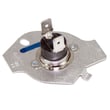
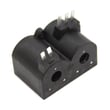
How long does a Maytag Bravos dryer last?
A Maytag Bravos-style dryer like the Maytag MGD6000XW0 lasts 10 to 15 years. With consistent vent cleaning, correct installation clearances, and prompt replacement of wear parts (rollers, idler pulley), many dryers reach the upper end of that range.
- Vent restriction and overheating (long vent runs, crushed flex vent, clogged hood)
- Heavy loads and frequent cycles (more drum and belt wear)
- Leveling and stability; an unlevel dryer can tumble poorly and stress support parts
- Routine maintenance; lint filter cleaning every load, periodic cabinet and vent cleaning
- Timely replacement of wear items such as drum rollers and the idler pulley
- Clean the lint screen every load.
- Inspect and clean the full vent path regularly; keep the route as straight as possible.
- Keep vent length within the limits shown in the installation guide.
- Level the dryer on a solid floor (maximum slope about 1 inch under the entire dryer).
- If you hear squealing or thumping, replace common wear parts before they damage the drum.
| Symptom | Likely wear area | Example part for MGD6000XW0 |
|---|---|---|
| Squealing, chirping | Idler pulley, rollers | Dryer idler pulley W10837240 |
| Thumping, rumbling | Drum support rollers | Dryer drum support roller WPW10314173 |
| Poor airflow, longer dry times | Blower wheel, venting | Dryer venting and airflow checks |
Most dryers do not “wear out” all at once; they lose airflow or develop friction in the drum support system. Keeping airflow within spec and replacing roller or pulley components early helps prevent overheating, motor strain, and premature shutdowns.
Last updated: February 2026
How to remove the front panel of a Maytag dryer?
On a Maytag MGD6000XW0 dryer, front panel removal typically starts by disconnecting power, then releasing the lower fasteners and top retaining clips so you can tilt the panel forward and unplug the door switch wiring. Use the MGD6000XW0 installation guide for the correct fastener locations for your exact door style.
- Unplug the dryer (or switch off the breaker).
- If it is a gas model, close the gas shutoff valve.
- Pull the dryer forward enough to work comfortably.
- Protect the floor with cardboard or a towel.
- Have a container ready for screws.
- Remove the lint screen (if your model has one in the top panel) and take out any screws revealed in the lint screen housing.
- Release the top panel: insert a putty knife a few inches in from each front corner to pop the spring clips, then lift the top.
- Remove the front panel screws: look for screws inside the cabinet near the top corners, and also along the lower edge (some versions use two screws at the bottom).
- Disconnect the door switch harness: support the panel, then unplug the door switch connector.
- Lift and tilt the panel off: lift the panel slightly to unhook it from the lower retaining tabs, then tilt it forward and remove.
| Area you can reach | Common reason you are opening it |
|---|---|
| Drum support and rollers | Squealing, thumping, rumbling |
| Belt and idler pulley | Drum not turning, belt slipping |
| Blower housing | Poor airflow, lint buildup noises |
If you are chasing a squeal or rumble, the dryer drum support roller WPW10314173 and dryer idler pulley W10837240 are common wear items on this style of Maytag dryer.
Removing the front panel the right way prevents broken clips, pinched wiring, and door alignment issues. It also gives you safe access to the drum support system, belt path, and airflow components for inspection and cleaning.
Last updated: February 2026
What is the capacity of the MGD6000XW0?
The Maytag MGD6000XW0 dryer is a full-size 27-inch platform; dryers in this class are typically 7.0 cu. ft. capacity. For the exact published capacity for your specific configuration, confirm it in the MGD6000XW0 owner's manual.
Use these quick checks so you match the correct Maytag spec for MGD6000XW0:
- Look for a “Specifications” or “Product data” section in the manual
- Match the complete model number on the model/serial tag (usually inside the door opening)
- If your unit has a steam option, verify the configuration in the manual because features can change spec listings
- Keep the capacity spec handy when comparing cycle charts and load recommendations
The installation guide is focused on safe setup (clearances, venting, gas or electrical requirements), not drum volume. Use it for installation measurements and requirements.
| Document | Best for | Examples you will see |
|---|---|---|
| MGD6000XW0 owner's manual | Operating info and published specs | Cycle charts, features, specifications |
| MGD6000XW0 installation guide | Setup requirements | Clearances, venting, electrical, gas hookup |
Capacity drives real-world drying performance. Loading to the right level keeps airflow moving through the drum, shortens dry times, and reduces strain on wear items like rollers and the idler pulley.
If you are hearing thumping or squealing while drying, inspect common wear parts such as the dryer drum support roller WPW10314173 and dryer idler pulley W10837240.
Last updated: February 2026
Where to find part number on Maytag dryer?
On your Maytag MGD6000XW0 dryer, we find the most reliable part-identification information on the model and serial rating plate. It’s typically in the door opening (door well); once you have the model and serial, we can match the correct replacement parts.
Check these common label locations first (in order):
- Inside the door opening (door well) on the cabinet frame
- Behind the door area near the opening edge
- Rear panel of the dryer cabinet
- Side panel near the back edge
- Lower front area behind the toe panel (on some builds)
If you see a plate with gas information, that is also a strong clue you’re in the right spot; the installation information notes that burner and gas type details are located on the rating plate in the door well.
A single “part number” is usually on the replacement part itself, but for ordering the right part we use your dryer’s identification numbers.
| What you find | What it looks like | What we use it for |
|---|---|---|
| Model number | MGD6000XW0 | Confirms the exact Maytag dryer design |
| Serial number | Letters and numbers | Narrows down production changes |
| Part number (on the part) | Stamped/printed on the component | Confirms the exact replacement match |
- Write the model number and serial number exactly as shown (include all letters).
- Take a clear photo before ordering parts.
- If the label is worn, use a flashlight and view from an angle to make the print stand out.
- For gas models, confirm the rating plate details match your setup before replacing burner-related parts.
Maytag dryers can have small production changes within the same model family. Using the MGD6000XW0 model and serial from the rating plate prevents ordering the wrong drum support roller, idler pulley, thermistor, or gas ignition parts.
For diagrams and label references, use the MGD6000XW0 owner's manual.
Last updated: February 2026
Why is my Maytag dryer not drying clothes completely?
For your Maytag MGD6000XW0 dryer, incomplete drying is usually caused by restricted airflow (lint screen, vent, or crushed duct), an installation issue (not level or too cold), or a heating problem. Start with venting and load size checks, then move to heat and sensor-related parts using the MGD6000XW0 installation guide.
- Clean the lint screen before every load.
- Confirm strong airflow at the outside vent hood while the dryer runs.
- Replace flexible plastic venting with rigid or approved metal duct; crushed foil duct traps lint and restricts airflow.
- Avoid overloading; packed loads block air movement and extend dry time.
- Make sure the dryer is level; poor leveling can affect tumbling and automatic sensor cycles.
- Keep the laundry area above 40°F; colder temperatures can cause longer drying times on sensor cycles.
If airflow is good but drying is still slow, focus on heat production and air movement inside the dryer.
| Symptom | Most likely area | What we check first |
|---|---|---|
| Runs but takes too long | Vent restriction | Duct length, kinks, lint buildup |
| Runs but no heat | Gas ignition/heating circuit | Igniter and flame sensing |
| Heat is weak or cycles oddly | Temperature sensing | Thermistor and thermal cut-off |
| Drum turns but airflow feels low | Blower system | Blower wheel condition |
- A worn blower wheel can reduce airflow through the drum; consider the dryer blower wheel WP697772.
- If heat is inconsistent, the dryer thermistor WP8577274 can cause temperature control problems.
- If the dryer overheated from poor venting, a safety device may open; the dryer thermal cut-off kit WP8573713 is a common fix after the vent is corrected.
- On gas models, ignition problems can stop heating; the igniter 279311 is a frequent wear item.
Restricted venting and crushed ducting do more than slow drying; they trap lint, reduce airflow, and can overheat components, leading to repeated shutdowns and part failures. Fixing airflow first prevents repeat repairs.
Last updated: February 2026










