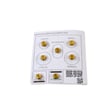
Owner’s manual
 Error Codes



Does the NX58J5600SG have a self-cleaning function?
Yes. The Samsung NX58J5600SG gas freestanding range includes a self-cleaning oven cycle (commonly labeled “Self Clean” on the control panel) that heats the oven to burn off baked-on residue so it can be wiped out after the cycle finishes. See the NX58J5600SG owner's manual for the exact steps and safety notes.
- Look for a Self Clean or Self Clean/Steam Clean key on the oven control panel.
- Remove oven racks, thermometers, foil, and any cookware before starting.
- Wipe out loose spills first; heavy grease can smoke during the cycle.
- Start the cycle and allow the door to lock (if your model locks during self-clean).
- Let the oven cool completely, then wipe out the ash with a damp cloth.
Self-clean often will not run if the range thinks the door is open, the oven is too hot, or a control input is not being accepted.
- Make sure the oven door is fully closed and seated.
- Cancel the cycle, wait for cooling, then try again.
- Reset power by turning the breaker off for 1 minute, then back on.
- If the display is unresponsive or the cycle cancels repeatedly, a control issue is likely.
| Symptom | What it usually points to | Example part for this model |
|---|---|---|
| Door status seems wrong, cycle will not begin | Door switch not sensing closed | Range oven door switch DG34-00006A |
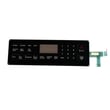
| Buttons do not respond, cycle cancels | Control not processing inputs | Samsung range oven control board DE92-02588J |
Using the correct self-clean procedure helps prevent excessive smoke, protects oven components, and reduces the chance of a door-lock or control interruption mid-cycle.
Last updated: February 2026
How much does a Samsung gas range weigh?
A Samsung gas freestanding range like model NX58J5600SG typically weighs about 170 to 220 lb. The exact shipping weight and net (installed) weight vary by configuration and packaging; we list the model-specific specs in the NX58J5600SG owner's manual.
Most 30-inch Samsung gas ranges fall into these ranges:
- Net weight (range only): ~170 to 200 lb
- Shipping weight (boxed): ~190 to 220 lb
- Heavier setups: models with larger ovens, extra insulation, or more robust grates
| Weight type | What it includes | Typical range |
|---|---|---|
| Net (installed) | Range only, no packaging | 170 to 200 lb |
| Shipping | Range plus carton, foam, accessories | 190 to 220 lb |
Use the specification section in the manual and match the label on your range:
- Check the model/serial tag (often on the frame behind the storage drawer or on the oven frame).
- In the manual, look for “Specifications” or “Product dimensions and weight.”
- If you are planning delivery, use shipping weight; if you are moving it inside your home, use net weight.
Weight affects safe handling and installation planning. A range in this class usually needs two adults (and ideally an appliance dolly) to move it without damaging the floor, gas line, or anti-tip hardware.
- Shut off the gas supply before moving the range.
- Protect floors with plywood or a floor runner.
- Avoid lifting by the door handle or control panel.
- Keep the range upright to protect internal components.
- Re-check leveling and stability after repositioning.
Last updated: February 2026
How to reset a Samsung gas oven?
To reset a Samsung gas oven like model NX58J5600SG, we recommend a hard reset: turn the range’s power off at the breaker (or unplug it) for about 1 to 5 minutes, then restore power. This clears many control glitches, lockups, and some error-code conditions; see the NX58J5600SG owner's manual for model-specific steps.
- Hard reset (most common): Power OFF 1 to 5 minutes, then power ON.
- Control lock reset: If the panel is “locked,” use the Control Lock key sequence shown in the manual.
- After a power outage: Set the clock, then test Bake and Broil again.
- If the oven still will not heat: Move to ignition and burner checks below.
- Turn all surface burner knobs to OFF.
- Shut power off at the circuit breaker (preferred) or unplug the cord.
- Wait 1 to 5 minutes.
- Restore power.
- Test Bake at 350°F and listen for ignition (clicking) and burner lighting.
A reset helps when the control board is confused; it will not fix a failed igniter, sensor, or gas valve.
Common causes on a Samsung gas freestanding range:
- Weak or failed oven igniter (oven burner will not light reliably)
- Temperature sensor out of range (baking temps erratic)
- Control board not sending voltage to the igniter
- Burner not lighting due to debris or poor airflow
| Symptom | Most likely area | What we check next |
|---|---|---|
| Display frozen or buttons unresponsive | Control lock or control glitch | Hard reset; then Control Lock steps in manual |
| Oven clicks but never lights | Ignition system | Inspect/replace igniter; check wiring |
| Oven lights but temperature is wrong | Sensor or airflow | Test sensor; verify burner flame pattern |
| No click, no heat | Control or power | Check breaker, then control board diagnostics |
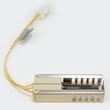
- Samsung range oven burner igniter DG94-00520A
- Samsung range oven temperature sensor DG32-00002B
- Samsung range oven control board DE92-02588J
Resetting is a safe first step because it restores normal operation after a control glitch without changing any gas components. If heat problems continue after a reset, focusing on the igniter, sensor, and control board prevents repeated no-heat failures.
Last updated: February 2026
What are common problems with the NX58J5600SG?
Common problems we see with the Samsung NX58J5600SG gas freestanding range include an oven that will not heat or heats unevenly, surface burners that click but do not ignite, and temperature complaints (overbaking or underbaking). Use the NX58J5600SG owner's manual to match symptoms to checks and error indicators.
- Oven will not heat or takes too long to preheat: weak or failing igniter, gas valve issue, or burner problem
- Oven temperature seems inaccurate: temperature sensor drift or airflow issues
- Surface burner clicks but won’t light: dirty burner head/igniter, moisture, or spark system issue
- All burners keep clicking: spark module or igniter switch/harness problem
- Control panel acts up (beeps, won’t respond, wrong display): control board or keypad/panel issue
- Confirm gas supply: other gas appliances working, shutoff valve fully open.
- Check burner caps and heads: seated correctly, ports clear, fully dry after cleaning.
- Listen and look during bake: you should typically hear a click and see the igniter glow before the burner lights.
- Try a simple reset: turn the breaker off for 1 minute, then back on.
- Verify settings: bake vs. broil selection, correct temperature, and no delayed start.
| Symptom | Common suspect part | Example part for this model |
|---|---|---|
| Oven won’t heat / weak flame | Oven burner igniter | Samsung range oven burner igniter DG94-00520A |
| Oven temp inaccurate | Oven temperature sensor | Samsung range oven temperature sensor DG32-00002B |
| Constant clicking / no spark at burners | Spark system | Range spark module DG96-00297A or range igniter switch and harness assembly DG96-00298D |
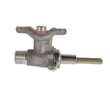
| One surface burner won’t adjust or won’t light consistently | Burner valve | Samsung range surface burner valve DG94-00932C |
Gas ignition and temperature control problems can cause long preheat times, uneven baking, and nuisance clicking. Fixing the root cause (igniter, sensor, spark system, or valve) restores normal flame ignition and steadier oven temperatures.
Last updated: February 2026