






How to force restart Maytag dryer?
To force restart your Maytag dryer model MDG7658BWW, we recommend doing a hard reset: turn the dryer off, unplug it (or switch the breaker off) for 1 minute, then restore power and start a cycle. This clears many control glitches and false no-start conditions.
- Turn the cycle selector to Off.
- Unplug the dryer from the outlet (or turn both dryer breakers off if it is hardwired).
- Wait 60 seconds.
- Plug back in (or turn breakers on).
- Select a timed cycle and press Start.
- If the dryer has a control lock, make sure it is unlocked.
A restart helps only if the issue is a temporary control problem. If the dryer still will not run, check these common causes:
- No power: tripped breaker, loose cord connection, or burned terminal connection
- Door not closing: door not fully latched or hinge alignment issue
- Poor airflow: clogged lint screen or venting causing overheating shutdowns
- Motor issue: motor hums but drum will not turn (belt, roller, or motor problem)
- Heat system fault (gas models): igniter or gas valve coils failing can cause short cycling or no heat
| Symptom | What it often points to | Example part for this model |
|---|---|---|
| Drum will not turn, motor runs | Broken belt | Dryer drum belt WP33002535 |
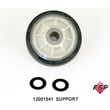
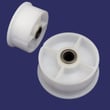
| Loud thumping/squeal | Worn drum support | Roller w/bea 12001541 |
| No heat or heat cuts out | Gas ignition sensing/valve coil issue | Holding coil 279834 |
A hard restart is the fastest safe first step because it rules out a simple control “freeze” before you spend time testing electrical parts like the terminal block, motor circuit, or thermostats.
Last updated: February 2026
What could be wrong with my Maytag dryer?
If your Maytag MDG7658BWW dryer isn’t drying well, won’t heat, won’t start, or is making noise, the most common causes are restricted airflow (lint screen or venting), a failed heat-system component (igniter, gas sensor, thermostat, coils), or a worn drive system (belt, rollers, idler). Use the checks below to narrow it down fast.
- Clean the lint screen before every load; wash it with warm water if you use dryer sheets.
- Check the exhaust vent for kinks, crushing, or a clogged wall cap.
- Confirm strong airflow outside while the dryer runs.
- Avoid overloading; heavy loads can mimic “no heat” by extending dry time.
- Verify the door fully closes and the drum turns freely by hand.
| Symptom | Most likely causes | Parts to consider for MDG7658BWW |
|---|---|---|
| Runs but no heat | Ignition or gas valve circuit issue | Dryer burner igniter WP33002789, gas sensor WP338906, holding coil 279834 |
| Heats but takes too long | Airflow restriction, weak heat cycling | Dryer lint filter WP33001808, thermostat WP3387134 |
| Won’t start (no motor) | Power supply, door switch, motor circuit | Dryer terminal block W11705611, dryer motor assembly WP33002795 |
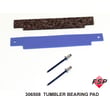
| Loud thumping/squeal | Worn drum support or belt path | Dryer drum belt WP33002535, roller w/bea 12001541, dryer drum bearing kit 306508 |
- Gas dryer safety: If you smell gas, shut off the gas supply, ventilate the area, and stop troubleshooting until the issue is corrected.
- Watch the burner through the inspection opening (if accessible): igniter should glow, then flame should light.
- Use a meter for electrical checks: how to use a multimeter to test electrical parts video.
A clogged vent can cause long dry times, overheating, and repeated thermal cycling that shortens the life of parts like the thermostat and gas ignition components. Fixing airflow first prevents repeat failures.
Last updated: February 2026
What is the code F01 on a Maytag dryer?
On the Maytag MDG7658BWW dryer, the F01 error code points to an electronic control problem, most often the main control board not correctly sensing or driving the motor circuit. Start with a power reset and basic wiring checks; if the code returns, troubleshooting focuses on the control and motor circuit.
- Unplug the dryer (or switch off the breaker) for 5 minutes, then restore power and try a cycle.
- Confirm the dryer is on a dedicated, properly grounded outlet and the cord is secure.
- If the drum is hard to turn by hand, check for mechanical drag (belt, rollers, idler).
- If the drum turns freely but the dryer will not run, focus on electrical checks.
- If you smell burning or see heat damage on wiring, stop and have the dryer serviced.
F01 is typically triggered when the control detects an abnormal condition in the motor drive circuit. Common causes include:
- Loose or damaged wire connections at the motor, control, or harness plugs
- A failing motor or motor start circuit
- A failing electronic control board (internal relay/triac fault)
- Mechanical resistance that makes the motor draw excessive current (belt, rollers, idler)
If you find mechanical binding or loud rumbling/squealing, these model-compatible parts are common fixes:
| Symptom you notice | What to inspect | Example model-compatible part |
|---|---|---|
| Drum not turning, belt slack | Belt condition and routing | Dryer drum belt WP33002535 |
| Squealing, thumping, rumbling | Drum support rollers | Roller w/bea 12001541 |
| Squeal near motor area | Idler pulley spins freely | (Inspect idler pulley and bracket) |
| Runs but airflow noise is abnormal | Blower wheel tight on shaft | Dryer blower wheel WP33002797 |
When the control cannot reliably run or monitor the motor circuit, the dryer may stop mid-cycle, refuse to start, or repeatedly trip the same fault. Fixing the underlying cause prevents repeat shutdowns and helps protect the motor and wiring.
Last updated: February 2026
How do I clear the code on my Maytag dryer?
To clear an error code on your Maytag MDG7658BWW dryer, we reset power to the dryer first. If the code returns right away or comes back during the next cycle, the code is pointing to a problem that needs troubleshooting (often a heating or control issue), not just a one-time glitch.
- Turn the dryer OFF.
- Unplug the dryer (or switch the breaker OFF).
- Wait 1 full minute.
- Restore power.
- Run a short timed dry cycle and watch for the code to reappear.
Many Maytag gas dryers will re-display a code when the underlying fault is still present. Start with the basics, then move to parts testing.
- Airflow restriction: clean the lint screen and confirm strong airflow at the outside vent.
- Overheating symptoms: loads taking too long, very hot cabinet, burning smell.
- No-heat or intermittent heat: burner lights once then quits, or never ignites.
- Power supply: confirm the outlet and cord are secure and not heat-damaged.
- Wiring/connection issues: look for loose spade terminals at the heater/burner circuit.
If your MDG7658BWW is not heating correctly or is overheating, these model-matched parts are common suspects:
| Symptom you see | Common check | Model-matched part to consider |
|---|---|---|
| No heat, igniter glows then shuts off | Gas valve coils | Holding coil 279834 |
| No heat or short-cycling heat | Radiant/flame sensing | Gas sensor WP338906 |
| Overheats or shuts down on heat | Cycling temperature control | Thermostat WP3387134 |
Clearing the code without fixing the cause can lead to repeat shutdowns, longer dry times, and extra wear on the motor, belt, and gas ignition system. A stable reset plus normal heat and airflow is what keeps the code from returning.
Last updated: February 2026





