Owner’s manual
 Error Codes


How to do a hard reset on a GE refrigerator?
To hard reset your GE PSHS6MGZBESS refrigerator, we recommend doing a full power reset: turn the unit off by unplugging it (or switching off the circuit breaker) for a few minutes, then restore power and allow the controls to reboot and temperatures to stabilize.
Hard reset steps (power reset)
- Unplug the refrigerator from the wall outlet, or switch OFF the dedicated breaker.
- Wait 3 to 5 minutes (this lets the control board fully power down).
- Restore power (plug back in, or switch the breaker ON).
- Wait 1 to 2 minutes for the display and fans to come back on.
- Give the refrigerator 24 hours to fully stabilize temperatures after any reset.
What to check after the reset
- Confirm the display is responsive and buttons work.
- Verify temperature settings (typical targets are 37°F fresh food and 0°F freezer).
- Listen for the evaporator fan and compressor to start within a few minutes.
- Check that the door seals are closing fully.
- If you recently changed the water filter, run water for a few minutes to clear air.
If the reset does not fix the problem
A hard reset clears many control glitches, but it will not correct a failed sensor, fan, or defrost component. These quick checks help narrow it down:
| Symptom after reset | Most likely area to inspect | Common related part on this model page |
|---|---|---|
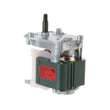
| Warm fridge or freezer, fan noise changes | Airflow or fan issue | Refrigerator evaporator fan motor WR60X10307 |
| Frost buildup on back freezer panel | Defrost system issue | Refrigerator defrost heater WR51X10055 |
| Temps seem inaccurate or swing widely | Temperature sensing | GE profile refrigerator temperature sensor WR55X10025 |
Why it matters
A proper power reset forces the electronic controls to restart cleanly. That can restore normal operation after a power flicker or a control lockup, and it is also a good first step before replacing parts.
For model-specific control behavior and any reset or diagnostic notes, use the owner's manual. If you need to order a replacement part for PSHS6MGZBESS, start with the parts list for this model, or search by model number on Sears PartsDirect.
Last updated: February 2026
What is the most common problem with a GE refrigerator?
The most common problem we see with GE refrigerators like model PSHS6MGZBESS is a cooling complaint (fresh food too warm, freezer not cold enough, or temperatures swinging). In many cases, the root cause is restricted airflow or a failing cooling-system support part such as a fan motor, defrost component, or temperature sensor.
Most common causes of poor cooling
Start with the highest-payoff checks first:
- Dirty condenser coils: heat cannot leave the system efficiently, so cooling drops.
- Airflow blocked inside the cabinet: overpacked shelves or blocked vents prevent circulation.
- Evaporator fan problem: weak or stopped airflow from the freezer to the fresh food section.
- Defrost system issue: frost buildup on the evaporator restricts airflow.
- Temperature sensing/control issue: the refrigerator misreads temperature and runs incorrectly.
Quick troubleshooting checklist (safe, no tools)
- Set controls to normal (avoid extreme cold settings for testing).
- Make sure interior vents are not blocked by food packages.
- Confirm both doors seal fully and close on their own.
- Listen for the evaporator fan in the freezer when the door switch is pressed.
- Clean condenser coils and verify the condenser fan runs when the compressor is running.
Parts that commonly relate to cooling symptoms on PSHS6MGZBESS
If basic checks do not fix it, these parts are frequent suspects for cooling and airflow problems:
| Symptom | What it often points to | Example part on this model page |
|---|---|---|
| Warm fresh food, freezer OK | Poor air movement from freezer | Refrigerator evaporator fan motor WR60X10307 |
| Frosted freezer back panel, weak airflow | Defrost failure | Refrigerator defrost heater WR51X10055 or refrigerator defrost bi-metal thermostat WR50X10065 |
| Temps swing or seem inaccurate | Sensor/control input issue | GE profile refrigerator temperature sensor WR55X10025 |
Why it matters
When cooling is weak, the compressor can run longer than normal, food safety can be affected, and frost or airflow restrictions can get worse over time. Catching a fan, defrost, or sensor issue early usually prevents bigger performance problems.
For model-specific operating tips and control settings, use the owner's manual for PSHS6MGZBESS. If you need to order a replacement part, start with the parts list for PSHS6MGZBESS, or search by model on Sears PartsDirect.
Last updated: February 2026
What is the average lifespan of PSHS6MGZBESS?
A GE side-by-side refrigerator like model PSHS6MGZBESS typically lasts 13 years with normal household use. Lifespan depends most on condenser airflow, door seal condition, and how quickly cooling issues (frost buildup, warm temps, water leaks) are corrected.
What affects lifespan the most
- Condenser cleanliness and airflow: dust-clogged coils make the compressor run hotter and longer.
- Door gasket sealing: air leaks cause long run times and moisture, leading to frost and temperature swings.
- Defrost system health: failed defrost parts can ice up the evaporator and restrict airflow.
- Fan operation: weak evaporator or condenser fans reduce cooling efficiency.
- Water system maintenance: timely filter changes help protect the valve and dispenser flow.
Quick maintenance checklist (high impact)
- Vacuum condenser area and ensure rear/bottom vents are clear.
- Keep freezer and fresh food sections from being overpacked (airflow paths matter).
- Replace the water filter on schedule; use the correct refrigerator water filter MWFP.
- Watch for heavy frost on the freezer back wall; that points to a defrost issue.
- Confirm interior lights turn off when doors close; a bad switch can add heat.
Common “wear” items vs. major components
| Category | Examples on PSHS6MGZBESS | Typical impact |
|---|---|---|
| Maintenance items | Water filter, door gaskets | Improves efficiency and cooling stability |
| Mid-level repairs | Defrost heater, evaporator fan motor, water valve | Prevents warm temps, icing, and leaks |
| Major repairs | Compressor-related parts | Restores cooling when sealed system is failing |
Why it matters
Planning around a 13-year average helps you decide when preventive maintenance makes sense versus when a major repair may not. For model-specific care steps and operating guidance, use the PSHS6MGZBESS owner’s manual.
Last updated: March 2026