 Installation guide
 Owner’s manual
 Error Codes





How do I reset the error code on my Whirlpool oven?
On your Whirlpool GBD307PDB09 electric wall oven, most display errors clear by cancelling the current entry: press UPPER OFF or LOWER OFF (double oven) to reset an Err message, then re-enter the setting. If you see PF, press UPPER OFF or LOWER OFF and reset the clock.
Quick reset steps (most common)
- If the display shows Err (invalid pad press):
- Press UPPER OFF or LOWER OFF.
- Wait a few seconds.
- Re-enter the cooking function and temperature.
- If the display shows PF (power failure):
- Press UPPER OFF or LOWER OFF.
- Set the time of day using the clock steps in the GBD307PDB09 owner's manual.
If the code keeps coming back
Repeated errors usually point to a control input issue (keypad press not registering correctly) or a temperature sensing problem during heating.
- Cancel the function with UPPER OFF or LOWER OFF, then try a basic BAKE cycle.
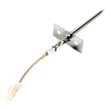
- If the oven heats erratically or shuts down, check the oven temperature sensor circuit; the sensor is a common cause of temperature-related faults.
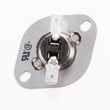
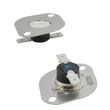
- If the oven overheats or trips out during use, a high-limit thermostat can open to protect the oven.
Parts that commonly relate to recurring fault symptoms
| Symptom you notice | What to check next | Example part for this model |
|---|---|---|
| Temperature swings, underbakes, overbakes | Temperature sensor and wiring | Wall oven temperature sensor WPW10131825 |
| Oven shuts off when hot, then works again later | High-limit thermostat operation | Oven high-limit thermostat WP9759242 |
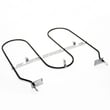
| Broil problems (no heat or uneven broil) | Broil element condition | Broiler element WP9760771 |
Why it matters
Clearing Err or PF gets the control back to a known state so the oven can accept new commands. If the message returns, it helps narrow the problem to the electronic control inputs, temperature sensor feedback, or an over-temperature safety device.
Ordering the right replacement part
We recommend matching parts to model GBD307PDB09 and comparing the part ID before ordering. You can order from the parts list for this model, or search by model number on Sears PartsDirect.
Last updated: February 2026
How long do Whirlpool wall ovens last?
A Whirlpool electric wall oven like model GBD307PDB09 typically lasts 13 to 15 years with normal household use and basic maintenance. Keeping the oven clean, avoiding harsh cleaners on sensitive areas, and addressing heating issues early helps you reach that expected lifespan (see the GBD307PDB09 owner's manual).
Typical lifespan and what affects it
Most electric built-in ovens land in the same general range, but real-world life depends on heat stress, cleaning habits, and how quickly small problems are fixed.
- Self-clean frequency: high heat cycles add wear to components over time
- Door seal and door alignment: heat loss makes the oven work harder
- Electrical health: loose connections can overheat and damage wiring
- Heating performance: slow preheat or uneven baking strains elements and controls
- Cooling airflow: restricted airflow raises internal temperatures
Maintenance habits that extend oven life
These steps are simple, safe, and directly tied to long-term reliability.
- Wipe up spills after the oven cools to reduce smoke and baked-on soil
- During self-clean, follow the manual timing guidance and let the oven cool fully before wiping ash
- Keep the door closing firmly; replace worn hinges or bumpers if the door sags
- If temps seem off, test and replace the temperature sensor when needed (example: wall oven temperature sensor WPW10131825)
- If the oven overheats or shuts down, check the high-limit thermostat (example: oven high-limit thermostat WP9759242)
Quick reference: what “normal” aging looks like
| Symptom | Common cause | Part often involved |
|---|---|---|
| Oven temperature swings | Sensor drifting out of range | Temperature sensor |
| Overheating or thermal shutdown | Safety thermostat opening | High-limit thermostat |
| Uneven broiling | Broiler not heating evenly | Broiler element |
| Door not sealing well | Worn hinge or bumper | Door hinge, door bumper |
Why it matters
When an oven runs hotter, cooler, or leaks heat, it cycles longer and stresses parts like the broiler element, thermostats, and wiring. Fixing those issues early usually prevents bigger failures and helps your GBD307PDB09 reach the full 13 to 15 year lifespan.
You can order model-matched replacement parts from the parts list for GBD307PDB09, or search by model number on Sears PartsDirect.
Last updated: February 2026
Why does my Whirlpool oven say F9 after a power outage?
On your Whirlpool GBD307PDB09 electric wall oven, an F9 (sometimes shown as F9 E0) after a power outage points to a power-up problem the control detected, such as electrical line noise or keypad input during the start-up delay. Clearing the display and resetting the clock usually restores normal operation.
What to do first (safe reset)
- Press UPPER OFF or LOWER OFF (double oven models) to clear the display.
- If the display shows PF, treat it as a power failure indicator; clear it and reset the clock.
- Wait at least 10 seconds after power returns before pressing any keys.
- Set the time of day using the clock steps in the owner's manual.
- If the code returns immediately after a reset, stop using the oven and check the items below.
Common causes after an outage
Power interruptions can confuse the electronic oven control during start-up. These are the most common triggers:
- Electrical line noise during the outage or restoration
- Keys pressed too soon during the power-up delay
- Unstable supply (loose terminal connections, weak breaker, or intermittent power)
Quick checks that prevent repeat errors
Turn off power to the oven at the breaker before inspecting anything.
- Verify the breaker is fully reset (OFF, then ON).
- Check for signs of overheating at the power connection area.
- If you have repeated power-related faults, inspect the terminal block WP8203546 connections for looseness or heat damage.
- If the oven also overheats or shuts down, the oven high-limit thermostat WP9759242 can be part of the protection circuit to evaluate.
What the display messages mean
| Display | What it usually indicates | What we do |
|---|---|---|
| PF | Power failure occurred | Clear with OFF, then reset clock |
| Err | Invalid pad was pressed | Press OFF and re-enter settings |
| F9 / F9 E0 | Power-up or line condition detected by control | Reset, wait 10 seconds, retry |
Why it matters
Power-related faults can interrupt baking, broiling, and timed cooking, and repeated events can stress wiring connections. A clean reset and stable power help protect the electronic control and keep temperatures consistent.
You can order model-specific replacement parts from the parts list for your GBD307PDB09, or search by model on Sears PartsDirect.
Last updated: February 2026







