 Installation guide
 Owner’s manual
 Error Codes




How do I know if my Frigidaire dishwasher control board is bad?
If your Frigidaire dishwasher model FFID2426TD2A has power but won’t run, won’t respond to selections, or behaves unpredictably after you’ve confirmed the door is fully latched and the cycle is set correctly, the electronic control board is a likely cause. Start with the basic checks and a control reset before replacing parts; many “board” symptoms come from simpler issues.
We use these steps first because they match the most common “won’t start” and “acts weird” complaints.
- Verify the breaker is on (or fuse is good).
- Confirm the water supply valve is turned on.
- Make sure a cycle is selected correctly.
- Check that Delay Start is not enabled.
- Close the door firmly until it latches.
- Press START/CANCEL after selecting the cycle.
For the model-specific operating steps and indicator light behavior, use the FFID2426TD2A owner’s manual.
After the checks above, these signs typically indicate a failing board or a board-related circuit issue:
- The dishwasher won’t start even though the door is latched and you press START.
- Cycles start and stop on their own, or the unit drains unexpectedly.
- Buttons respond intermittently (works sometimes, dead other times).
- The unit appears “stuck” in a state where it will not accept new selections.
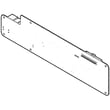
If these symptoms persist, the model’s main control is the dishwasher electronic control board A11147301.
Some control behaviors are normal and can look like a bad board:
| What you see | What it usually means | What to do |
|---|---|---|
| Buttons won’t change settings | Controls are locked | Hold AIR DRY for 3 seconds (door open) to unlock |
| You cancel and it keeps running briefly | Normal cancel-drain routine | Hold START/CANCEL for 3 seconds; it drains for about 90 seconds |
Replacing a control board is one of the higher-cost dishwasher repairs. Confirming power, door latch, control lock, and proper cycle selection first helps you avoid replacing the wrong part and gets your FFID2426TD2A running faster.
Last updated: January 2026
What is the most common problem with a Frigidaire dishwasher?
For the Frigidaire FFID2426TD2A dishwasher, the most common problem we see is poor draining (water left in the tub) caused by a clogged filter area, a restricted drain hose, or a drain pump issue. A close second is a “won’t start” condition caused by the door not latching fully.
- Water left in the bottom: filter area clogged, drain hose kinked, or drain pump not moving water
- Hums but won’t drain: debris in the pump or a failing drain pump
- Won’t start or stops right away: door not fully latched, control not resuming after a pause
- Not cleaning well: spray arms blocked, low water pressure, or loading issues
- Odor: standing water from incomplete draining or soiled dishes sitting too long
- Cancel the cycle and let it attempt to drain; listen for the drain pump running.
- Check the filter and sump area for food, labels, glass, or bone fragments; reinstall the filter correctly.
- Inspect the drain path: air gap (if used), garbage disposal inlet plug (new installs), and the drain hose routing.
- Confirm household water pressure is 20 to 120 psi and incoming water temperature is about 120°F (49°C).
- Make sure nothing blocks the spray arms from rotating.
| Problem you see | Most likely part area | Example part for FFID2426TD2A |
|---|---|---|
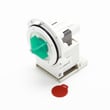
| Won’t drain or drains slowly | Drain pump or drain path | Drain pump a A00126401 |
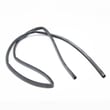
| Kinked, leaking, or restricted drain line | Drain hose | Dishwasher drain hose 807117001 |
| Poor wash plus standing water | Filter and sump area | Dishwasher filter 5304532206 |
A dishwasher that does not drain fully can leave odors, redeposit soil on dishes, and strain the pump and motor over time. Fixing the drain path early is usually the fastest way to restore normal cleaning and drying.
For model-specific operating and “before you call” checks, follow the steps in the FFID2426TD2A owner’s manual.
Last updated: January 2026
How can I force my Frigidaire dishwasher to drain?
To force a drain on your Frigidaire FFID2426TD2A dishwasher, press and hold START/CANCEL for 3 seconds; the dishwasher cancels the cycle and runs an automatic drain for about 90 seconds. Use this when you need to clear standing water before troubleshooting.
- Press and hold START/CANCEL for 3 seconds.
- Watch for the cycle lights to go out; the START/CANCEL light stays on.
- Close the door fully so the drain can run.
- Wait about 90 seconds for the drain to finish.
- Select a new cycle if needed.
For the exact button names and indicator lights on this model, follow the FFID2426TD2A user manual.
A forced drain only works if water can flow out through the drain path. Check these common causes:
- Drain hose is kinked or crushed under the sink
- Sink drain connection is below the trap or installed incorrectly
- Garbage disposer inlet still has the knockout plug installed
- Filter or sump area is clogged with debris
- Drain pump is jammed or failing
If you suspect a pump issue (humming, intermittent draining, or no drain sound), the drain pump a A00126401 is the model-matched replacement part.
Correct drain routing prevents backflow and helps the pump move water out.
| What to check | What “good” looks like | What happens if it is wrong |
|---|---|---|
| Drain hose routing | No kinks; smooth path to sink/disposer | Slow drain or no drain |
| Sink connection point | Drain entry is above the trap | Dirty water can flow back |
| Air gap (if required) | Installed per local code; required if routed through floor | Poor draining or backups |
Installation routing options and requirements are shown in the FFID2426TD2A installation guide.
Forcing a drain is the quickest way to stop a cycle and clear water so you can safely inspect the filter, drain hose, and pump area. It also helps prevent odors and reduces the chance of water spilling when you open the door.
Last updated: January 2026
How to do a hard reset on a Frigidaire dishwasher?
For a Frigidaire FFID2426TD2A dishwasher, a “hard reset” means stopping the current cycle and clearing the control by using the model’s Cancel/Drain function or a breaker power cycle. Follow the exact button sequence in the FFID2426TD2A owner's manual so the reset matches your control panel.
- Cancel/Drain reset: Use the START/CANCEL (or Cancel/Drain) pad sequence listed for FFID2426TD2A.
- Breaker power cycle: Turn the dishwasher circuit breaker OFF, wait 5 minutes, then turn it ON.
- Control lock check: If the keypad is unresponsive, unlock the controls using the lock procedure shown for your model.
- Door reset: Close the door firmly; many models will not respond if the latch is not fully engaged.
- Press the model’s Cancel/Drain control (often START/CANCEL) using the timing shown in the manual.
- Let the dishwasher complete the drain portion of the cancel cycle.
- When the lights return to idle, reselect your wash cycle and options.
- Press START/CANCEL to begin.
A reset clears a stuck cycle, paused operation, or a control glitch. If the problem returns immediately, the dishwasher usually has a drain, fill, heating, or control issue.
| What you see after reset | What it usually means | What to check next |
|---|---|---|
| Water still standing | Drain restriction or drain system problem | Filter area, drain hose routing, air gap or disposer inlet plug |
| Won’t start | Door latch, control lock, or control issue | Door closure, lock setting, then power cycle |
| Poor drying | Heat or rinse aid issue | Rinse aid level, heated dry option, heating performance |
Resetting the right way prevents leftover water, clears a cancelled cycle cleanly, and helps you separate a one-time control interruption from a repeatable failure that needs troubleshooting.
If the dishwasher has power but still will not run after a reset, use dishwasher wont start video for the most common checks.
Last updated: January 2026





