Owner’s manual
 Error Codes





How to remove the bottom cover of a dishwasher?
On the KitchenAid KUDM01TJBL0 dishwasher, the bottom cover (toe panel or access panel) typically comes off by removing the mounting screws along the top edge of the panel, then pulling the panel forward and down. Turn off power at the breaker first because wiring can be routed behind the panel.
Before you start (safety and access)
- Switch OFF the dishwasher circuit breaker.
- If the dishwasher was running, let the heater area cool.
- Have a towel ready; a small amount of water can be in the base.
- Use a flashlight to see the screws and insulation.
- Keep track of screws so the panel sits flush when reinstalled.
Steps to remove the bottom cover
- Open the dishwasher door and look along the lower edge of the frame for screws that secure the toe panel/access panel.
- Close the door.
- Remove the screws (usually 2 to 4) holding the panel.
- Pull the panel slightly forward, then lift or drop it down to disengage any tabs.
- If there is insulation attached, support it so it does not tear.
If the panel will not come off
- Check for hidden screws at the far left and right corners.
- Look for locking tabs that must be depressed before the panel releases.
- Make sure the panel is not caught on the floor or on the dishwasher leveling legs.
What you can check once the cover is off
| What you see | What it can indicate | Common next step |
|---|---|---|
| Moisture in the base | Possible leak | Inspect door seal and hoses |
| Kinked or wet hose area | Drain or fill issue | Check routing and clamps |
| Loose wiring near the door | Intermittent power/start issues | Reseat connectors with power off |
Why it matters
Removing the bottom cover gives access to key components like the water inlet area, drain routing, and leak evidence. That helps you diagnose problems such as leaking, not filling, or not draining without removing the dishwasher from the cabinet.
For diagrams and panel fastener locations specific to your model, use the KUDM01TJBL0 owner's manual.
Last updated: February 2026
How to get KitchenAid replacement parts?
For your KitchenAid dishwasher model KUDM01TJBL0, the most reliable way to get replacement parts is to look up your model and order factory-specified parts that match your exact component. Use the parts list for KUDM01TJBL0 and confirm fit using the diagrams and your manual.
The fastest way to find the right part
- Use your dishwasher’s full model number: KUDM01TJBL0
- Match the part by name and part ID, not just by appearance
- Compare the diagram location to what you’re replacing
- Confirm the symptom first (leak, no fill, no drain, not cleaning)
- Keep your serial number handy for reference
A good starting point for part identification and troubleshooting steps is the owner's manual.
Common replacement parts for KUDM01TJBL0
These are examples of parts available for this model that customers often replace:
- Dishwasher door seal W10542314 (leaks around the door)
- Inlet valve WP8531669 (won’t fill or fills slowly)
- Dishwasher drain hose 8269144A (drain leaks or poor draining)
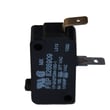
- Dishwasher door switch WP8269209 (won’t start when door is closed)
- Dishwasher dispenser WP8558129 (detergent door not opening or not dispensing)
Quick “symptom to part” guide
| What’s happening | What to check first | Example part for this model |
|---|---|---|
| Water on floor at the front | Door seal and door closure | Door seal |
| Dishwasher won’t fill | Water supply, inlet valve | Inlet valve |
| Dishwasher won’t drain | Drain hose routing, clogs | Drain hose |
| Won’t start | Door latch and door switch | Door switch |
Why it matters
Factory-specified parts are built to fit and function correctly in your KUDM01TJBL0 dishwasher. That helps prevent repeat leaks, poor cleaning, and installation issues caused by mismatched components.
Last updated: February 2026
What is the most common problem with KitchenAid dishwashers?
The most common KitchenAid dishwasher complaints are poor cleaning (spots, film, leftover soil), followed by leaks and “won’t start” symptoms. On the KitchenAid KUDM01TJBL0, cleaning issues are often tied to water temperature, detergent use, and proper fill pressure, plus normal wear items like seals.
Most common issues we see (and what usually causes them)
- Not cleaning well / spots and film: water not hot enough, detergent issues, spray arm or filter restrictions
- Not draining: kinked or clogged drain hose, drain path blockage
- Leaks: worn door seal, vent gasket, or door not closing evenly
- Won’t start / stops mid-cycle: door not latching, door switch not closing, control lock or cycle selection issues
- Not filling enough: low supply pressure, inlet valve problems, float/float switch issues
Quick checks for poor cleaning (highest-frequency fix)
The KUDM01TJBL0 manual calls out a few basics that solve a large share of “doesn’t clean” complaints:
- Run hot water at the sink until it is hot before starting; target at least 120°F (49°C)
- Use fresh, effective dishwasher detergent; never use less than 1 tbsp (15 g) per load
- Confirm home water pressure is in the normal fill range; 20 to 120 psi supports proper filling
- Avoid overloading so spray arms can rotate and water can reach dishes
- For occasional spot and film removal, use a white vinegar rinse as described in the owner's manual (use occasionally only)
Parts that commonly solve leaks, no-fill, and no-start
If basic checks do not fix the symptom, these model-compatible parts are common next steps:
| Symptom | Common part to inspect/replace | What it affects |
|---|---|---|
| Leaking at the door | Dishwasher door seal W10542314 | Seals the tub opening to prevent drips at the front |
| Not draining / slow drain | Dishwasher drain hose 8269144A | Carries water to the sink drain/disposer |
| Not filling / fills slowly | Inlet valve WP8531669 | Controls water entering the dishwasher |
| Won’t start when door closes | Dishwasher door switch WP8269209 | Confirms the door is closed so the unit can run |
Why it matters
Most “common problems” are maintenance and setup related, not major failures. Correct water temperature, correct detergent amount, and proper fill pressure improve cleaning, reduce residue, and help prevent repeat service issues.
Last updated: February 2026
What does 010 mean?
On a KitchenAid KUDM01TJBL0 dishwasher, “010” is not a standard dishwasher error code; it is most often a display readout (such as time remaining) or a control/diagnostic indicator tied to the cycle or keypad sequence. For model-specific meanings, use the troubleshooting and diagnostics information in the owner's manual.
Where you might see “010” and what to check
- Time remaining display: Some cycles can show low remaining minutes near the end of a cycle.
- Diagnostic mode readout: A keypad sequence can trigger a service test that shows numbers.
- Cycle selection indicator: Certain control panels show numeric indicators tied to options.
- Stuck key behavior: A stuck or shorted key can cause unusual numbers or nonresponsive controls.
- Power interruption: After a brief outage, the control can resume with an unexpected display.
Quick steps we recommend
- Cancel and drain: Press Cancel/Drain (or the model’s cancel function) and let it finish.
- Power reset: Turn off power at the breaker for 1 minute, then restore power.
- Try a normal cycle: Start a basic cycle and watch whether “010” returns.
- Check the door latch: Make sure the door closes firmly; a latch issue can confuse the control.
- Look for stored fault behavior: If the dishwasher beeps, flashes, or won’t start, use the manual’s diagnostic guidance.
Parts that commonly relate to “won’t start” or odd control behavior
If “010” appears along with starting problems, these parts are common suspects on dishwashers:
| Symptom you notice | Common area to inspect | Example part for this model |
|---|---|---|
| Won’t start, acts like door is open | Door latch/switch circuit | Dishwasher door switch WP8269209 |
| Starts then stops, inconsistent operation | Door latch alignment/switch engagement | Latch bolt 8193882 |
| Powers on but won’t run a cycle | Control input not registering (often door related) | Dishwasher door switch WP8269209 |
Why it matters
A true error code points to a specific failure, but a plain numeric display often points to a normal status readout or a control-state issue (reset, diagnostic mode, or door-switch input). Confirming the meaning prevents replacing parts that are still good.
Last updated: February 2026