 Installation guide
 Owner’s manual
 Error Codes





How to reset Maytag Neptune dryer?
To reset your Maytag MDG5500AWQ Neptune dryer, we unplug the dryer (or switch the breaker off), wait 1 to 5 minutes, then restore power and restart a cycle. If the display shows PF after power returns, press OFF and restart the cycle.
Quick reset steps (safe and effective)
- Press OFF to stop the cycle.
- Unplug the dryer (or turn both sides of the dryer breaker off).
- Wait 1 to 5 minutes.
- Restore power.
- If PF appears, press OFF, then start the cycle again.
- If the dryer still will not run, check that the door is fully closed and the controls respond.
What “PF” means on this model
On the MDG5500AWQ, PF indicates a power failure. It is normal to see PF the first time power is applied or after an outage; clearing it is part of the reset.
| Display/condition | What it means | What we do |
|---|---|---|
| PF on display | Power was interrupted | Press OFF, then restart cycle |
| No display at all | No power to dryer | Check outlet, breaker, cord connection |
| Powers on but won’t heat (gas) | Air in gas line or ignition issue | Run on heat to purge; if no ignition in 5 minutes, stop and wait 5 minutes |
Why it matters
A reset clears a stuck control state after a power interruption and gets the dryer back to normal operation without replacing parts. If PF keeps returning, focus on the home power supply and connections.
Helpful references for this dryer
- Use the MDG5500AWQ owner’s manual for control panel behavior, PF guidance, and operating steps.
- Use the MDG5500AWQ installation guide for power supply and final installation checklist items (grounding, breaker, venting, and gas connection checks).
Last updated: February 2026
What's the life expectancy of a Maytag dryer?
A Maytag dryer typically lasts 13 years. With consistent airflow maintenance (lint screen and venting) and timely replacement of wear items, many Maytag dryers, including model MDG5500AWQ, reach 15 to 20 years of service.
What affects dryer lifespan the most
- Airflow and venting: restricted exhaust overheats components and shortens life
- Load habits: chronic overloading strains the belt, rollers, and motor
- Heat system health (gas models): ignition and flame sensing issues cause cycling stress
- Routine cleaning: lint buildup increases wear and drying time
- Early repair of noises: worn rollers and seals can damage the drum if ignored
Quick maintenance checklist (high impact)
- Clean the lint screen every load; replace a damaged filter such as the dryer lint filter WP33001808.
- Inspect and clean the vent path (dryer outlet to exterior hood) at least yearly.
- Keep the area around the dryer clear so it can pull room air properly.
- If drying times increase, address airflow first before replacing parts.
- Follow operating and care guidance in the MDG5500AWQ owner's manual.
Common wear items and what they do
| Part area | What wears out | Typical symptom |
|---|---|---|
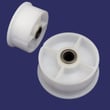
| Drum drive | Belt, idler, rollers | Squealing, thumping, drum not turning |
| Air movement | Blower wheel, housing | Poor airflow, long dry times |
| Gas heat (gas models) | Igniter, sensor, coils | No heat, heat cuts in and out |
Why it matters
A dryer can run for years while slowly losing airflow or developing drum support wear. Fixing those issues early reduces overheating, shortens cycle times, and helps the motor and gas ignition system last longer.
Last updated: February 2026
Do Maytag dryers have a lifetime warranty?
No. Maytag dryers, including model MDG5500AWQ, do not come with a lifetime warranty; warranty coverage is limited and requires proof of the original purchase date. For the exact terms that apply to your dryer, use the warranty section in the MDG5500AWQ owner's manual.
What warranty coverage typically includes
Warranty terms vary by product line and purchase date, but most Maytag dryer warranties are limited (not lifetime) and focus on defects in materials or workmanship.
Common warranty basics to confirm:
- Coverage length for parts and labor
- Which components are covered (for example, motor or drum coverage may differ)
- What is excluded (installation, misuse, venting issues, normal wear)
- What documentation is required (sales receipt, model and serial number)
- How service is obtained (in-home service vs. carry-in, depending on region)
Where to find your model and serial number
For MDG5500AWQ, the manual notes the model and serial information is on the data plate in the lower center of the door opening.
| Item | Where to look | Why you need it |
|---|---|---|
| Model number | Door opening data plate | Confirms correct warranty and parts |
| Serial number | Door opening data plate | Helps determine production details |
| Proof of purchase | Receipt or invoice | Required for warranty service |
Why it matters
Warranty coverage affects whether a repair is out-of-pocket. Many dryer problems are caused by maintenance or airflow issues (not covered), while true component failures may be covered depending on the term and exclusions.
If you are troubleshooting a symptom before scheduling service, we recommend starting with dryer common questions to narrow down likely causes.
Last updated: February 2026
How to remove the front panel of a Maytag dryer?
On the Maytag MDG5500AWQ dryer, we remove the front panel by disconnecting power first, then releasing the fasteners and clips that secure the lower and upper edges of the panel. Once the panel is free, we support it and disconnect the door switch wiring before lifting it away.
Safety first (before you touch any screws)
- Unplug the dryer from the wall outlet.
- If it is a gas dryer, turn the gas supply valve off.
- Let the dryer cool completely if it was running.
- Wear cut-resistant gloves; cabinet edges can be sharp.
- Keep a small container for screws so nothing gets lost.
Front panel removal steps (typical Maytag layout)
- Remove the lint screen (if it is in the top panel) and any screws revealed in that opening.
- Use a putty knife to release the top panel clips (usually a few inches in from each front corner), then lift the top.
- Remove the screws securing the front panel to the cabinet (commonly at the top corners, sometimes also at the bottom).
- Tilt the front panel forward slightly.
- Disconnect the door switch wire harness (note the connector orientation).
- Lift the panel up and off the lower retaining tabs or clips.
What you can service once the front is off
| Symptom | Common area you can access | Example part for this model |
|---|---|---|
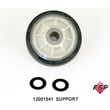
| Squealing or thumping | Drum support and belt path | Roller w/bea 12001541 |
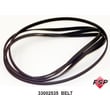
| Drum not turning | Belt and idler area | Belt, tumble WP33002535 |
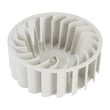
| Poor airflow or rumbling | Blower housing and wheel | Dryer blower wheel 33001790 |
Why it matters
Removing the front panel correctly prevents broken clips, pinched door switch wires, and cabinet misalignment that can cause vibration, noise, or door sealing problems.
Reference for your exact fastener locations
For the MDG5500AWQ cabinet layout and any model-specific screw locations, we follow the MDG5500AWQ installation guide and the MDG5500AWQ owner's manual.
Last updated: February 2026





