 Owner’s manual
 Error Codes



Where is the model number on a Jenn Air wall oven?
On the Jenn-Air W30400B wall oven, the model number is printed on the serial plate located on the oven front frame. You typically see it when you open the oven door and look around the front frame area.
How to find it quickly
- Turn the oven light on and open the oven door fully.
- Look along the oven front frame (the metal frame around the oven opening).
- Check the left and right sides of the frame first; then check the top edge.
- Find the serial plate label; it lists both the model number and serial number.
- Write the numbers down exactly as shown; this helps match parts and manuals.
What the label usually includes
| Label item | What it’s used for | Example for this oven |
|---|---|---|
| Model number | Identifies the exact oven design | W30400B |
| Serial number | Identifies production run details | Varies by unit |
| Date purchased (not on label) | Helpful for your records | Your receipt |
Why it matters
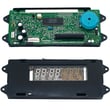
We use the model number to match the correct wall oven parts and diagrams for your exact configuration. For example, the correct electronic control can vary by model, so confirming the label helps avoid ordering the wrong part like the range oven control board and clock WP71001799.
Tip if the label is hard to read
- Wipe the label gently with a dry cloth (avoid soaking it).
- Take a clear phone photo and zoom in.
- Copy letters and numbers exactly; even one character difference can change the parts list.
For more model identification details and record-keeping fields, use the W30400B use and care manual.
Last updated: January 2026
How to reset jenn air wall oven?
To reset a Jenn-Air wall oven model W30400B, we recommend doing a full power reset at the breaker: turn the oven circuit breaker(s) OFF for 1 minute, then turn them back ON and start a Bake cycle to confirm normal operation. See the W30400B owner's manual for control and Cancel Off guidance.
Quick reset steps (power reset)
- Turn OFF the wall oven circuit breaker(s) for 1 full minute.
- Turn the breaker(s) ON.
- Set the oven to Bake and let it run for about 1 minute.
- If an F-code or error returns and the oven beeps continuously, press Cancel Off.
- If the fault returns again after Cancel Off, disconnect power and schedule service.
What “Cancel Off” does vs. a breaker reset
| Action | What it resets | When to use it |
|---|---|---|
| Press Cancel Off | Stops the current cooking cycle and clears some control messages | When an error appears during cooking or you need to stop a cycle |
| Turn breaker OFF/ON | Reboots the electronic control (full reset) | When the control is unresponsive, an error keeps returning, or after a power glitch |
Why it matters
A breaker reset clears temporary control glitches and restores normal keypad and heating operation. If a fault code keeps coming back after a reset, the issue is usually in a component the control monitors, such as the temperature sensor or the oven control.
Parts that commonly relate to recurring reset or error issues
If the oven repeatedly needs resetting, these model-compatible parts are often involved:
- Oven sensor 12001656 (temperature feedback to the control)
- Range oven control board and clock WP71001799 (electronic control)
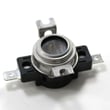
- Range high-limit thermostat WP71001844 (overheat protection)
Last updated: January 2026
Why is my Jennair wall oven not turning on?
If your Jenn-Air wall oven model W30400B is not turning on, the most common causes are a tripped breaker or blown fuse, the oven not getting power at the outlet/junction box, or the control lockout (Child Protection Lock) being set so cooking functions stay OFF while the clock and timer still work. See the W30400B owner's manual for the exact lockout and basic checks.
Quick checks (fastest to most likely)
- Check the home circuit breaker for the oven; reset it fully OFF then back ON.
- If your home uses fuses, check for a blown fuse on the oven circuit.
- Confirm the oven is properly connected to power (hardwired junction box or outlet, depending on installation).
- Look at the display: if it shows OFF when you press Bake/Broil, the controls are locked.
- Cancel any delayed start settings; a programmed delay can make it seem like the oven will not start.
- If the display is blank and the breaker is on, stop and have the power supply wiring checked.
If the display works but the oven will not heat
The manual troubleshooting points to control settings, delayed start, or the Child Protection Lock as the primary reasons the oven will not heat even though the clock or indicator lights work.
| What you see | What it usually means | What to do |
|---|---|---|
| Clock/timer works, heat will not start | Controls set incorrectly or delayed start is set | Cancel and re-set Bake/Broil normally |
| “OFF” appears when pressing a cooking pad | Control lockout is enabled | Turn off lockout (see manual steps) |
| Light works but no heat | Heating circuit issue (element, sensor, control) | Move to the part checks below |
Part-related causes (after power and lockout are ruled out)
If power is correct and settings are correct, a failed component can prevent operation or heating:
- Electronic control: range oven control board and clock WP71001799
- Temperature sensing: oven sensor 12001656
- Overheat protection: range high-limit thermostat WP71001844
Why it matters
A wall oven that will not turn on is often a power or lockout issue, which is a quick fix. Confirming those first helps avoid replacing parts like the control board, oven sensor, or high-limit thermostat unnecessarily.
Last updated: January 2026





