Owner’s manual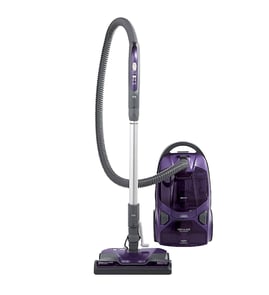



How long do Kenmore canister vacuums last?
A Kenmore canister vacuum like model 11629229213 typically lasts 10 years with normal household use and routine maintenance; heavy use and skipped bag or filter care can shorten that to about 5 years. Consistent clog prevention and timely belt and filter service extend lifespan.
Typical lifespan (what to expect)
Most bagged canister vacuums fall into these ranges:
- 5 years: heavy use, frequent clogs, overdue bag or filter changes
- 10 years: typical home use with regular maintenance
- 15 years: light to moderate use with excellent care and prompt repairs
| Usage pattern | Expected lifespan | What usually ends it |
|---|---|---|
| Heavy (daily, pets, large home) | ~5 years | motor overheating, worn power nozzle parts |
| Typical (weekly) | ~10 years | reduced suction from leaks, clogs, neglected filters |
| Light (occasional) | ~15 years | age-related wear, hose or cord issues |
Maintenance that adds years
Your Use & Care Guide for this Kenmore canister includes sections for removing clogs, bag changing, motor safety filter cleaning, exhaust filter changing, and PowerMate care (belt changes and agitator cleaning). Use it as your routine checklist in the owner's manual.
- Change the bag before it overfills (overfull bags restrict airflow)
- Clean or replace the motor safety filter on schedule
- Replace the exhaust filter when airflow drops or odors increase
- Clear clogs in the hose, wands, and nozzle as soon as suction changes
- Service the PowerMate: belt condition and agitator cleaning
Signs it is near end-of-life
These symptoms usually mean the vacuum needs service now to avoid motor damage:
- Suction is weak even after a fresh bag and clean filters
- The vacuum shuts off during use (often overheating from restricted airflow)
- Burning smell, unusually loud motor noise, or hot exhaust
- Power nozzle brush stops or struggles (belt, brush roll, or blockage)
Why it matters
Canister vacuums rely on steady airflow to cool the suction motor. When bags, filters, or passages clog, the motor runs hotter and wears faster. Staying ahead of airflow restrictions is the simplest way to get the full 10-year lifespan.
Last updated: February 2026
What are the disadvantages of a canister vacuum?
Canister vacuums like the Kenmore 11629229213 clean bare floors, stairs, and tight areas very well, but the tradeoffs are storage, handling, and upkeep. The separate canister and hose take more space, you have to pull the canister behind you, and bag and filter maintenance is ongoing (especially if you vacuum fine dust).
Common disadvantages you may notice
- Bulkier to store than many uprights (hose, wand, and floor nozzle take space).
- More “pull-behind” handling; the canister can bump furniture and door frames.
- More bending and reaching when switching tools or moving between areas.
- Stairs require extra care; we recommend moving the canister by its handle grip, not by the hose.
- Bagged designs add recurring cost; bags must be replaced and should never be reused.
- Performance can drop quickly if airflow is restricted by a full bag, dirty filters, or a clog.
What the 11629229213 manual highlights (real-world drawbacks)
The owner's manual calls out a few canister-specific handling points that can feel like “cons” in daily use:
| Situation | What can be inconvenient | What helps |
|---|---|---|
| Cleaning stairs | Canister can be awkward and can fall if placed poorly | Keep it stable; move it using the canister handle grip |
| Pulling the vacuum | Hose can twist; canister may snag or bump | Check for hose twisting before pulling the canister |
| Carpet cleaning | Fast, jerky strokes miss debris | Use slow, gliding passes and change direction at the end of each pull stroke |
How to reduce the downsides (quick tips)
- Close the suction control for carpeted stairs; open it for drapes and lightweight rugs.
- Keep airflow open: change the dust bag when it is full and replace dirty filters.
- If suction is weak, follow the manual’s clog checks (hose, wand, and PowerMate swivel).
- If the PowerMate brush stops, clear the jam and use the belt reset feature as directed.
Why it matters
Most “canister vacuum problems” are really handling and airflow issues. When the bag, filters, or hose path restrict airflow, you lose suction and the vacuum feels heavier, louder, and less effective.
Last updated: February 2026
How to find vacuum model number?
Your Kenmore canister vacuum model number is printed on the model and serial number plate on the canister. For Kenmore model 11629229213, you can also find a separate model/serial label on the bottom of the PowerMate (power nozzle). See the owner's manual for label locations and diagrams.
Where to look on model 11629229213
Check these common spots first:
- Canister body: look for the model and serial number plate on the vacuum canister housing
- PowerMate (power head): check the bottom for the PowerMate model/serial label
- Under covers: if your unit has a tool cover or access cover, check just inside the cover area
- Near cord rewind area: labels are often placed near the cord reel compartment on canisters
What to write down (and why)
Record both numbers exactly as shown:
- Model number (example: 11629229213)
- Serial number
- Date of purchase (helpful for your records)
Why it matters
The model number ensures we match the correct Kenmore vacuum parts and diagrams; the serial number helps identify production variations that can affect fit.
Quick reference table
| Vacuum section | Typical label location | What it’s used for |
|---|---|---|
| Canister (main unit) | Model/serial number plate on the canister housing | Ordering filters, hoses, switches, internal parts |
| PowerMate (power nozzle) | Model/serial label on the bottom | Ordering belts, brush roll parts, headlight parts |
Tips to avoid common mistakes
- Copy letters and numbers exactly; do not add spaces
- If a digit is hard to read, take a photo and zoom in
- Use the canister model number (11629229213) when browsing the parts list for the vacuum
Last updated: February 2026
How do you know if your vacuum motor is burnt out?
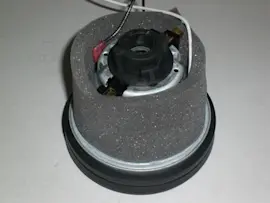
If your Kenmore 11629229213 canister vacuum suddenly has no power or suction, makes a sharp burning smell, or repeatedly shuts off and will not restart after cooling, the motor may be damaged. First rule out overheating from a clog or full bag using the steps in the owner's manual.
Quick signs the motor is failing (not just a clog)
- Strong electrical or “burnt” odor from the canister housing
- Loud grinding, squealing, or rattling that was not there before
- Vacuum only clicks/hums and the motor will not spin up
- Power cuts out quickly even with clean airflow and a new bag
- Visible sparking through motor vents (if your model has vent openings)
Check this first: thermal protector and airflow
Your vacuum has a thermal protector that shuts the motor off automatically if airflow is restricted (for example, a clog or a full dust bag). Use this checklist before assuming the motor is burnt out:
- Turn the vacuum off and unplug it
- Check the dust bag; replace it if it is full (never reuse a dust bag)
- Check and clean or replace clogged filters (motor safety filter and exhaust filter)
- Check the hose, wand, and PowerMate path for clogs and wrapped debris
- Let the vacuum cool about 30 minutes, then restart
What to do based on what you find
| What you observe | Most likely cause | What we recommend |
|---|---|---|
| Runs again after 30-minute cool-down | Overheating from restricted airflow | Remove clogs, replace bag, clean filters |
| Still shuts off quickly | Ongoing restriction or failing motor | Recheck airflow path; inspect filters and PowerMate |
| Hums/clicks but will not start | Jammed fan, worn brushes, or motor failure | Stop using it; plan for motor service/replacement |
| Burning smell continues | Electrical overheating | Unplug immediately; do not run again until inspected |
Why it matters
Running a canister vacuum with restricted airflow (clogged hose, full bag, dirty motor safety filter) overheats the motor and can permanently damage it. Keeping airflow open is the best way to prevent motor failure.
For step-by-step troubleshooting beyond the bag, filters, and clogs, use our vacuum repair-guides landing page.
Last updated: February 2026