Installation guide
 Owner’s manual









Are Maytag parts easy to get?
Yes. For the Maytag MGDC215EW2 gas dryer, parts are typically easy to get because Maytag is widely supported and many common service items are shared across similar Whirlpool-built dryers. The key is matching parts by the exact model number MGDC215EW2.
How we recommend matching parts for MGDC215EW2
Using the full model number helps avoid ordering a look-alike part that won’t fit your exact dryer.
- Use the complete model number: MGDC215EW2
- Match by part name and part ID (not just a description)
- Compare any listed “replaces” numbers to confirm you’re in the right family
- Keep your serial number handy for service or warranty questions
Common MGDC215EW2 parts that are usually easy to source
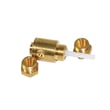
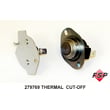
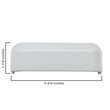
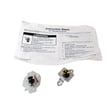
These are examples of parts for this model that are commonly replaced and typically stocked.
Using the manuals to confirm symptoms before buying parts
For MGDC215EW2, the provided documentation covers the MGDC215EW family and is commonly used to verify operation, venting, and troubleshooting steps that apply across closely related variants.
- Use cycle operation, dryer care, and troubleshooting in the MGDC215EW2 use and care manual
- Use venting, gas hookup, and clearance requirements in the MGDC215EW2 installation instructions
Quick comparison: parts that are “easy” vs “may take longer”
| Part type | Examples | What to expect |
|---|---|---|
| High-wear service parts | door switch, belt, igniter | Usually easy to get |
| Safety/temperature parts | cut-off kit, thermostat | Usually easy to get |
| Large assemblies | drum, cabinet panels | Can take longer |
Why it matters
On gas dryers like the MGDC215EW2, long dry times are often caused by restricted airflow (lint screen or venting) rather than a failed part. Confirming the symptom first helps you avoid unnecessary returns and downtime.
Last updated: January 2026
Do Maytag dryers have a lifetime warranty?
No. For the Maytag MGDC215EW2 gas dryer, the warranty is not a lifetime warranty; it includes a 1-year limited warranty (parts and labor) plus a limited parts-only warranty from years 2 through 10 on the drive motor and the dryer drum (side walls only). Details are listed in the MGDC215EW2 use & care manual.
What the MGDC215EW2 warranty covers
Here’s the coverage structure called out for this model:
- Year 1: Limited warranty covering parts and labor for defects in materials or workmanship.
- Years 2 to 10: Limited warranty covering parts only for:
- Drive motor
- Dryer drum (side walls only)
- Labor after year 1: Typically not included for the 2 to 10 year coverage.
Quick warranty snapshot
| Coverage period | What’s covered | Labor included? |
|---|---|---|
| 1st year | Factory specified parts and repair labor | Yes |
| 2nd to 10th year | Drive motor and dryer drum (side walls only) | No |
Why it matters
Knowing the difference between “lifetime” and “limited” coverage helps you plan for repair costs. For example, if the dryer stops tumbling due to a worn belt or rollers, those are normal wear items and are not part of the 2 to 10 year motor and drum coverage.
If you’re troubleshooting a motor or tumbling issue
If your MGDC215EW2 won’t start or won’t tumble, these checks often help narrow it down:
- Confirm the door is fully closed and the door switch clicks
- Verify the gas supply shut-off valve is open (for heat issues)
- Check airflow and venting for restrictions
- Listen for motor hum (possible motor or start circuit issue)
- Inspect common wear parts like the belt and drum support rollers
If you determine the motor is the problem, the compatible replacement is the drive motor 279827.
Last updated: January 2026
How big is the Maytag mgdc215ew2?
The Maytag gas dryer model MGDC215EW2 is a 29-inch wide dryer with an overall height of 43 inches and an overall depth of 27-3/4 inches. Plan for extra space behind it for venting and enough clearance for the door to open fully; see the MGDC215EW2 installation guide.
MGDC215EW2 dimensions (quick reference)
| Measurement | Size |
|---|---|
| Width | 29 in |
| Overall height | 43 in |
| Overall depth | 27-3/4 in |
Installation clearances to plan for
Even with the correct cabinet dimensions, your install space needs room for airflow, venting, and service access.
- Allow at least 5-1/2 inches behind the dryer for the exhaust vent with an elbow.
- Make sure the location allows the dryer door to open fully.
- For closet installs, the door needs top and bottom ventilation openings.
- Keep the area in front of the dryer clear so airflow is not restricted.
Why it matters
Correct sizing helps prevent crushed venting (long dry times), makes hookups easier (gas line and 120V outlet), and avoids door clearance problems that can make the dryer inconvenient to use.
Related model-specific tip
If you need to level the dryer because the floor slopes, this model can use an extended leveling leg kit such as the dryer extended-length leveling leg 49621 when appropriate for your installation.
Last updated: January 2026
How do I reset my Maytag dryer?
For the Maytag MGDC215EW2 gas dryer, the standard reset is a power reset: unplug the dryer (or switch the breaker off) for about 1 minute, then restore power and try a cycle again. This clears many control glitches, but it will not fix a tripped safety device or airflow problem.
Quick reset steps (MGDC215EW2)
- Turn the cycle knob to Off.
- Unplug the dryer (or turn the breaker off).
- Wait 1 minute.
- Restore power.
- Close the door fully.
- Press and hold Push to Start until the drum starts.
For normal operating steps and control descriptions, follow the MGDC215EW2 use and care guide.
If “resetting” doesn’t work, check these common stop conditions
A dryer that will not start or stops quickly is often being blocked by a safety condition, not a software issue.
- Door not registering closed: If the door switch is failing, the dryer may not run. Consider testing or replacing the dryer door switch WP3406107.
- Overheating protection tripped: A blown thermal fuse or thermal cut-off can prevent operation until the failed part is replaced.
- Restricted venting: Lint buildup or crushed venting can cause overheating and shutdowns.
- No power at the outlet: Check the breaker and confirm the outlet has power.
- Start switch or timer issue: If the dryer has power but won’t start, the start switch or timer can be the cause.
Venting and airflow checklist (most important on gas dryers)
Use these basics to prevent repeat shutdowns and long dry times:
- Clean the lint screen before every load.
- Use 4-inch heavy metal venting (avoid plastic or foil).
- Keep the vent run as short and straight as possible.
- Clean the full vent system about every 2 years (more often with heavy use).
For venting requirements and installation checks, use the MGDC215EW2 installation instructions.
What a reset can and can’t do
| Situation | Will a power reset help? | What usually fixes it |
|---|---|---|
| Control glitch or odd behavior | Yes | Power reset |
| Dryer won’t start due to door not sensed | No | Diagnose door switch |
| Dryer overheats or shuts down | No | Fix venting; replace failed safety part |
| No heat on a gas dryer | No | Diagnose igniter, gas valve coils, sensors |
Why it matters
Resetting is a fast first step, but repeated “needs a reset” symptoms usually point to airflow restriction, a failing door switch, or an overheating safety device. Fixing the root cause helps protect the dryer and improves drying performance.
Last updated: January 2026
How to remove the front of a Maytag dryer?
To remove the front panel on a Maytag MGDC215EW2 gas dryer, we typically unplug the dryer, shut off the gas, lift the top, disconnect the door switch wiring, then remove the screws holding the front panel to the cabinet and bulkhead so the panel can lift off the lower clips.
Safety first (gas dryer)
Before you start, follow the basic safety steps in the MGDC215EW2 installation guide.
- Unplug the power cord.
- Close the gas shut-off valve.
- Let the dryer cool completely.
- Work in a well-ventilated area.
- Wear cut-resistant gloves (cabinet edges can be sharp).
Front panel removal steps (typical for this platform)
Exact fastener locations can vary by production run, but this process is the standard approach for MGDC215EW2-STYLE cabinets.
- Remove the lint screen.
- Release the top panel (usually by removing screws near the lint screen opening or releasing spring clips under the front edge).
- Lift the top and support it.
- Disconnect the door switch wire harness (if the front panel cannot move freely).
- Remove the screws securing the front panel to the cabinet.
- If needed, remove screws securing the front panel to the front bulkhead.
- Lift the front panel up and off the lower retaining clips, then pull it forward.
If the panel won’t come off
- Check for hidden screws inside the door opening.
- Make sure the top is fully released.
- Look for a front panel clip that is still engaged; replace damaged clips such as the dryer clip W10854425.
What you can access after the front is off
Once the front panel is removed, you can typically reach common service items such as:
| Area opened up | What you can inspect | Common related part |
|---|---|---|
| Front cabinet and door area | Door switch operation and wiring | Dryer door switch WP3406107 |
| Front drum support area | Drum support wear, squealing, thumping | Drum rollers, belt, idler (varies) |
Why it matters
Removing the front panel correctly helps prevent broken tabs, bent cabinet edges, and wiring damage. It also makes repairs like door switch replacement and drum support inspection much easier and safer.
Last updated: January 2026
What is the average lifespan of a Maytag dryer?
A Maytag dryer typically lasts 10 to 15 years with normal household use. For your Maytag MGDC215EW2 gas dryer, strong airflow (lint screen and venting) plus timely replacement of common wear items is what most often keeps it running toward the high end of that range. See care and cleaning guidance in the MGDC215EW2 use and care manual.
What affects lifespan the most
- Airflow and venting: restricted exhaust makes the dryer run hotter and longer
- Lint screen maintenance: clean every load; remove residue buildup periodically
- Load habits: chronic overloading strains the drive motor, belt, and drum supports
- Heat system condition: ignition and flame sensing problems can cause repeated cycling
- Routine wear parts: rollers, belt, and related drum support components
Quick maintenance schedule (best ROI)
| Task | How often | Why it matters |
|---|---|---|
| Clean lint screen | Every load | Improves airflow and drying time |
| Check outside exhaust airflow | Monthly | Catches clogs early |
| Clean full vent run | Every 2 years | Reduces overheating and long dry times |
| Keep dryer level | As needed | Helps reduce vibration and wear |
Common wear parts to replace before they cause bigger problems
If your MGDC215EW2 starts squealing, thumping, or the drum struggles to turn, these are typical wear items to inspect:
- Dryer drum support roller WPW10314173 (supports the drum as it rotates)
- Dryer drum belt WPW10198086 (drives the drum)
- Dryer repair kit 4392065 (kit commonly used to refresh multiple drum support components at once)
Why it matters
A dryer that runs with poor airflow or worn drum support parts often needs longer cycles, which increases heat stress on components like the drive motor and operating thermostat. Preventive cleaning and small repairs usually cost far less than replacing the dryer.
Last updated: January 2026
What is the most common problem with the Maytag dryer?
For the Maytag MGDC215EW2 gas dryer, the most common problem is poor drying performance caused by restricted airflow (a clogged lint screen, blocked exhaust hood, or crushed/too-long vent). The use & care guidance for this model emphasizes venting and lint-screen cleaning because airflow directly affects heat and cycle time.
Most common symptoms
- Clothes take too long to dry
- Dryer heats but cycles off and on more than usual
- Dryer feels hotter than normal around the cabinet
- Lint buildup around the door area or exhaust outlet
- Automatic cycles stop before clothes feel dry
What to check first (no-parts steps)
Start with airflow checks because they solve many complaints without replacing parts.
- Clean the lint screen before every load; if you see residue, wash it with hot water and a nylon brush, then dry it
- Verify strong airflow at the outside exhaust hood while the dryer is running
- Inspect the vent run for kinks, crushing, or too many elbows
- Use 4-inch heavy metal venting (avoid plastic or foil)
- Clean the full vent system periodically (the guide recommends at least every 2 years)
For model-specific venting rules and clearances, follow the MGDC215EW2 installation guide.
When it becomes a parts problem on MGDC215EW2
If airflow is good but you still have no heat, heat that stops mid-cycle, or the dryer won’t run, the issue often shifts to heat-safety or ignition components.
| Symptom | What it often points to | Example compatible part for MGDC215EW2 |
|---|---|---|
| Dryer runs but has no heat | Overheat protection opened or heat control issue | Cut-off kit 279769 |
| Heat starts then stops | Gas ignition system not staying energized | Dryer gas valve coil kit WPW10328463 |
| Dryer won’t start when door is closed | Door switch not closing the circuit | Dryer door switch WP3406107 |
Why it matters
Restricted venting is the leading cause behind “takes too long” and many “no heat” complaints. Fixing airflow first improves drying, reduces overheating, and helps prevent repeat failures of safety cutoffs and thermostats.
Last updated: January 2026