Installation guide
 Owner’s manual
 Error Codes
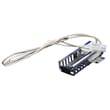



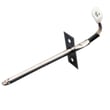
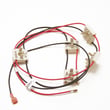


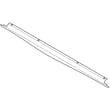
What model is my Kenmore gas range?
Your Kenmore gas range model number is printed on the identification plate; on model 79073433312, it’s located on the right-hand surface of the oven front frame and is easiest to see after you open the storage, warmer, or broiler drawer. Confirm the full model and serial before ordering parts.
- Pull out and remove the storage drawer (or open the warmer or broiler drawer, depending on your configuration).
- Look at the right-hand front frame of the oven opening for the identification plate.
- Write down the model number, serial number, and any lot number/letter shown.
- If the label is greasy or faded, wipe it gently with a damp cloth and mild detergent, then dry.
- Match the model number exactly (all digits) when searching for Kenmore range parts.
Besides the model number, the plate typically lists key details that help ensure you get the right parts and service.
| Label item | What it’s used for | Why you need it |
|---|---|---|
| Model number | Identifies the exact range design | Ensures correct part fit |
| Serial number | Identifies production run | Helps confirm compatible revisions |
| Fuel and pressure info | Shows how the range left the factory | Helps with safe setup and service |
Kenmore ranges often share similar styling across multiple series, but parts like an oven igniter, control overlay, or burner components can vary by model. Using the exact model number from the identification plate prevents ordering the wrong replacement.
For the official location diagram and labeling details, use the 79073433312 installation guide.
Last updated: February 2026
How to remove the top of a Kenmore gas range?
To remove the cooktop (top) on a Kenmore gas range model 79073433312, we typically lift off the grates and burner caps first, then remove any hidden mounting screws so the top can hinge up or lift free. Follow the steps and safety notes in the 79073433312 installation guide.
Before you start, make the range safe to handle:
- Turn all burner knobs to OFF and let the range cool completely.
- Shut off the gas supply at the external manual shut-off valve.
- Unplug the power cord (spark ignition uses electricity).
- If you must pull the range out, disconnect gas and power only after shutting gas off.
- Keep hardware organized so the cooktop sits flat when reinstalled.
Most Kenmore gas ranges in this family use the same basic approach:
- Remove the grates.
- Lift off the burner caps.
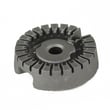
- If your model uses removable burner heads, lift them off (some are held by screws).
- Look for mounting screws:
- Around burner bases
- Under the front lip of the cooktop
- Under the control panel edge (varies by design)
- Remove the screws and gently lift the cooktop.
- Some tops hinge up and rest on support rods.
- Others lift up and off once the front clips release.
| What you find | What it usually means | Common next step |
|---|---|---|
| Grease and debris | Burner ports can clog and mis-ignite | Clean and dry thoroughly |
| Loose/burnt wires | Ignition may click or fail | Inspect harness and terminals |
| Cracked igniter parts | Weak/no spark at one burner | Replace the affected igniter assembly |
Removing the top is the fastest way to access surface burner ignition parts, wiring, and the spark module. It also helps you clean spills that can cause constant clicking, uneven flames, or burners that will not light.
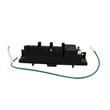
If you are lifting the top because burners will not spark or keep clicking, these model-matched parts are common suspects:
- Range spark module 5304508269 (controls spark to the surface burners)
- Frigidaire range igniter switch and harness assembly 316580615 (switches that trigger spark when you turn a knob)
Last updated: February 2026
What is the code F3 on a Kenmore oven?
On the Kenmore gas range model 79073433312, an F3 error code points to an oven temperature sensing problem, most often the oven temperature sensor circuit (sensor itself or the wiring between the sensor and the control). Use the reset steps in the 79073433312 owner's manual first, then test the sensor.
- Press Clear/Off to clear the code.
- If the code returns, turn power off to the range at the breaker for 5 minutes.
- Restore power, set the clock, then try Bake or Broil again.
- If F3 returns quickly, move to sensor and wiring checks.
- Failed or out-of-range oven temperature sensor.
- Loose, corroded, or damaged sensor connector at the rear of the oven cavity.
- Pinched/burned wiring in the harness between the sensor and control.
- Less common: a problem on the oven control board.
- Unplug the range or switch off the breaker.
- Locate the sensor inside the oven (typically a thin probe on the back wall).
- Inspect the sensor plug and harness for heat damage or loose fit.
- If you have a multimeter, measure sensor resistance at room temperature.
| Oven temp sensor condition | What you usually see | What it means |
|---|---|---|
| Normal at room temp | ~1,000 to 1,100 ohms | Sensor likely OK |
| Open circuit | OL / infinite | Sensor or wiring open |
| Shorted | Very low ohms | Sensor or wiring short |
If the sensor tests bad, replace the range oven temperature sensor 316233903. If the sensor tests good, focus on the harness/connector; if wiring checks out, the control may be the next suspect.
The control uses the temperature sensor signal to regulate gas flow and oven heat. When the signal is missing or out of range, the range may stop heating, overheat, or shut down to prevent unsafe operation.
Last updated: February 2026
What causes a Kenmore oven to stop working?
On the Kenmore gas range model 79073433312, the oven most often “stops working” because the oven burner is not igniting (weak igniter), the oven temperature sensing circuit is off, or the control is not sending power correctly. A power outage can also stop oven ignition on electric-ignition models.
- Confirm the display and oven controls respond; press STOP to clear an active function.
- If there was a power failure, turn all oven controls OFF and reset the clock once power returns (the oven should not be operated during an outage). See the 79073433312 owner's manual.
- Make sure the oven vent and airflow around the range are not blocked; this range needs fresh air for proper burner combustion.
- If the surface burners work but the oven will not heat, focus on the oven ignition and temperature sensing parts.
- If nothing works (no display, no lights), check the house breaker or outlet power first.
| Symptom | Likely cause | Common fix |
|---|---|---|
| No heat, no flame in bake/broil | Weak/hot-surface igniter | Replace range oven igniter 5304509706 |
| Oven heats erratically or wrong temp | Temperature sensor out of range or coated | Inspect/replace range oven temperature sensor 316233903 |
| Clicking/sparking issues on top burners (not oven heat) | Ignition switch/harness or spark module | Inspect frigidaire range igniter switch and harness assembly 316580615 or range spark module 5304508269 |
| Oven won’t light even with good igniter | Gas valve/regulator or control issue | Test gas valve circuit; consider professional service |
A gas oven depends on electric ignition; if the igniter is weak, the gas may not light and the oven will not heat. Airflow restrictions at the vent can also affect combustion and performance, so keeping vents clear helps the oven run safely and consistently.
- Do not attempt to operate the electric-ignition oven during an electrical power failure; reset controls to OFF. Refer to the 79073433312 installation guide.
- Never use the range as a space heater.
- If you smell gas, turn the controls off and ventilate the area before continuing.
Last updated: February 2026