Owner’s manual



How do I rebalance the drum on my Samsung washer?
On our Samsung WF448AAW front-load washer, “rebalancing the drum” usually means redistributing the load and correcting installation issues (leveling and shipping bolts). The washer may also add water during spin to help redistribute an imbalance; if shaking continues, inspect suspension components. See the WF448AAW owner's manual.
- Pause the cycle and wait for the door lock light to go out, then open the door.
- Redistribute items evenly; avoid washing one heavy item by itself.
- For bulky items (rug, pillow, a couple sweaters), add a few towels to help the drum tumble and spin smoothly.
- Do not overload the tub; overloading increases vibration and wear.
- Restart the cycle and select a higher spin speed only if the load type allows it.
From the WF448AAW troubleshooting guidance, vibration and noise are often caused by setup issues.
- Confirm the washer sits on a solid, level floor.
- Adjust the leveling feet until the cabinet is stable (no rocking).
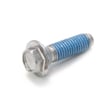
- Verify the shipping (transport) bolts were removed.
- Make sure the washer is not touching a wall, dryer, or cabinet.
- Balance the load size; very small loads (1 to 2 items) can go off-balance and may not spin out fully.
If the washer is level, not overloaded, and still bangs or walks during spin, the tub support system is typically worn.
| Symptom | Most likely cause | What to do next |
|---|---|---|
| Loud banging only on heavy loads | Load distribution issue | Re-load, add towels, reduce load size |
| Shakes on most loads even when level | Worn shocks/suspension | Inspect and replace worn support parts |
| Won’t spin out small loads | Load too small/unbalanced | Add a few similar items, use appropriate cycle |
Running the WF448AAW while severely out of balance can increase wear on the tub support, bearings, and motor system, and it can also leave clothes too wet if the washer reduces or cancels the final spin.
Last updated: February 2026
How long does a Samsung VRT washer last?
Most Samsung VRT front-load washers like model WF448AAW typically last 10 years with normal household use; with consistent care and timely repairs, 15 years is a realistic target for many homes.
- Load size and balance: frequent overloading and unbalanced loads increase wear on the tub, bearings, and suspension.
- Detergent habits: too much detergent (especially non-HE) leaves residue that drives odor and component stress.
- Water quality: hard water speeds up scale buildup and can affect valves and heating performance.
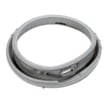
- Door boot care: leaving the door closed after use traps moisture and shortens the life of the door boot.
- Spin speed and vibration: VRT reduces vibration, but repeated high-speed spins still add mechanical wear.
Your WF448AAW is a high-speed front-load washer (up to 1300 RPM) and is designed to minimize noise and vibration with VRT. For exact operating specs and care instructions, follow the WF448AAW owner’s manual.
| Item | What to expect |
|---|---|
| Typical service life | About 10 years |
| Well-maintained service life | Often up to 15 years |
| Max spin speed | 1300 RPM |
- Loud rumbling or grinding during spin (often tub bearing or basket support wear)
- Repeated leaking around the door area (door boot issues)
- Frequent no-fill or slow-fill symptoms (inlet valve problems)
- Door won’t lock or unlock reliably (door lock problems)
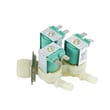
If you’re troubleshooting fill issues, a common replacement is the washer water inlet valve DC62-30314K.
Planning around a 10-year baseline helps you decide when to invest in major repairs (motor, tub, spin basket) versus routine maintenance. Keeping the door boot clean and the loads balanced is the simplest way to extend the life of a Samsung VRT washer.
Last updated: February 2026
Where can I find my Samsung washer part number?
For your Samsung washer model WF448AAW, the part number is printed on the part itself; to order the correct replacement, we match that part number to your washer’s model and serial information from the rating label. Your WF448AAW owner’s manual also shows where key components are located so you can access and identify parts safely.
On Samsung front-load washers like WF448AAW, the model and serial label is typically found around the door opening area (often on the cabinet frame) or on the back of the washer. Use that label information when searching parts.
- Check the cabinet frame just inside the door opening
- Check the rear panel of the washer
- Write down the model number and serial number exactly as shown
- Take a clear photo of the label for reference
- Use the model number to confirm fit before ordering any part
Most washer parts have a manufacturer part number printed, stamped, or labeled directly on the component.
- Water valves: printed on the valve body or label
- Door lock: printed on the lock housing
- Drain hose: printed along the hose or on an attached tag
- Motor components: printed on the stator/rotor label
- Door boot: printed on the rubber or on a tag near the clamp area
| What you are replacing | What to look for | Example part number for WF448AAW |
|---|---|---|
| Fill problem or no water | Label on valve body | DC62-30314K |
| Door won’t lock/unlock | Label on lock assembly | DC64-00519B |
| Leaks at the door opening | Marking/tag on door boot | DC64-01570A |
| Drain leak or poor draining | Printing/tag on hose | DC97-15298A |
Samsung often uses similar-looking parts across multiple washer versions. Using the model/serial label plus the number printed on the old part prevents ordering a look-alike that does not fit, leaks, or triggers error codes.
Last updated: February 2026
Does a Samsung washer have a filter that needs to be cleaned?
Yes. Your Samsung WF448AAW front-load washer has a debris (drain pump) filter that needs periodic cleaning to help prevent slow draining, odors, and drain errors. We follow the cleaning steps and intervals shown in the WF448AAW owner's manual.
On front-load Samsung washers like WF448AAW, the debris filter is part of the drain pump system. It catches items such as lint, coins, hair pins, and small fabric pieces before they reach the pump.
Cleaning helps when you notice:
- Water draining slowly or not fully draining
- Musty odor around the door area
- Excess vibration from water left in the tub
- Drain-related information codes during a cycle
We clean the debris filter on a regular schedule and anytime the washer has a drain problem.
- Every 1 to 3 months for typical household use
- Immediately after washing heavily linting items (towels, fleece)
- After a “pocket item” incident (coins, screws, hair pins)
- Any time the washer stops with water left in the tub
Use the procedure in the manual for your exact access method and safety notes.
- Unplug the washer (or switch off the breaker)
- Place a shallow pan and towels at the lower front area
- Drain any remaining water slowly before removing the filter
- Remove the filter, rinse it, and clear the filter housing
- Reinstall the filter fully and check for leaks on the next rinse/spin
| Filter type | What it protects | Typical location |
|---|---|---|
| Debris (drain pump) filter | Drain pump and drain path | Lower front access area |
| Water inlet screen filters | Inlet valve from sediment | Inside hot/cold hose ports |
| Door seal/bellow area | Not a filter, but needs cleaning | Around the door opening |
A clean debris filter keeps water moving through the drain hose properly, reduces strain on the drain pump, and helps your washer run cleaner and quieter over time.
Last updated: February 2026