Error Codes



How many hours a day should you run a dehumidifier?
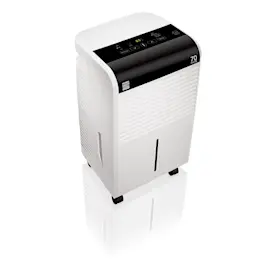
For a GE ADEW20LYQ1 dehumidifier, we typically recommend running it as long as needed to hold your target humidity, which for most homes is 30% to 50% RH. In a damp basement or after a water event, it often runs nearly continuously for the first 24 to 48 hours, then cycles on and off.
A practical run-time guide
Use your room humidity and comfort as the deciding factor, not a fixed number of hours.
- Normal maintenance: about 6 to 12 hours per day (often cycling automatically)
- Very damp spaces (basements, rainy season): 12 to 24 hours per day
- Initial dry-down after heavy dampness: 24 to 48 hours of near-continuous operation
- If the room feels too dry: raise the setpoint (for example, from 35% to 45%)
- If it never shuts off: check airflow, temperature, and drainage setup
What changes how long it runs
These factors have the biggest impact on run time and water removal:
| Factor | What you’ll notice | What to do |
|---|---|---|
| Room size vs. unit capacity | Slow drying, long run times | Close doors, reduce open area |
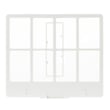
| Airflow restriction | Weak performance, longer cycles | Clean/replace the filter assembly WK85X21720 |
| Low room temperature | Frosting, poor moisture removal | Warm the space (most units struggle below ~65°F) |
| Drainage method | Bucket fills fast or unit stops | Empty and reseat bucket, or set up continuous drain |
Why it matters
Running long enough to maintain 30% to 50% RH helps prevent musty odors and condensation while avoiding over-drying. A clean filter and correct drainage also reduce strain on the compressor and fan motor.
Quick checks if it’s running “too much”
- Verify doors/windows are closed
- Make sure the unit has several inches of clearance for airflow
- Clean the air filter and intake grille
- Confirm the bucket is seated correctly and not triggering a “full” condition
- Review symptom help in dehumidifier doesn't remove moisture
Last updated: January 2026
Do dehumidifiers run a lot of electricity?
GE dehumidifiers like model ADEW20LYQ1 use a moderate amount of electricity. Most portable units draw roughly 300 to 700 watts while the compressor is running, so cost depends mainly on how many hours per day it runs and your electric rate.
Typical electricity use and what it costs
A dehumidifier cycles on and off; it uses the most power when the compressor is on.
- Typical wattage: ~300 to 700 W (varies by size and conditions)
- Big cost drivers: room humidity, temperature, setpoint (RH%), and airflow
- Most common “high bill” cause: running 24/7 in a very damp space
- Best target humidity: about 45% to 55% RH for comfort and efficiency
| Usage pattern | What you’ll usually see | What to do |
|---|---|---|
| Runs almost constantly | Higher monthly cost | Raise setpoint a few percent; improve airflow |
| Short cycles, frequent starts | Less moisture removed per hour | Clean filter; check for blocked intake/exhaust |
| Runs but bucket fills slowly | Lower effectiveness | Verify room temp is warm enough; clean coils |
How to reduce electricity use (without losing performance)
These steps cut runtime, which is what lowers cost.
- Clean or replace the air filter; a clogged filter makes the unit run longer (see filter assembly WK85X21720).
- Keep the unit away from walls and curtains; allow several inches of clearance for airflow.
- Close windows and doors in the damp area; outside air can keep humidity high.
- Use continuous drain when appropriate so it can run efficiently without bucket interruptions.
- Set the humidity higher once the space is under control (for example, move from 40% to 50% RH).
Why it matters
When a dehumidifier runs longer than necessary, it not only increases electricity use, it also increases wear on the compressor and fan motor. Good airflow and a clean filter help the ADEW20LYQ1 remove moisture faster and cycle off sooner.
Related help: how to clean a dehumidifier
Last updated: January 2026
What are the downsides of using a dehumidifier?
Using a dehumidifier like the GE ADEW20LYQ1 can make a space more comfortable, but the main downsides are higher electricity use, added noise, and ongoing upkeep. If it runs too much, it can over-dry the air and create comfort issues, and poor cleaning can lead to odors and hygiene problems.
Common downsides to plan for
- Energy cost: Dehumidifiers cycle like small air conditioners; longer run times raise your electric bill.
- Noise and vibration: Fan and compressor noise can be noticeable in bedrooms or finished basements.
- Maintenance: You need to empty and clean the bucket, clean the air filter, and keep the coils clean.
- Over-drying risk: Very low humidity can dry skin, irritate sinuses, and stress wood floors or furniture.
- Performance limits in cool areas: Many units remove less moisture in colder basements and may frost up.
Maintenance items that reduce problems
Keeping airflow and drainage in good shape prevents many complaints (smell, poor moisture removal, leaks).
| Issue you notice | Most common cause | What we recommend |
|---|---|---|
| Musty smell | Dirty bucket or filter | Wash bucket with mild soap; clean/replace the filter |
| Not collecting much water | Restricted airflow or low room temp | Clean filter, close windows, raise room temp if possible |
| Water on the floor | Bucket not seated or drain issue | Reseat bucket, level the unit, check drain setup |
If your filter is damaged or won’t clean up well, replacing the filter assembly WK85X21720 restores airflow and helps the dehumidifier run more efficiently.
Why it matters
A dehumidifier works best when it can move air freely across the coil and drain water reliably. When humidity is set too low or maintenance is skipped, you can end up with higher operating cost, more noise, and worse indoor air quality.
Helpful DIY reading
Last updated: January 2026