Owner’s manual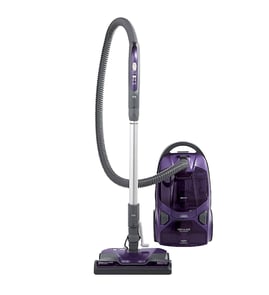




Does a Kenmore canister vacuum have a fuse?
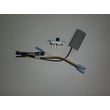
Yes. Kenmore canister vacuums like model 11626512690 rely on your home’s circuit breaker or fuse for primary overcurrent protection, and the power nozzle (POWER-MATE) uses an internal overload protector that trips if the brush jams. For model-specific safety and troubleshooting steps, use the owner's manual.
What protection this vacuum uses (and what it means)
Most “no power” situations on this Kenmore canister vacuum come from one of these protections:
- Household breaker or fuse: If it trips or blows, the vacuum will not run.
- POWER-MATE overload protector: If the brush jams, the POWER-MATE shuts off but the canister motor can keep running.
- Polarized plug: Helps reduce shock risk; it only fits one way in a polarized outlet.
Quick checks when the vacuum will not start
Unplug the vacuum before inspecting anything.
- Try a different known-good outlet (preferably a floor outlet).
- Check your home electrical panel for a tripped breaker or blown fuse.
- Make sure the cord is fully pulled out and the plug is firmly seated.
- Inspect the hose and wand connections for looseness or damage.
- If suction is poor, check for clogs and a full bag (restricted airflow can mimic a power problem).
POWER-MATE overload protector: symptoms and reset
If the brush stops but the canister still runs, the overload protector likely tripped.
| What you see | What it usually means | What to do |
|---|---|---|
| Canister runs, POWER-MATE stops | Brush jam or belt/brush drag | Clear blockage; press the overload protector reset button |
| POWER-MATE won’t run when attached | Connection issue or overload trip | Reseat connections; reset overload protector |
Why it matters
Knowing whether you are dealing with a household fuse/breaker versus a POWER-MATE overload trip prevents unnecessary parts replacement and helps you restore power safely.
Last updated: February 2026
What are the disadvantages of a canister vacuum?
Canister vacuums like the Kenmore 11626512690 clean well, but they take more effort to move and store than many uprights. You typically pull the canister behind you, manage a hose and wand, and you may notice more bending and bumping into furniture.
Common disadvantages (what most owners notice)
- Harder to store: the canister, hose, wand, and Power-Mate head take up more space.
- More “drag” while cleaning: you pull the canister as you work, and it can catch on corners.
- More bending and handling: switching tools, adjusting suction, and moving the canister often means more reaching.
- Can bump walls and furniture: the canister follows the hose; if you tug quickly, it can scuff baseboards.
- Thick or deep-pile carpet can be tougher: you may need to adjust height and slow down to prevent brush overload.
Model-specific tips that reduce the downsides
The 11626512690 manual calls out features that help with maneuvering and cleaning technique:
- Use the hose swivel so the hose turns without moving the canister; this helps in tight areas.
- Check the hose for twisting before pulling the canister.
- Use slow, straight push-pull strokes with the Power-Mate for better pickup.
- Keep airflow passages open and check for clogs if suction drops.
For the exact operating and safety guidance (including stair use warnings), follow the owner's manual.
Quick comparison: canister vs upright
| Feature | Canister vacuum | Upright vacuum |
|---|---|---|
| Storage | Bulkier (multiple pieces) | Usually simpler footprint |
| Maneuvering | Great reach, but you pull a canister | One-piece push/pull |
| Above-floor cleaning | Typically easier with hose/wand | Often needs attachments |
| Thick carpet | Can require more adjustments | Often better “all-in-one” feel |
Why it matters
If storage space is tight or you vacuum lots of thick carpet, the extra handling can feel like a daily hassle. If you mainly need reach for edges, stairs, and small areas, a canister’s hose and wand can still be a strong fit.
Last updated: February 2026
What is the best canister vacuum in real simple?
Real Simple’s “best canister vacuum” pick can change from year to year based on their latest testing. For a dependable benchmark, we recommend comparing their current top pick against what you already own, like the Kenmore 11626512690, using suction, filtration, and ease-of-use factors listed in the owner's manual.
How to compare Real Simple’s top pick to your Kenmore 11626512690
Use these practical checkpoints to decide whether switching vacuums is worth it:
- Suction consistency: strong pickup without frequent clogs
- Airflow restriction indicators: performance light or red-line indicator behavior (if equipped)
- Floor versatility: bare floor, area rugs, and carpet performance
- Hose handling: swivel action, reach, and resistance to twisting
- Maintenance time: bag changes, filter cleaning, brush and belt care
What “best” usually means in canister vacuum reviews
Most review outlets score canister vacuums on a similar set of criteria.
| Category | What reviewers test | What to check on your vacuum |
|---|---|---|
| Cleaning performance | pickup on hard floor and carpet | use slow, straight strokes on carpet for best results |
| Filtration | dust containment and exhaust air | keep the dust bag and motor safety filter maintained |
| Ease of use | weight, steering, controls | confirm hose swivel turns freely and the canister rolls smoothly |
| Reliability | clog resistance, overheating protection | keep airflow paths open; reset overload protection if tripped |
Quick maintenance checks that affect “best vacuum” performance
Even a top-rated canister vacuum will feel weak if airflow is restricted. For the Kenmore 11626512690, we follow these steps:
- Change the dust bag when full or when the performance indicator shows restriction
- Check the hose and airflow passages for clogs (unplug first)
- Clean the motor safety filter behind the dust bag during bag changes
- Use suction control correctly (open for drapes and lightweight rugs; close for upholstery and carpet)
- Avoid fast, jerky strokes on carpet; use slow, gliding passes
If your hose is cracked or collapsing
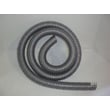
A damaged hose can cause major suction loss and poor pickup. Replacing the hose restores airflow and handling; use the model-matched vacuum hose 4369467.
Why it matters
“Best canister vacuum” rankings are useful, but your real-world results depend on airflow, bag and filter condition, and correct settings. Keeping your Kenmore 11626512690 maintained often delivers the performance you expect without replacing the whole vacuum.
Last updated: February 2026
How do you reset the belt on a Kenmore vacuum?
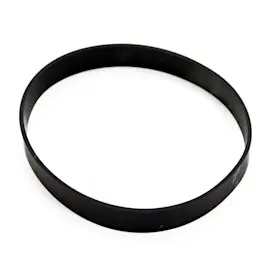
On the Kenmore 11626512690 canister vacuum, “resetting” the belt means reinstalling the belt on the power nozzle so it rides on the motor drive shaft and the brush roll correctly. Unplug the vacuum first, then follow the belt access and reassembly steps in the owner's manual.
Reset (re-seat) the belt on the power nozzle
- Unplug the vacuum from the electrical outlet.
- Disconnect the power nozzle from the wand so you can work on it safely.
- Remove the light cover and remove the bulb.
- Remove the nozzle cover screws; release the cover tabs and lift the cover off.
- Lift out the brush roll, loop the belt onto the motor drive shaft and around the brush roll, then reinstall the brush roll.
- Reinstall the cover, screws, bulb, and light cover.
Quick checks after you reinstall the belt
- Turn the brush roll by hand; it should rotate smoothly with light belt tension.
- Confirm the belt is not twisted and is centered on the brush roll pulley area.
- Remove hair, string, and lint from the brush and brush support areas.
- Make sure the nozzle cover is fully seated; a misaligned cover can bind the brush.
Symptoms and what they usually mean
| What you notice | Most common cause | What to do next |
|---|---|---|
| Brush does not spin, suction seems normal | Belt off or broken | Re-seat belt; replace if worn or damaged |
| Burning rubber smell | Brush jam or belt slipping | Clear debris; verify brush spins freely |
| Poor carpet pickup | Brush not turning at full speed | Recheck belt routing and brush area buildup |
Why it matters
The belt transfers motor power to the brush roll. If it is off, twisted, or slipping because of a jam, cleaning performance drops and the belt can overheat and fail.
Last updated: February 2026