 Owner’s manual
 Error Codes


How do I clear the error code on my Samsung oven?
On your Samsung NE58K9430SS electric range, you can often clear an error by canceling the cycle and resetting power. Press Clear/Off to stop the oven, then turn the range off at the breaker for 5 minutes and restore power; if the code returns, it usually indicates a condition that needs troubleshooting.
Quick reset steps (safe first)
- Press Clear/Off and wait 30 seconds.
- If the display still shows a code, switch the range OFF at the circuit breaker.
- Leave power off for 5 minutes.
- Restore power and set the clock if prompted.
- Try a simple function (for example, Bake at 350°F) to see if the code reappears.
If the display says “TEST” or “DEMO” (not a true error)
Some Samsung ranges show “TEST” when they are in demo/test mode, which can look like a fault.
Try one of these common control-panel exits:
- Press and hold Clear/Off for 3 to 5 seconds.
- Or press and hold Options for 3 seconds, select 0, then press Start/Set.
For button sequences and model-specific control details, use the NE58K9430SS manual.
What to do if the code comes back
If the same error returns after a power reset, we treat it as an active fault (often related to temperature sensing, keypad/control input, door lock circuit, or wiring).
- Write down the exact code and when it happens (preheat, broil, self-clean).
- Check for obvious issues: stuck keys, moisture on the control panel, or a recently run self-clean.
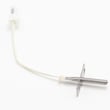
- If you’re comfortable with electrical checks, use a meter to test components like the oven temperature sensor and inspect harness connections (power off at the breaker).
Common outcomes by symptom
| What you see | What it usually means | Next step |
|---|---|---|
| Code clears and stays off | Temporary glitch | Keep using normally |
| Code returns immediately | Ongoing fault | Troubleshoot sensor/control/wiring |
| “TEST/DEMO” shows | Demo mode active | Exit demo mode using the manual |
Why it matters
Clearing the display is helpful, but if the code returns it is protecting the oven from unsafe heating or incorrect temperature control. Addressing the root cause helps prevent no-heat, overheating, or repeated shutdowns.
Last updated: January 2026
Where's the model number on a Samsung electric range?
On the Samsung electric slide-in range model NE58K9430SS, the model number is typically printed on a rating label you can see after pulling the bottom storage drawer out and looking along the frame area behind it. Confirm the exact label location in the NE58K9430SS manual.
Common model tag locations on Samsung ranges
Check these spots in this order:
- Behind the bottom storage drawer (most common)
- Along the oven frame just inside the drawer opening
- On the oven door frame area (visible when the door is open)
- On the back panel of the range (harder to access)
How to find it safely
Before reaching around the range:
- Turn the range off and let it cool completely
- Pull the storage drawer straight out (remove it if your drawer design allows)
- Use a flashlight to read the label clearly
- Write down the full model number and any suffix (letters/numbers after a slash)
- Take a photo of the label for parts lookup accuracy
What the label usually shows (and why it matters)
| Label item | What we use it for |
|---|---|
| Model number (example: NE58K9430SS) | Ensures parts fit your exact range |
| Version code (often after a slash) | Matches the correct part variation |
| Serial number | Helps date the unit for service history |
Why it matters
Samsung ranges can have multiple versions that look identical but use different bake elements, surface elements, control boards, or wiring harnesses. Using the exact model and version from the rating label helps us match the correct replacement parts the first time.
Last updated: January 2026
Why is my Samsung stove LED display not working?
On the Samsung NE58K9430SS electric slide-in range, a dead LED display is usually caused by a power supply problem (lost L1 or neutral), a loose or damaged wire connection, or a failed electronic oven control (control board). A hard reset sometimes restores the display.
Quick checks (start here)
- Confirm the range is getting 240 VAC across L1 to L2 and 120 VAC from L1 to neutral at the terminal block (a partial power loss can leave some functions working).
- Check the house breaker: many ranges use a 2-pole breaker; one side can trip and still look “on.”
- Do a hard reset: unplug the range or switch the breaker off for 5 minutes, then restore power.
- If the display flickers or comes and goes, suspect a loose harness connection at the control panel.
- If the oven is dead but cooktop works, suspect the electronic oven control or its power feed.
What to inspect inside the control area
Before opening panels, shut off power at the breaker.
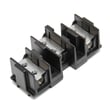
- Terminal block and power cord: look for heat damage, loose lugs, or a burned neutral.
- Wiring harness connections: reseat connectors to the display/control board; look for pinched wires.
- Control board area: some models use a protective fuse or thermal cutoff in the control circuit; if open, the display can go blank.
For panel access, wiring routing, and any model-specific notes, use the NE58K9430SS manual.
Symptoms and most likely causes
| What you see | Most likely cause | What we recommend |
|---|---|---|
| Display completely blank; cooktop still heats | Lost 120V leg/neutral, wiring issue, or failed control board | Verify supply voltage; inspect terminal block; then test control circuit |
| Display blank; nothing works | No power to range or failed power connection | Check breaker, outlet, cord, terminal block |
| Display intermittent or dim | Loose connector, failing control board | Reseat connectors; inspect for heat damage |
Why it matters
The display is part of the range’s control system; if it is not powered correctly, the oven may not regulate temperature safely or may not respond to keypad inputs. Fixing the power feed and connections first prevents unnecessary control board replacement.
Helpful DIY reference
Last updated: January 2026
Why is my Samsung range touchpad not working?
On the Samsung NE58K9430SS electric slide-in range, a touchpad that will not respond is most often caused by grease or moisture on the glass, a control lock setting, a power reset issue, or a failing touch control panel or electronic control board. Start with cleaning and a reset before planning a repair.
Quick checks (no tools)
- Clean the panel: Use a barely damp microfiber cloth, then dry completely. Avoid spraying cleaner directly on the control area.
- Check Control Lock: If the range is locked, the touchpad can seem “dead”. Use the lock/unlock steps in the NE58K9430SS manual.
- Power reset: Turn the range breaker OFF for 1 to 5 minutes, then turn it back ON.
- Listen and look: If the display is blank or flickering, the issue may be power supply or the main control, not the keypad itself.
What usually fails (and how symptoms differ)
| Symptom | Most likely cause | What we recommend first |
|---|---|---|
| Some keys work, others do not | Touch control panel (keypad) failure or contamination | Clean and dry; then reset power |
| No keys work but display is on | Touch control panel not communicating with control | Reset; check ribbon connection (service) |
| Display is blank and oven will not run | Power supply issue, blown fuse, or electronic control board | Verify breaker; electrical checks (service) |
| Random beeping or ghost touches | Moisture intrusion or failing touch panel | Dry thoroughly; avoid steam; consider replacement |
If you are comfortable doing basic electrical checks
Turn off power at the breaker before accessing any wiring.
- Inspect the ribbon connector from the touchpad to the control board for a loose fit or corrosion.
- Check for pinched or damaged wires near the console hinge points.
- If your model uses a fuse in the control circuit, test it for continuity (a blown fuse can disable the controls).
A helpful skill builder is how to use a multimeter to test electrical parts video.
Why it matters
A non-working touchpad can prevent safe operation (you may not be able to cancel a bake cycle or shut off a surface element). Addressing moisture, lock settings, and power issues first helps avoid unnecessary part replacement.
Last updated: January 2026
What type of plug does a Samsung electric range use?
Samsung electric ranges like NE58K9430SS typically connect using either a 3-prong (3-wire) or 4-prong (4-wire) range cord and matching outlet; the correct plug style depends on the receptacle installed in your home and the approved wiring method in the NE58K9430SS manual.
Which plug type is correct for NE58K9430SS?
We cannot identify the exact plug style from the NE58K9430SS model number alone because Samsung ranges are commonly set up to work with either outlet style, and the cord is selected to match your home’s receptacle.
- 4-slot outlet (4-wire cord): two hot legs, one neutral, one equipment ground
- 3-slot outlet (3-wire cord): two hot legs and one neutral (grounding is handled differently)
- The power cord is often not included, so you purchase the cord that matches your outlet
Electrical requirements and what we can confirm
The exact circuit amperage requirement for NE58K9430SS is not identified by the model context provided here, so we do not recommend assuming a specific amp rating. Use the electrical rating information and installation instructions in the manual and verify your breaker size and wiring with a qualified electrician.
- Confirm the supply is 120/240V or 120/208V, 60 Hz, single-phase (common for U.S. electric ranges)
- Use a range-rated cord and the correct strain relief at the terminal block
- If converting between 3-wire and 4-wire, follow the terminal block steps exactly
| Wall outlet you have | Cord you typically need | What changes |
|---|---|---|
| 4-slot receptacle | 4-prong range cord | Separate equipment ground conductor |
| 3-slot receptacle | 3-prong range cord | Neutral and grounding method differ |
Why it matters
Using the correct 3-wire or 4-wire connection helps ensure the terminal block is wired correctly and the range is grounded as intended; incorrect neutral or ground handling can create shock risk or damage.
Last updated: January 2026




