 Owner’s manual



How to fix E2 error in Samsung washing machine?
On the Samsung WA50F9A7DSW washer, an E2 error is most often tied to a control issue or a cycle interruption. We start with a safe reset and quick checks (power, load, drain) because those fix the majority of E2 complaints without replacing parts.
Quick fix steps (in order)
- Unplug the washer (or switch off the breaker) for 2 to 5 minutes, then restore power.
- Press each key on the control panel once to confirm none feel stuck; wipe the panel dry.
- Cancel the cycle and restart with a small test load (no bulky items).
- Verify the lid closes fully and nothing is pinched between the lid and top.
- If the tub is full of water, run Drain/Spin; listen for the drain pump running.
If it will not drain or it stops mid-cycle
A drain problem can trigger error behavior that looks like a control fault. Check the drain path first.
What to check
- Drain hose: not kinked, crushed, or shoved too far down the standpipe
- Standpipe or sink: not clogged and able to accept water quickly
- Pump sound: a steady hum with no water movement often points to a blockage or failing pump
| Symptom | Most likely cause | What we do next |
|---|---|---|
| Water stays in tub | Drain restriction or pump issue | Inspect hose and pump area; consider pump replacement |
| Error returns immediately after reset | Keypad/control issue | Dry/clean panel; follow control checks in the manual |
| Only happens on heavy loads | Out-of-balance interruption | Reduce load size; redistribute items |
Parts that commonly relate to drain complaints
If your troubleshooting points to a drain failure, these are common repair parts for this model:
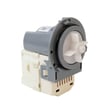
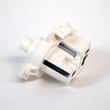
- Washer drain pump assembly dc97-19289f (complete assembly)
- Washer drain hose dc97-17345b (tub-to-pump hose)
Why it matters
Clearing an E2 quickly prevents repeated cycle stops, standing water, and extra strain on the drain pump, control board, and wiring.
For model-specific button sequences and error handling, follow the WA50F9A7DSW manual.
Last updated: February 2026
What is the capacity of the Samsung wa50f9a7dsw a2?
The Samsung WA50F9A7DSW top-load washer is a 5.0 cu. ft. capacity machine. That capacity rating helps you size loads correctly so you get good cleaning performance without overloading the wash basket; see the WA50F9A7DSW owner's manual for cycle and load-size guidance.
What 5.0 cu. ft. means for everyday loads
A 5.0 cu. ft. Samsung top-load washer is designed for larger, bulkier loads when you use the right cycle and avoid packing items down.
- Wash bulky items (like comforters) one at a time when possible
- Load loosely; don’t compress laundry below the washplate area
- Mix large and small items to improve balance during spin
- Use the Bedding/Bulky cycle (or the closest match on your control panel) for comforters
- If the washer bangs or stops to rebalance, reduce the load size
Quick load-sizing guide (typical)
These are practical, real-world examples for a 5.0 cu. ft. top-load washer like the WA50F9A7DSW.
| Load type | Typical examples | Best practice |
|---|---|---|
| Medium | Mixed clothes for 1 to 2 people | Fill loosely to about 1/2 to 2/3 full |
| Large | Towels, jeans, heavier fabrics | Leave space at the top for tumbling |
| Bulky | Queen comforter or large blanket | One bulky item; add a few small items if allowed |
Why it matters
Correct load sizing protects key components (drive system, suspension, and spin basket) and helps prevent out-of-balance spinning, longer cycle times, and poor rinsing.
If you’re seeing balance or spin issues
Capacity is only part of the story; loading and leveling matter too.
- Make sure the washer is level on the floor
- Redistribute the load if it clumps to one side
- Use the correct cycle for bulky items
- Run a cleaning cycle periodically to reduce residue buildup
Last updated: February 2026
What is the life expectancy of a Samsung front load washing machine?
A Samsung front load washing machine typically lasts 10 to 13 years with normal household use and basic maintenance. For your Samsung WA50F9A7DSW, following the care and loading guidance in the WA50F9A7DSW owner's manual helps you get the longest service life.
What affects washer lifespan the most
A washer’s life is usually determined by wear on the drive system, drainage, and how consistently it’s maintained.
- Load size and balance (overloading and chronic out-of-balance loads shorten life)
- Detergent use (too much detergent can cause residue and odor issues)
- Water quality (hard water can increase buildup)
- Drain performance (slow draining strains the drain pump)
- Leveling and vibration (excess vibration stresses the tub and suspension)
Quick maintenance that extends life
These habits reduce strain on key components like the drain pump, inlet valve, and control system.
- Keep loads below the top of the drum and mix items to improve balance
- Use HE detergent and measure it; avoid “extra suds”
- Leave the door open after cycles to help the tub dry
- Run a monthly cleaning cycle (or hot cycle) to reduce residue
- Check hoses for bulges or leaks and replace if worn
Typical lifespan expectations (at-a-glance)
| Usage pattern | Typical life expectancy | What to watch for |
|---|---|---|
| Light (few loads/week) | 12 to 15 years | Minor leaks, noisy spin |
| Average (most households) | 10 to 13 years | Drain issues, vibration |
| Heavy (daily loads) | 7 to 10 years | Pump wear, bearing noise |
Why it matters
Knowing the expected lifespan helps you decide whether to repair or replace when symptoms show up (slow drain, won’t fill, loud spin). For example, repeated draining problems often point to the drain system, where a replacement like the washer drain pump DC31-00054D can restore normal operation.
Last updated: February 2026
What is the most common problem with Samsung washing machines?
The most common Samsung washer complaint is a spin or drain problem: the washer fills, then won’t drain fully or won’t reach high-speed spin. On the Samsung WA50F9A7DSW, this is usually caused by an out-of-balance load, a draining restriction, or a lid lock issue.
What to check first (fast, no parts)
- Redistribute the load; bulky items (blankets, towels) often cause imbalance.
- Run a Spin Only or Rinse + Spin cycle with the tub empty to see if it reaches full spin.
- Confirm the drain hose is not kinked, crushed, or shoved too far down the standpipe.
- Make sure the lid closes firmly; listen for the lid lock to engage.
- Use the troubleshooting steps and cycle details in the WA50F9A7DSW owner's manual.
Common causes and what they look like
| Symptom | Most likely cause | What you’ll notice |
|---|---|---|
| Won’t spin, stops mid-cycle | Unbalanced load or vibration sensing | Tub rebalances repeatedly, cycle pauses often |
| Water left in tub | Drain restriction or weak pump | Slow drain, gurgling, wet clothes |
| Won’t spin with lid closed | Lid lock not engaging | Clicking but no spin, lid error behavior |
| Fills slowly or won’t fill | Water inlet issue | Long fill times, fill-related error codes |
Parts that commonly fix spin and drain complaints
If basic checks point to a hardware issue, these are frequent repair items for this model family:
- Washer drain pump assembly dc97-19289f (complete pump assembly)
- Washer drain hose dc97-17345b (tub-to-pump hose that can clog with debris)
- Washer door lock assembly dc34-00025e (lid lock that must engage for spin)
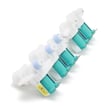
- Samsung washer water inlet valve DC97-15459G (helps resolve fill problems that interrupt cycles)
Why it matters
Spin and drain problems leave clothes soaking wet and can trigger repeated rebalancing, longer cycle times, and extra wear on the drive system. Fixing the root cause restores normal cycle completion and protects the washer’s motor and control.
Last updated: February 2026
Why is my Samsung WA50F9A7DSW A2 not filling with water?
If your Samsung WA50F9A7DSW washer isn’t filling, the most common causes are a closed water supply valve, kinked inlet hoses, clogged inlet screen filters, or a failed water inlet valve. Start with the supply and hose checks, then move to the valve and control-related checks in the WA50F9A7DSW owner's manual.
Quick checks we recommend first
- Confirm both hot and cold shutoff valves are fully open.
- Straighten any kinks; make sure hoses are not crushed behind the washer.
- Verify the home has water pressure; most washers need steady household pressure to fill.
- Check that the lid is fully closed and the cycle is started (some cycles pause filling if the lid isn’t sensed).
- If the washer is showing an error code, match it to the symptom before replacing parts.
Clean the inlet screen filters (common fix)
Sediment can clog the tiny screens where the hoses connect to the washer, restricting flow.
- Unplug the washer.
- Turn off both water valves.
- Remove the inlet hoses from the back of the washer.
- Carefully pull out and rinse the inlet screens; reinstall.
- Reconnect hoses, turn water on, and test a fill.
Parts that commonly cause a “no fill” symptom
If supply and screens are good, the inlet valve or a control/sensing issue is next.
| Symptom | Most likely cause | What to do |
|---|---|---|
| No water at all | Inlet valve not opening | Test/replace the Samsung washer water inlet valve DC97-15459G |
| Slow fill | Clogged screens or low pressure | Clean screens; confirm pressure |
| Fills then stops quickly | Lid lock not sensed or control issue | Check lid closure; inspect lid lock wiring |
Why it matters
A washer that can’t fill will stall the cycle, leave detergent undissolved, and can trigger Samsung washer error codes. Fixing the water supply path first prevents unnecessary part replacement.
Helpful troubleshooting reference
If you see a code while the washer is trying to fill, use Samsung top load washer error codes to narrow the cause to fill, drain, or lid-sensing problems.
Last updated: February 2026





