Owner’s manual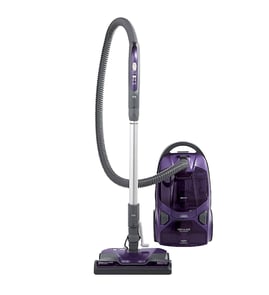

How to change the belt on a Kenmore canister vacuum?
To change the belt on your Kenmore canister vacuum model 11628014700, unplug the vacuum, open the power nozzle (power head) bottom plate, remove the brush roll, swap the belt onto the motor shaft and brush roll, then reassemble and confirm the brush spins freely with firm belt tension. See the 11628014700 owner's manual for your exact latch and screw locations.
Steps to replace the power nozzle belt
- Unplug the vacuum and disconnect the wand from the power nozzle.
- Flip the power nozzle over; remove the bottom plate screws or release the retaining clips.
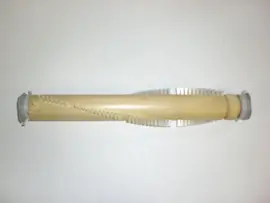
- Lift off the bottom plate and remove the brush roll (agitator).
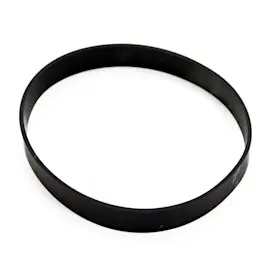
- Slide the old belt off the brush roll and motor shaft.
- Loop the new belt around the motor shaft first, then stretch it onto the brush roll.
- Reinstall the brush roll, making sure the end caps seat fully in their holders.
- Reinstall the bottom plate; rotate the brush by hand to confirm smooth movement.
Quick checks after reassembly
If the belt is installed correctly, these checks pass immediately:
| Check | What you should see | What it usually means if it fails |
|---|---|---|
| Brush roll turns by hand | Smooth rotation with light resistance | Belt twisted, brush not seated, or debris in end caps |
| Belt tracks in the center | Belt stays aligned | Brush roll installed backward or belt not on motor shaft |
| No burning rubber smell | Normal operation | Belt slipping due to jammed brush or wrong belt type |
Why it matters
A worn or misrouted belt reduces brush roll speed, which cuts carpet cleaning performance and can overheat the belt. Replacing the belt and clearing hair and thread from the brush roll end caps restores agitation and airflow pickup.
Helpful tips (common on Kenmore power nozzles)
- Clean hair and string from the brush roll and both end caps before installing the new belt.
- If the brush roll has a height setting, start at a higher setting for thick carpet to reduce belt strain.
- If the belt breaks again quickly, inspect for a seized brush roll, cracked end cap, or a jam in the belt path.
Last updated: February 2026
Where is the reset button on the Kenmore vacuum?
On the Kenmore canister vacuum model 11628014700, there typically is not a single external “reset button” like you might see on some upright vacuums. Most “reset” situations are handled by unplugging the vacuum and correcting the cause (overheat, clog, or a tripped thermal protector), then letting it cool before restarting; see the 11628014700 owner’s manual for model-specific controls and protections.
What to check first (most common “reset” causes)
- Unplug the vacuum for safety before inspecting anything.
- Check for a clog in the hose, wand, floor nozzle, or inlet.
- Inspect and clean/replace filters (dirty filters restrict airflow and trigger overheating).
- Check the dust bag or bin (a full bag reduces suction and airflow).
- Look for a jam in the nozzle (hair and string can stall moving parts and strain the motor).
- Let the vacuum cool 30 to 60 minutes if it shut off while running.
Quick “reset” procedure we recommend
- Turn the power switch off.
- Unplug the power cord.
- Clear airflow restrictions (bag, filters, hose, nozzle).
- Wait for the motor to cool.
- Plug back in and test on a bare floor first.
Symptoms and what they usually mean
| Symptom | Most likely cause | What to do |
|---|---|---|
| Vacuum shuts off after a few minutes | Overheating from low airflow | Clean filters, check clogs, cool down |
| Weak suction but motor runs | Full bag, clogged hose, dirty filter | Replace bag, clear blockage, service filters |
| Burning smell | Belt/nozzle friction or motor strain | Stop use, clear jams, inspect nozzle area |
Why it matters
A canister vacuum relies on steady airflow to cool the motor. When airflow drops (clogged hose, packed bag, dirty filter), the thermal protector can shut the vacuum off. Fixing the airflow issue prevents repeat shutdowns and protects the motor.
Last updated: February 2026
Where to find model number on Kenmore canister vacuum?
On the Kenmore canister vacuum model 11628014700, the model number is printed on the model and serial number plate (a small label on the vacuum body). We use that exact model number to match the correct parts, attachments, and diagrams for your vacuum.
Common places to check
Look for a sticker or metal plate in these typical spots on Kenmore canister vacuums:
- Bottom of the canister (flip the canister over and check near the wheels)
- Back or side of the canister body near the cord rewind area
- Under the bag door or dust compartment cover (inside the canister housing)
- Near the power switch or handle area on the canister
- On the underside of the hose connection port (where the hose plugs in)
What the label usually shows
The plate typically includes more than one identifier. Use the model number for parts lookup.
| Label item | What it’s used for | Example format |
|---|---|---|
| Model number | Finding correct parts and diagrams | 116.28014700 or 11628014700 |
| Serial number | Manufacturing tracking and service history | Letters and numbers |
Tips to avoid mix-ups when ordering parts
- Write the model number exactly as shown, including any dots or extra digits.
- If the label is worn, take a clear photo and zoom in to read it.
- If you see multiple numbers, choose the one labeled Model.
- Use the model number to confirm fit for items like the hose, wand, floor nozzle, power cord, and filters.
Why it matters
Kenmore canister vacuums often look similar across series, but small model-number differences can change which motor, switch, cord reel, or attachments fit. Using the model number from the plate prevents ordering the wrong replacement part.
For additional label location details and model-number formatting, check the 11628014700 owner’s manual.
Last updated: February 2026
Does a Kenmore canister vacuum have a fuse?
Yes, many Kenmore canister vacuums (including model 11628014700) use a fuse or thermal cutout as overcurrent or overheat protection. If your vacuum is completely dead or shuts off after running, checking that protective device is a smart first step; use the 11628014700 owner’s manual to confirm the exact location and reset or replacement procedure.
What “fuse” usually means on a canister vacuum
On canister vacuums, the protection device is commonly one of these:
- Thermal fuse/thermal cutout: opens when the motor overheats (often not resettable)
- Resettable thermal protector: trips on heat and resets after cooling
- Inline electrical fuse: less common, but some designs include one in the power path
- Circuit breaker (reset button): more common on some uprights than canisters
Quick checks before you open the vacuum
Unplug the vacuum first.
- Try a different wall outlet (rule out a tripped household breaker)
- Inspect the power cord and plug for cuts, kinks, or burn marks
- Check for a full bag or clogged filters; restricted airflow overheats the motor
- Look for a blockage in the hose, wand, or nozzle
- Let the vacuum cool 30 to 60 minutes; a thermal protector may reset after cooling
How to confirm a blown fuse or open thermal cutout
If you’re comfortable with basic electrical testing, a continuity test is the fastest way to confirm the problem.
| Symptom | Most likely cause | What to check first |
|---|---|---|
| Completely dead, no lights/sound | Open fuse/thermal cutout, bad cord, bad switch | Cord, switch, fuse/cutout continuity |
| Runs briefly then stops | Overheating from clog or dirty filters | Bag, filters, airflow path |
| Intermittent power when cord moves | Broken conductor in cord or loose connection | Cord strain relief and cord continuity |
A multimeter set to continuity or ohms should show a closed circuit through a good fuse or closed thermal protector. For safe technique and meter setup, follow how to use a multimeter to test electrical parts video.
Why it matters
That fuse or thermal protector is there to prevent motor damage from overheating or electrical overload. Replacing it without fixing the root cause (clogged hose, packed bag, dirty filter, failing motor) often leads to repeat shutdowns.
Last updated: February 2026
Who makes Kenmore canister vacuum cleaners?
Kenmore is a brand name, not a single factory; Kenmore canister vacuums have been manufactured by different companies over time under contract. For the Kenmore 11628014700 canister vacuum, the most reliable way to confirm the original manufacturer and service details is to check the identification and parts information in the 11628014700 owner’s manual.
How Kenmore manufacturing works
Kenmore (sold historically through Sears) sources many appliances and floor-care products from outside manufacturers. That means the maker can vary by model series and production era.
Common ways we see this show up:
- The same Kenmore brand canister vacuum line can include multiple manufacturers across years.
- Parts layouts and service procedures are often manufacturer-specific.
- The model number and data label are the best “fingerprint” for matching parts.
How to identify the manufacturer for model 11628014700
Use these checks to pin it down quickly:
- Look for the rating label on the canister body (often near the cord reel area or underside).
- Note the full model number (11628014700) and any additional codes on the label.
- Compare the label details to the product identification section in the 11628014700 owner’s manual.
- Match parts by model number, not by appearance alone (hoses, wands, and power nozzles can look similar).
Quick reference: what to look for
| Where you check | What you’re looking for | Why it helps |
|---|---|---|
| Rating label on canister | Manufacturer name or compliance markings | Often lists the actual maker or importer |
| Model number format | “116.” prefix and full digits | Helps narrow the product family and parts system |
| Manual identification pages | Model and product ID details | Confirms the correct documentation and service info |
Why it matters
The manufacturer affects which parts fit (hose assembly, power nozzle, cord reel, filters) and which troubleshooting steps apply. Confirming the maker through the model’s documentation helps prevent ordering the wrong vacuum cleaner parts.
Last updated: February 2026
Why is my Kenmore vacuum not suctioning?
For Kenmore canister vacuum model 11628014700, loss of suction is almost always caused by restricted airflow: a clogged filter, a blockage in the hose or wand, a full bag or bin, or a poor seal at the canister lid. Restoring airflow restores suction.
Quick checks that fix most no-suction problems
- Empty the bag or dust bin; a full container chokes airflow fast.
- Clean or replace filters (pre-motor and exhaust/HEPA if equipped); clogged filters are the most common cause.
- Check the hose and wand for clogs; remove the hose and look through it toward a light.
- Inspect the floor nozzle; hair and string can jam the brush area and block the intake.
- Confirm all connections seal tightly (hose to canister, wand to nozzle, lid fully latched).
Step-by-step airflow test (fast and reliable)
- Turn the vacuum off and unplug it.
- Disconnect the hose from the canister.
- Look into the canister intake port and the hose ends; remove any debris.
- Reconnect and test suction at each point in order:
- Canister intake
- Hose end
- Wand end
- Floor nozzle
What the results mean
| Test point | If suction is strong here | If suction is weak here |
|---|---|---|
| Canister intake | Blockage is downstream (hose/wand/nozzle) | Filter, bag/bin, lid seal, or motor airflow issue |
| Hose end | Wand/nozzle issue | Hose clog, split hose, or loose cuff seal |
| Floor nozzle | Nozzle is OK | Nozzle clog, worn gasket, or brush area packed with debris |
Why it matters
A canister vacuum depends on steady airflow to create suction. When filters load up or a hose/nozzle clogs, the motor can still run but airflow drops sharply, so pickup performance falls off even on clean floors.
Model-specific tip
Use the maintenance and filter-care steps in the 11628014700 owner’s manual so you clean washable filters correctly and reinstall them in the right orientation.
Last updated: February 2026
How long do Kenmore canister vacuums last?
Most Kenmore canister vacuums typically last 8 to 12 years with normal home use and basic maintenance. For your Kenmore model 11628014700, lifespan depends most on airflow (clean filters and clear clogs), brush wear, and how often the vacuum is used; our 11628014700 owner's manual covers the routine care that helps it reach the high end of that range.
Typical lifespan by usage
| Usage pattern | What we usually see | What shortens life fastest |
|---|---|---|
| Light (1 to 2 rooms, 1 to 2x/week) | 10 to 12 years | Stored with a full bag, clogged filters |
| Average (whole home weekly) | 8 to 10 years | Frequent clogs, running with low airflow |
| Heavy (pets, daily use) | 5 to 8 years | Brush roll wear, hose cracks, motor overheating |
Signs it is near end-of-life (or needs service)
- Suction stays weak even after changing the bag and cleaning filters
- Motor sounds higher-pitched, surges, or smells hot during use
- Power nozzle stops spinning or the brush roll is consistently jammed
- Hose or wand leaks air (cracks, loose cuffs) and suction drops at the nozzle
- The vacuum shuts off unexpectedly (often heat protection from restricted airflow)
Maintenance that adds years
- Replace the bag before it is packed full; low airflow makes the motor run hotter
- Clean or replace filters on schedule (pre-motor and exhaust/HEPA if equipped)
- Clear clogs in the hose, wand, and power nozzle air path
- Remove hair and string from the brush roll and end caps
- Check the cord rewind and cord for damage; stop using it if the cord is compromised
Why it matters
Canister vacuums usually fail early from restricted airflow and brush/nozzle wear, not from age alone. Keeping airflow strong reduces heat stress on the motor and keeps cleaning performance consistent.
Last updated: February 2026
Why is my Kenmore vacuum brush not spinning?
On Kenmore canister vacuum model 11628014700, the brush (agitator) usually stops spinning because the belt is broken or off the motor shaft, the brush roll is jammed with hair/debris, or the nozzle is not set up to run the brush. Start with a quick jam and belt check, then confirm the nozzle settings.
Quick checks (most common fixes)
- Unplug the vacuum before working on the power nozzle.
- Remove hair, string, and carpet fibers from the brush roll ends and bristles.
- Check the belt for cracks, stretching, or breakage; a loose belt can slip and stop the brush.
- Make sure the brush control (carpet/floor) is set to carpet if your nozzle has a brush switch.
- Inspect the brush roll for stiff or seized end caps; it should spin freely by hand.
- Confirm the wand and nozzle connections are fully seated; a poor connection can prevent brush power.
What to inspect and what it means
| What you see | Likely cause | What to do next |
|---|---|---|
| Brush roll is packed with hair and hard to turn | Brush roll jam | Clean ends and bearings; retest |
| Belt is broken or missing | Worn/broken belt | Replace the belt |
| Belt is intact but loose and shiny | Stretched belt | Replace the belt |
| Brush turns by hand, belt looks OK, still no spin | Nozzle motor issue or wiring issue | Check for power/nozzle motor operation; test wiring if needed |
If you suspect an electrical problem
If the brush roll spins freely and the belt is good, the power nozzle motor, switch, or wiring can be the cause. Use safe electrical troubleshooting steps:
- Check the cord and hose for damage and intermittent power.
- Look for loose, burned, or corroded contacts at the wand and nozzle connectors.
- Test continuity with a meter if you have one.
For diagrams, access points, and model-specific disassembly guidance, use the 11628014700 owner’s manual. For safe meter use, follow how to use a multimeter to test electrical parts video.
Why it matters
A non-spinning brush reduces carpet cleaning and can overheat the belt or nozzle motor. Fixing a jam or replacing a worn belt early helps prevent bigger power nozzle repairs.
Last updated: February 2026
What is the bottom part of a vacuum called?
The bottom cleaning head of a vacuum is commonly called the power nozzle (also called a power head or floor nozzle). On the Kenmore canister vacuum model 11628014700, this is the attachment that sits on the floor and does the main carpet and hard-floor pickup.
Common names you will hear
- Power nozzle (most common when it has a motorized brushroll)
- Power head
- Floor nozzle
- Nozzle assembly
- Vacuum head
What that “bottom part” usually includes
In most canister vacuums, the power nozzle is more than just a plastic base; it is a small system of parts that work together.
- Brushroll (agitator) to lift carpet fibers
- Drive belt to spin the brushroll
- Base plate (bottom cover)
- Wheels and axles for smooth movement
- Height adjustment (on many models) for carpet vs. hard floors
- Suction channel and neck (where the wand connects)
Quick identification guide
| If the bottom head has... | It is usually called... | Best for... |
|---|---|---|
| A spinning brushroll (often belt-driven) | Power nozzle / power head | Carpet and rugs |
| No brushroll, just suction | Floor nozzle | Hard floors, low-pile rugs |
| A wide opening and soft bristles | Parquet floor brush | Hardwood, tile |
Why it matters
Using the right term helps you match the correct Kenmore part category (nozzle, brushroll, belt, base plate) and troubleshoot faster when you have issues like “no brush spin,” poor pickup, or a head that will not sit flat.
For diagrams and the exact naming used for model 11628014700, check the 11628014700 owner’s manual.
Last updated: February 2026
What are the parts of the vacuum?
On Kenmore canister vacuum model 11628014700, the vacuum is built from a canister (motor, controls, cord rewind), an airflow path (bag chamber, filters, seals), and cleaning attachments (hose, wand, and a floor nozzle). Use the 11628014700 owner’s manual to match the exact attachment set and component names.
Main parts and what they do
- Canister housing: holds the suction motor, switches, and cord rewind
- Dust bag system: disposable bag plus bag holder/collar that seals to the intake
- Filters: pre-motor filter protects the motor; exhaust filter captures fine dust
- Hose and handle: carries airflow and often includes suction control
- Wand: extends reach and connects the handle to the floor tool
- Floor nozzle: either a straight suction floor brush or a power nozzle for carpet
Common replaceable parts (most often needed)
- Dust bags (full or clogged bags reduce airflow)
- Pre-motor and exhaust filters (cause odors, overheating, dusty exhaust)
- Hose cuffs, seals, and gaskets (air leaks and whistling)
- Wand locks and connectors (loose fit, intermittent suction)
- Floor nozzle wear items (brush strip, wheels, or belt if your nozzle is motorized)
Quick identification guide
| Area | What you are looking at | Typical symptom when it needs attention |
|---|---|---|
| Bag compartment | Bag, bag holder, seals | Weak suction, dust smell |
| Filter locations | Pre-motor, exhaust filter | Overheating, dusty exhaust |
| Air path | Hose, wand, inlet/outlet seals | Whistling, low suction |
| Floor tool | Floor brush or power nozzle | Poor pickup, debris left behind |
Why it matters
When suction drops, the cause is usually in the bag, filters, or an air leak. When carpet pickup is poor, the issue is usually in the floor nozzle (clog, worn brush, or belt on power nozzles).
Last updated: February 2026