 Owner’s manual




Is the Kenmore Elite a HE washer?
Yes. The Kenmore Elite washer model 79641482410 is a high-efficiency (HE) washer; it’s designed to clean effectively while using less water than traditional washers, and it’s intended to be used with HE detergent. For cycle and detergent guidance specific to your washer, use the 79641482410 owner's manual.
- Use HE detergent (look for “HE” on the bottle)
- Measure detergent carefully; too much can cause oversudsing and poor rinsing
- Don’t overload; leave room for tumbling so clothes can rinse and spin properly
- Use the right cycle options for the load (soil level, extra rinse, etc.)
- Keep water flow strong by cleaning inlet screens periodically (per the manual)
HE washers need low-sudsing detergent because they use less water. If you see excess suds, odors, or residue, detergent amount is usually the first thing to adjust.
| Load type | What to do | What you’ll notice if it’s right |
|---|---|---|
| Small or lightly soiled | Use the lowest recommended HE dose | Cleaner rinse, fewer suds |
| Normal everyday loads | Use a mid-range HE dose | Good cleaning, no film |
| Large or heavily soiled | Increase dose slightly (still HE) | Better cleaning without suds overflow |
Using HE detergent and correct loading helps your 79641482410 drain, rinse, and spin the way it was designed to. It also reduces common issues like lingering suds, musty smells, and slow draining.
Last updated: February 2026
How to force a Kenmore Elite washer to drain?
On the Kenmore Elite washer model 79641482410, the quickest way to force a drain is to run the built-in Drain & Spin cycle; for drain-only, select NO SPIN so the drain pump runs without spinning the load. See the exact button sequence in the 79641482410 owner's manual.
- Press POWER.
- Select Drain & Spin.
- Press SPIN SPEED until you reach your choice:
- NO SPIN = drain only
- Any spin speed = drain, then spin
- Press START/PAUSE.
These checks fix most “won’t drain” situations on front-load washers.
- Unplug the washer for safety.
- Make sure the drain hose is not stretched, pinched, crushed, or kinked.
- Confirm the standpipe setup is correct:
- Hose inserted about 8 to 12 inches into the standpipe
- Standpipe height does not exceed 96 inches from the bottom of the washer
- If you use an extension, do not extend the drain hose more than 6 feet (longer extensions cause poor draining).
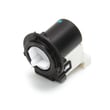
- If you hear the pump hum but water does not move, inspect the pump area for blockage; a failing pump motor is a common cause (see drain pump motor (4681EA2001T) - washer part by lg electronics 4681EA2001T).
| Setup item | Best practice | What happens if wrong |
|---|---|---|
| Standpipe insertion depth | 8 to 12 inches | Can contribute to odor or poor draining |
| Max standpipe height | 96 inches | Slow drain, incomplete drain |
| Hose extension length | Up to 6 feet | Poor draining, weak spin performance |
Forcing a proper drain protects the door lock, prevents standing water odors, and helps the washer reach full spin speed so clothes come out drier.
Last updated: February 2026
How to reset a Kenmore Elite washing machine?
To reset your Kenmore Elite washer model 79641482410, unplug it (or turn off the breaker) for 60 seconds, then restore power and start a cycle to clear the control. This reset is also the recommended first step after certain error codes or a power interruption.
- Press POWER to turn the washer off.
- Unplug the washer (or switch the laundry breaker off).
- Wait 60 seconds.
- Restore power.
- Press POWER, then select any cycle and press START.
- If an error returns immediately, stop the cycle and troubleshoot the specific symptom.
For model-specific control behavior and troubleshooting, use the 79641482410 owner's manual.
A reset clears temporary control glitches and helps after:
- PF (power failure): selecting any cycle clears the code and you can use the washer.
- A cycle that stalled after a brief outage.
- A one-time control lockup where buttons do not respond normally.
A reset will not correct a hard failure such as a door that will not lock, a drain problem, or a motor fault that immediately returns.
Use these fast checks before replacing parts:
- Confirm the door is fully closed and locking; the washer will not operate unless the door is locked.
- Reduce and rebalance the load; heavy single items can trigger an imbalance stop.
- If the tub is full of water, clean the pump filter and check for a drain restriction.
- If you suspect a drain issue, inspect the drain pump motor (4681EA2001T) - washer part by lg electronics 4681EA2001T.
| Symptom after reset | Most common cause | Best next step |
|---|---|---|
| PF shows again | Power interruption | Select any cycle to clear, then run a test load |
| Won’t start, door message | Door not locking | Check latch/strike alignment, then troubleshoot door lock |
| Stops before spin | Load imbalance | Add 1 to 2 similar items, redistribute load |
| Won’t drain | Clogged filter or pump issue | Clean filter, check drain hose and pump |
Resetting correctly prevents unnecessary part replacement and helps you separate a temporary control glitch from a real problem with the door lock, drain pump, or motor system.
Last updated: February 2026
What is the life expectancy of a Kenmore washer?
A Kenmore washer typically lasts 10 to 15 years. For your Kenmore Elite washer model 79641482410, lifespan depends most on load size, how often you run cycles, and routine care like cleaning the drain pump filter and keeping the door seal clean (see the 79641482410 owner's manual).
Most front-load washers reach the 10 to 15 year range when they are not overloaded and basic maintenance is done consistently.
- Heavy weekly use (large households) shortens lifespan faster than light use
- Overloading strains the motor, suspension, and spin system
- Poor draining (clogs, coins, lint) overworks the drain pump
- Hard water and excess detergent increase residue and odor issues
- Skipping cleaning can lead to leaks, vibration, and premature part wear
The manual for this model describes cleaning lint and foreign objects from the pump filter and reinstalling it securely; that single task prevents many “won’t drain” and leak complaints.
- Clean the drain pump filter regularly
- Wipe the door boot and leave the door cracked open between loads
- Use HE detergent and measure carefully
- Run a monthly tub-clean cycle (or hottest cycle with washer cleaner)
- Level the washer to reduce vibration and bearing wear
| Washer age | Common recommendation | Why |
|---|---|---|
| 0-7 years | Repair is usually worthwhile | High remaining service life |
| 8-12 years | Depends on repair cost | Mid-life, more wear items |
| 13-15 years | Replace often makes sense | Multiple systems near end of life |
Knowing the normal 10 to 15 year life expectancy helps you decide whether a symptom is a quick maintenance fix (like a clogged filter) or a sign the washer is nearing end-of-life and may need larger repairs.
Last updated: February 2026
What model is my Kenmore Elite washer?
Your Kenmore Elite washer’s model number is printed on the identification plate. For model 79641482410, the manual specifies the identification plate is inside the washer door opening area; record both the model and serial number exactly as shown.
Check these common identification-plate locations used on Kenmore Elite washers like 79641482410:
- Open the washer door and look just inside the opening for the identification plate
- Check the cabinet frame around the opening where the door closes
- Look for a sticker or metal plate that lists Model No. and Serial No.
- Wipe the area clean; detergent residue can hide the print
For the exact location callout and labeling format, use the 79641482410 owner’s manual.
Copy these items exactly from the identification plate:
- Model number (for example: 79641482410)
- Serial number (unique to your washer)
- Date of purchase (useful for service records)
| Label item | What we use it for | Examples of what it affects |
|---|---|---|
| Model number | Matching diagrams and parts lists | Door lock, drain pump, control panel |
| Serial number | Identifying the production run | Part revisions, service history |
| Date of purchase | Maintenance and documentation | Service records, ownership files |
Kenmore Elite model numbers can look similar, but internal components and wiring can differ by model and production run. Using the exact model and serial number helps us match the correct replacement part and avoid returns.
Last updated: February 2026
Does my Kenmore top load washer have a filter?
Yes; Kenmore Elite washer model 79641482410 uses serviceable filters, including water inlet screens and a drain pump filter (coin trap) that catches lint and small items to protect the pump and improve draining. Follow the exact access and cleaning steps in the 79641482410 owner's manual.
These are the customer-maintenance filters called out for this washer:
- Drain pump filter (coin trap): traps lint, buttons, coins, and debris before they reach the pump.
- Water inlet filters (screens): small mesh screens inside the inlet ports where the hot and cold hoses connect.
- Dispenser area: not a true filter, but buildup here can cause poor dispensing and odors.
On this Kenmore 796 platform, the drain pump filter is accessed from the lower front of the washer behind a small access panel. The manual procedure matters because you need to drain residual water before removing the filter.
- Unplug the washer before opening the access panel
- Place towels and a shallow pan under the access area
- Drain water from the small drain hose (if equipped) before twisting out the filter
- Remove lint and foreign objects; rinse the filter if needed
- Reinstall the filter fully and close the access panel to prevent leaks
Cleaning the drain pump filter is the first step. If draining is still weak, check these common causes:
- Drain hose kinked, crushed, or pushed too far into the standpipe
- Clog in the tub-to-pump hose or at the pump inlet
- Pump runs (hums) but does not move water
- Heavy lint load from items like towels causing repeated filter blockage
| Symptom | What to check first | Part often involved |
|---|---|---|
| Water left in drum | Drain pump filter and drain hose | Drain pump motor 4681EA2001T |
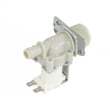
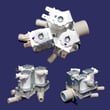
| Slow fill or fill errors | Inlet hose screens at the valve | Washer water inlet valve 5221ER1003A |
A clogged drain pump filter or inlet screen causes longer cycles, poor spin performance, and standing water. Keeping these filters clean protects the drain pump and helps your Kenmore washer run at full performance.
Last updated: February 2026


