Owner’s manual
 Error Codes




How do I reset a wall oven?
To reset your Kenmore wall oven model 79048832901, clear the current cooking function with STOP/CANCEL, then power-cycle the oven at the breaker for about 1 minute and restore power. After power returns, reset the clock and reselect your oven function using the steps in the 79048832901 owner's manual.
Quick reset steps (most common)
- Press STOP to clear any active bake, broil, timed bake, or self-clean setting.
- Turn OFF the wall oven circuit breaker (or remove the fuse) for 60 seconds.
- Turn the breaker ON.
- Set the clock, then try Bake again.
- If the display shows Loc, cancel control lockout (below).
If the oven is locked (display shows “Loc”)
The control can be set to an oven lockout mode that prevents normal operation.
- Press and hold the STOP pad for 3 seconds to toggle lockout.
- Wait about 15 seconds for the door lock motor to finish moving.
- Do not try to open the door while the Door Locked light is flashing.
What “reset” fixes (and what it does not)
| Symptom | Reset helps? | Next likely step |
|---|---|---|
| Control frozen or unresponsive | Yes | Power-cycle at breaker |
| Oven started acting odd after outage | Yes | Reset clock and function |
| Oven not heating at all | Sometimes | Check error codes, sensor, thermal limit |
| Door will not unlock after clean | Sometimes | Cancel lockout, allow cool-down |
Why it matters
A power interruption or a stuck control state can leave the electronic oven control in a “hung” mode. Clearing the function with STOP and cycling power restores normal control logic, then the oven needs the clock and cooking mode set again.
Last updated: January 2026
Why is my wall oven not turning on?
If your Kenmore wall oven model 79048832901 is not turning on (no display, no beeps, no heat), the most common causes are a power supply problem, the clock not being set after a power interruption, or a control-related fault. Start by confirming the oven has correct power, then reset the controls per the 79048832901 owner's manual.
Quick checks first (most common)
- Check the breaker: A wall oven typically uses a 240V double-pole breaker; reset it fully OFF then ON.
- Look for a flashing display: After power is interrupted, the display can flash and the oven may not run until the clock is set.
- Press STOP/CLEAR: If the control is stuck in an error state, STOP can clear the display so you can retry programming.
- Confirm the oven is not in Sabbath mode: If “SAb” is showing, the oven will not operate normally until Sabbath is turned off.
- Verify the junction box connection: A loose or burned connection can leave the oven completely dead.
What to do based on what you see
| Symptom | What it usually points to | What we recommend |
|---|---|---|
| No display, no sound | No power to oven, loose/burned wiring, failed connection | Reset breaker; check junction box and wiring; service if wiring is damaged |
| Display flashes | Power interruption; clock not set | Set the clock, then try BAKE/BROIL |
| Beeping with an “F” code | Electronic control detected a fault | Press STOP; if it returns, use Kenmore 790 manual clean wall oven error codes to identify next steps |
| Oven will not start and “SAb” shows | Sabbath feature active | Turn off Sabbath feature using the control pad sequence in the manual |
Why it matters
A “dead” wall oven is often a simple power or control-state issue (breaker, clock reset, Sabbath mode). Confirming those basics first prevents unnecessary parts replacement and helps you pinpoint whether you need an electrical repair or an oven control diagnosis.
Last updated: January 2026
How to unlock Kenmore self-cleaning oven?
On Kenmore wall oven model 79048832901, the door unlocks automatically after you cancel or finish Self-Clean and the oven cools down; the lock can stay engaged for about 1 hour while the oven temperature drops. Do not force the door open because it can damage the lock system (see the 79048832901 owner's manual).
Quick steps to unlock the door
- Press Cancel/Off to stop Self-Clean.
- Wait for the oven to cool; the Door Lock light should turn off after about 1 hour.
- Once the Door Lock light is off, open the door normally.
- If the display shows End and the Clean indicator stays on, press Cancel/Off again to return to the time of day.
- Do not try to pry or pull the door open while the lock light is flashing (the lock motor can take about 15 seconds to fully engage or disengage).
If the door is still locked after cooling
A door that stays locked usually means the oven still senses high temperature, the lock motor is stuck, or a control issue is preventing the unlock command.
- Confirm the oven is truly cool to the touch (especially near the door frame).
- Restore power by turning the breaker off for 1 minute, then back on (this can reset the control).
- If the oven overheated during Self-Clean, a safety device may have tripped; check for signs of overheating and allow extra cooling time.
- If the lock will not release, the door lock motor or related wiring may need service.
Common parts involved (when the lock will not release)
| Symptom | Often related to | Example part for this model |
|---|---|---|
| Oven temperature seems wrong, lock stays on | Temperature sensing issue | Range oven temperature sensor 5304504897 |
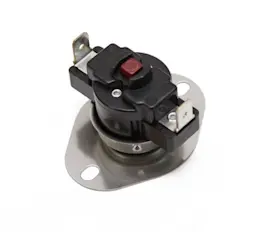
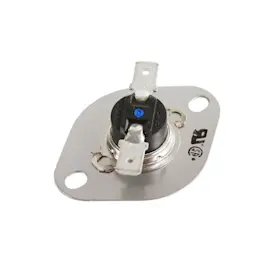
| Oven overheats, shuts down, lock acts up | Overheat protection | Frigidaire range high-limit thermostat 318578506 |
Why it matters
Forcing the door open can damage the automatic door locking system and turn a simple cool-down wait into a larger repair. Letting the oven cool and watching the Door Lock indicator prevents burns and protects the latch mechanism.
Last updated: January 2026
Why is my Kenmore oven not heating up?
If your Kenmore wall oven model 79048832901 is not heating, the most common causes are a power supply problem, a control setting issue, or a failed heating circuit component such as the oven temperature sensor or a safety thermostat. Start with the quick checks in the 79048832901 owner's manual.
Quick checks we recommend first
- Confirm the clock is set after a power interruption; some ovens will not program until the clock is set.
- Verify the house circuit breaker is fully engaged (a tripped breaker can look “half on”).
- Make sure the oven controls are set correctly for Bake or Broil (not just a temperature entry).
- If the display is beeping or showing a fault, press STOP to clear it and retry the cycle.
- If broiling, confirm the door position matches the broil instructions for your model.
Parts that commonly cause “no heat” or weak heat
If power and settings are correct, these parts are frequent culprits on electric wall ovens:
| Symptom | Most likely part to check | What you may notice |
|---|---|---|
| Oven heats inconsistently or never reaches set temp | Range oven temperature sensor 5304504897 | Baking runs long; temperature swings |
| Oven shuts down or won’t heat after getting hot | Frigidaire range high-limit thermostat 318578506 | Heat stops mid-cycle; may reset after cooling |
| Oven appears dead or has intermittent power | Terminal block connections | Burning smell at junction box; loose wires |
Why it matters
A wall oven that will not heat is often a simple control or power issue, but a drifting temperature sensor or an open high-limit thermostat can prevent the control from energizing the heating elements correctly. Fixing the root cause restores safe, accurate baking temperatures.
Helpful tip for temperature complaints (not a total no-heat)
If the oven heats but seems too hot or too cool, your model allows a temperature offset adjustment (calibration). Follow the calibration steps in the 79048832901 owner's manual before replacing parts.
Last updated: January 2026