 Installation guide
 Owner’s manual




What is the average lifespan of a Frigidaire dishwasher?
A Frigidaire dishwasher typically lasts 10 years on average. For your Frigidaire FFID2426TS4A dishwasher, reaching that 10-year mark (or longer) depends most on water quality, how often you run cycles, and routine care like cleaning the filter and checking for leaks; see the FFID2426TS4A use & care manual.
Typical lifespan range (what we see most often)
Most Frigidaire dishwashers fall into this service-life range:
- 8 to 13 years is a common real-world range
- 10 years is a solid “average” planning number
- Heavy daily use can shorten life; light use can extend it
- Hard water and poor draining are two of the biggest life-shorteners
Lifespan at a glance
| Usage pattern | What to expect | Notes |
|---|---|---|
| Light (2 to 3 loads/week) | 11 to 13 years | Less wear on pump, seals, and heater |
| Average (4 to 7 loads/week) | ~10 years | Typical household use |
| Heavy (1 to 2 loads/day) | 8 to 9 years | More heat cycles and pump run-time |
How to help your FFID2426TS4A last longer
We recommend these habits because they reduce strain on the wash system, drain system, and door seals:
- Run hot water at the sink until it is hot before starting a cycle
- Use the right detergent amount for your water hardness
- Keep the spray arms clear so they can rotate freely
- Clean the filter area and remove debris regularly
- Avoid overloading; it blocks spray and can stress the motor
- Watch for early leak signs around the door and bottom edge
Why it matters
Knowing the expected lifespan helps you decide when maintenance is worth it and when a repair is likely to pay off. Small fixes (like addressing leaks early) can prevent bigger failures such as motor damage or electrical issues.
Last updated: January 2026
How to make a Frigidaire dishwasher drain?
On the Frigidaire FFID2426TS4A dishwasher, we cancel the cycle to force a drain: press and hold START/CANCEL for about 3 seconds; the dishwasher should run an approximately 90-second drain. If water still remains, we focus on a clog or a drain-system issue rather than the control setting. See the FFID2426TS4A use & care manual.
Quick steps to force a drain (FFID2426TS4A)
- Press and hold START/CANCEL for 3 seconds.
- Listen for the drain pump to run and water to move through the drain hose.
- Wait for the drain period to finish (about 90 seconds).
- If needed, start a new cycle after the drain completes.
If it still will not drain: what to check first
We use these checks because they solve most “won’t drain” complaints without pulling the dishwasher out.
- Make sure the cycle is not paused and the door is fully latched.
- If connected to a disposer, confirm the disposer is empty.
- Confirm the disposer inlet knockout plug was removed (common on new installs).
- Check for a kinked or crushed drain hose under the sink.
- Clean the filter area and remove debris that can block flow (food, labels, glass).
Parts that commonly fix a no-drain problem
If the drain path is clear but the dishwasher still leaves standing water, the issue is often a failed pump or a restricted hose.
| Symptom | Most likely area | What we do next |
|---|---|---|
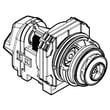
| Hums but does not move water | Drain pump | Inspect/replace the drain pump a A00126401 |
| Drains slowly or backs up | Drain hose or installation | Inspect routing and replace the dishwasher drain hose 807117001 if damaged |
| Water returns after draining | Check valve | Inspect the check valve for debris or sticking |
Why it matters
A dishwasher that cannot drain can leave dirty water in the sump, cause odors, and stop the next cycle from washing correctly. Restoring proper drain flow protects the pump, improves cleaning, and prevents repeat clogs.
Last updated: January 2026
What is the most common problem with the Frigidaire dishwasher?
For the Frigidaire FFID2426TS4A dishwasher, the most common service issue we see is a drain problem: water left in the bottom of the tub after the cycle ends. In many cases it traces back to a clog in the filter/glass trap area, a kinked drain hose, or a weak drain pump.
Quick checks we recommend first
- Cancel the cycle and let the unit run its drain (hold Start/Cancel about 3 seconds, then allow the drain to complete).
- Check the bottom of the tub for debris around the filter area and glass trap.
- Confirm the drain hose is not kinked or crushed under the sink.
- If connected to a disposer, make sure the disposer is empty and the disposer inlet knockout plug was removed.
- Run hot water at the sink until it is hot before starting a cycle (helps cleaning and reduces greasy buildup).
For model-specific operating and cleaning steps, follow the FFID2426TS4A use & care manual.
Common symptoms and the most likely causes
| Symptom | Most likely cause | What to inspect first |
|---|---|---|
| Water left in tub | Drain restriction or weak drain pump | Filter/glass trap, drain hose routing |
| Poor cleaning | Low water temp, blocked spray, detergent issues | Spray arms, loading, detergent cup |
| Leaking | Door seal or door bottom seal not sealing | Door gasket area, level installation |
| Won’t start | Door not latching or control issue | Latch engagement, control panel response |
Parts that often solve the problem (when a repair is needed)
If you confirm the dishwasher is not draining and the hose and filter area are clear, these model-compatible parts are common fixes:
- Dishwasher drain hose 807117001 (cracked, clogged, or kinked hose)
- Drain pump a A00126401 (pump not pushing water out)
- Dishwasher filter 5304506525 (restriction at the filter area)
Why it matters
A dishwasher that does not drain can leave dirty water in the sump, cause odors, and reduce wash performance on the next load. Catching a drain restriction early can prevent pump strain and repeat clogs.
Last updated: January 2026
How do I know if my Frigidaire dishwasher control board is bad?
If your Frigidaire FFID2426TS4A dishwasher has power but will not start, runs unpredictably, or the cycle lights/buttons act erratically, the electronic control board may be failing. We recommend ruling out door-latch and user-interface problems first, because they can mimic a bad board.
Quick checks before blaming the control board
- Confirm the door closes fully and latches; a door that is not latched can prevent any cycle from starting.
- Cancel and restart a cycle (press and hold Start/Cancel for about 3 seconds, then reselect a cycle).
- Check for control lock being enabled (this model uses an Air Dry button hold to lock/unlock controls).
- Verify the dishwasher is getting proper power (breaker on, no loose power connections).
- Look for obvious damage: burnt smell, scorch marks, or moisture corrosion on the board area.
For control lock, cycle cancel, and basic “won’t run” checks specific to this model, use the FFID2426TS4A use & care manual.
Symptoms that strongly point to a bad control board
A failing control board often shows up as one or more of these patterns:
- Dishwasher is completely dead even though power is present at the junction box
- Starts only sometimes, or stops mid-cycle with no clear cause
- Random beeping, flashing, or “stuck” indicators
- Outputs not being energized (for example, no drain at the end of a cancel)
Control board vs. look-alike failures
| What you see | More likely cause | What to check next |
|---|---|---|
| Buttons do nothing, but unit has power | User interface issue | Inspect/replace dishwasher user interface control button assembly 5304518467 |
| Won’t start unless you slam/hold door | Door latch issue | Inspect/replace dishwasher door latch 5304525218 |
| Won’t drain, water remains in tub | Drain system issue | Check hose/kinks; consider drain pump a A00126401 |
| Fills too much or won’t fill | Float/float switch issue | Check float movement; consider dishwasher float switch 154773201 |
Why it matters
Replacing the electronic control board is one of the higher-cost repairs on a dishwasher. Verifying the door latch, user interface, and drain/fill safety devices first helps avoid replacing the wrong part and gets your FFID2426TS4A running sooner.
Last updated: January 2026





