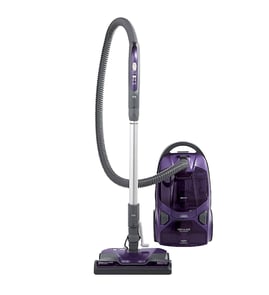

What are the disadvantages of a canister vacuum?
Canister vacuums (including Kenmore model 3462701680) trade strong bare-floor and above-floor cleaning for a few everyday drawbacks: they take more space, you pull a separate canister behind you, and they can feel less convenient on thick carpet compared with many uprights.
Common disadvantages (what most owners notice)
- Bulkier storage: hose, wand, and floor nozzle take up room.
- More “pulling and bumping”: the canister can catch on corners or tap furniture.
- More bending: you often reach down to move the canister, change tools, or manage the cord.
- Carpet performance can vary: deep-pile carpet may need a powered nozzle and correct height setting to clean well.
- More pieces to manage: wand, hose, and attachments add a learning curve.
- Ongoing consumables (on bagged models): replacement bags and filters add routine cost.
Quick comparison: canister vs. upright
| Feature | Canister vacuum | Upright vacuum |
|---|---|---|
| Storage footprint | Larger (separate hose/wand) | Often smaller, one-piece body |
| Bare floors and stairs | Typically excellent | Varies by model |
| Deep carpet | Varies; best with powered nozzle | Often strong by design |
| Handling | Pull canister behind you | Push one unit in front of you |
Tips to reduce the downsides
- Use a shorter hose reach when possible so the canister follows more easily.
- Keep the cord behind you to reduce snagging.
- If carpet cleaning is weak, check for clogs, a worn brush, or a dirty filter.
- Replace bags/filters on schedule to maintain airflow and suction.
Why it matters
Most “canister vacuum problems” come down to airflow and handling. When suction drops (full bag, clogged hose, dirty filter), the canister design can feel frustrating fast, especially on carpet.
For general DIY repair readiness and the tools that make troubleshooting easier, see must have tools for appliance repair.
Last updated: February 2026
Why did my vacuum suddenly stop working?
If your Kenmore canister vacuum model 3462701680 suddenly stopped working, the most common causes are a power issue (outlet, cord, plug), an airflow blockage (full bag, clogged hose, dirty filters), or a tripped thermal protector from overheating. Start with the quick checks below.
Quick checks (fastest fixes first)
- Confirm the wall outlet works by plugging in a lamp.
- Reseat the plug firmly; inspect the plug blades for looseness or heat discoloration.
- Check the power cord for cuts, kinks, or a spot that feels soft or “thin” (internal break).
- If your model has a cord rewind, pull the cord out a few feet and try again (rewind contacts can be intermittent).
- Replace the bag or empty the dirt container (if applicable) and clear any packed debris at the inlet.
- Clean or replace filters; a clogged filter can overheat the motor and trigger a shutoff.
Reset an overheated vacuum (thermal protector)
Many canister vacuums shut off to protect the motor when airflow is restricted.
- Turn the vacuum off and unplug it.
- Clear clogs in the hose, wand, floor nozzle, and any narrow elbows.
- Check filters and the bag for restriction.
- Let it cool unplugged for 30 to 60 minutes, then try again.
Where clogs usually hide
- Hose ends (right at the handle or canister inlet)
- Wand bends and quick-release joints
- Floor nozzle neck (where it pivots)
- Behind the bag chamber inlet or pre-filter screen
Symptom-to-cause guide
| What you notice | Most likely cause | What to do |
|---|---|---|
| No lights, no sound | Outlet, cord, switch, cord rewind contacts | Test outlet; inspect cord; try cord repositioning |
| Runs briefly then stops | Overheating from clog or dirty filter | Clear blockage; clean/replace filters; cool down |
| Motor runs but no suction | Clog, full bag, filter restriction, hose leak | Clear path; change bag; check seals and hose |
| Burning smell | Severe restriction or failing motor/brushes | Unplug; clear restriction; do not keep running |
Why it matters
A sudden stop is often a protection response to restricted airflow. Fixing the clog or filter issue quickly helps prevent repeated overheating that can shorten motor life.
For help confirming the exact model number before ordering parts, use how to find your appliance model number (and what it means for parts).
Last updated: February 2026
Does a Kenmore canister vacuum have a fuse?
Yes, many Kenmore canister vacuums (including models in the 3462701680 family) use a fuse or fuse-like overcurrent protection in the power path to help protect the motor and wiring. If your vacuum is completely dead, checking that protection device is a key first step.
What “fuse” means on a canister vacuum
Depending on the design, your Kenmore 3462701680 canister vacuum may use one of these:
- A replaceable inline fuse (often in the cord reel/power entry area)
- A thermal fuse (one-time safety device that opens if the motor overheats)
- A resettable thermal protector (opens when hot, then resets after cooling)
- A circuit breaker style reset (less common on canisters)
Quick checks when the vacuum has no power
Unplug the vacuum before opening any covers.
- Confirm the wall outlet works (test with a lamp)
- Inspect the power cord for cuts, kinks, or a loose plug
- Check the cord reel: pull the cord fully out, then retract and try again
- If the vacuum has a power switch on the handle, test both handle and canister switches
- Smell for a burnt odor near the motor housing (overheat event)
- Look for signs of overheating: clogged filters, full bag, blocked hose
Where the fuse or protector is usually located
Most canister designs place protection devices close to where heat or current is highest.
| Protection type | Typical location | What you’ll notice |
|---|---|---|
| Inline fuse | Near power cord entry or cord reel | Vacuum is totally dead |
| Thermal fuse | In the motor wiring harness | Vacuum is totally dead after overheating |
| Resettable protector | On or near the motor | Vacuum stops, then may run again after cooling |
Why it matters
A blown fuse or opened thermal device is usually a symptom, not the root cause. Fixing airflow problems (bag, filters, hose clogs) prevents repeat failures and protects the motor.
Testing safely (basic DIY)
If you’re comfortable with electrical testing, use a continuity test to confirm whether the cord, switch, and protection device are open.
- Use a meter set to continuity/ohms
- Test with the unit unplugged
- Work from the plug inward (plug prongs, cord, reel contacts, switch, then motor circuit)
For tool basics, see how to use a multimeter to test electrical parts video.
Last updated: February 2026
Where to find model number on Kenmore canister vacuum?
On a Kenmore canister vacuum (including model 3462701680), the model number is printed on the model and serial number plate. You will typically find that plate on the underside of the canister body, near the rear wheels, or close to the cord rewind/power cord exit area.
Common places to check
- Bottom of the canister (flip the canister over and look for a sticker or metal plate)
- Back of the canister near the power cord exit or cord rewind pedal
- Behind the dust bag door or dust compartment cover (inside the canister)
- Near the hose connection port on the canister body
- Under a removable trim panel or accessory storage lid (if your unit has one)
What the label looks like (and what to write down)
The plate usually includes several fields. Record these exactly as shown:
| Label field | What it’s used for |
|---|---|
| Model number | Matching the correct parts diagrams and parts list |
| Serial number | Identifying production run details for the same model |
| Electrical rating (amps/volts) | Confirming power requirements and troubleshooting basics |
Why it matters
Kenmore canister vacuums often look similar across multiple series, but parts like the hose, wand, power nozzle components, switches, and cord rewind assemblies can vary by model. Using the exact model number helps us match the right vacuum cleaner parts the first time.
If the label is missing or unreadable
- Check for a second sticker inside the bag compartment or under the canister
- Take a clear photo and zoom in; worn print is often easier to read on a photo
- Look for an etched or stamped number on the plate (sometimes it’s faint)
- Use our guide: how to find your appliance model number (and what it means for parts)
Last updated: February 2026
How long do Kenmore canister vacuums last?
A Kenmore canister vacuum like model 3462701680 typically lasts 10 to 15 years with normal household use and routine maintenance; heavy use, clogged filtration, and running with full bags can shorten life to 5 to 8 years.
Typical lifespan ranges (what we see most often)
- Light use (1 to 2 times/week): 12 to 15 years
- Average use (2 to 4 times/week): 10 to 12 years
- Heavy use (daily, pets, large homes): 5 to 10 years
- Well-maintained older units: 15+ years is common when airflow is kept strong
| Usage pattern | What wears out first | What extends life most |
|---|---|---|
| Light | Belts, hoses | Bag changes, filter cleaning |
| Average | Power nozzle parts, cord reel | Clearing clogs, replacing worn brush roll |
| Heavy | Motor bearings, electrical switches | Never running with restricted airflow |
Maintenance that adds years to a canister vacuum
- Change the bag before it is packed full (airflow is the motor’s cooling).
- Clean or replace filters on schedule (pre-motor and exhaust/HEPA if equipped).
- Check the hose, wand, and nozzle for clogs when suction drops.
- Remove hair and string from the brush roll to prevent belt and motor strain.
- Stop using the vacuum if you smell hot plastic or hear grinding; address the cause first.
Signs it is near end of life (or needs a key repair)
- Suction stays weak even after a new bag and clean filters
- Burning smell, overheating, or frequent thermal shutoff
- Loud whining or rattling from the motor housing
- Power nozzle stops spinning or chews belts repeatedly
- Cord reel will not retract or power cuts in and out
Why it matters
Most canister vacuum failures trace back to restricted airflow (full bag, dirty filter, clog). Keeping airflow strong protects the motor, improves cleaning performance, and reduces the chance of overheating.
For help confirming you have the correct model number before ordering maintenance items, use how to find your appliance model number (and what it means for parts).
Last updated: February 2026