 Owner’s manual




How do I tell how old my Maytag dryer is by serial number?
You can date a Maytag dryer like model MDE5806AYW by decoding the two-letter date code at the end of the serial number: the first letter is the year and the second letter is the month. We recommend confirming the exact letter chart for your unit in the MDE5806AYW owner's manual.
How to find and decode the date code
- Locate the dryer’s model and serial tag (commonly on the door opening, door frame, or cabinet opening).
- Write down the full serial number.
- Look at the last two letters of the serial number.
- Decode them:
- 1st letter = manufacturing year
- 2nd letter = manufacturing month
Example
If a serial number ends in LA:
- L = year
- A = month
Quick checklist before you decide it’s “old”
- Compare the serial tag info to the purchase/installation date (if you have it).
- Check whether the dryer has had major repairs (motor, drum rollers, heating system).
- Listen for wear symptoms like squealing or thumping (often drum support or drive components).
- Keep the venting clear; restricted airflow can make a dryer seem “worn out” early.
Common “age-related” parts customers replace
These are typical wear items on many Maytag dryers; if you’re troubleshooting noise or poor tumbling, these are good starting points:
Why it matters
Knowing the manufacture month and year helps us match the correct Maytag parts and revisions for MDE5806AYW, especially for items like controls, thermostats, and drum support components.
| What you need | Where it comes from | What it tells you |
|---|---|---|
| Serial number ending (2 letters) | Serial tag | Approx. build month and year |
| Model number (MDE5806AYW) | Serial tag | Correct parts breakdown |
Last updated: February 2026
What could be wrong with my Maytag dryer?
If your Maytag MDE5806AYW dryer isn’t drying well, won’t start, or is making noise, the most common causes are restricted airflow (lint screen or venting), a heat-control problem (thermostat/thermistor), or a worn drive component (roller, pulley, blower wheel). Use the MDE5806AYW owner’s manual troubleshooting section to narrow it down.
Quick checks we recommend first
- Clean the lint screen completely and confirm strong airflow at the outside vent hood.
- Make sure the exhaust duct is not crushed, kinked, or packed with lint.
- Verify the dryer is on the correct cycle and heat setting for the load.
- For gas models, confirm the gas supply valve is open; for electric, confirm the breaker is fully reset.
- If you notice a strong odor from paint or cleaners, ventilate the room before running the dryer (room air is pulled into the dryer).
Symptom-to-cause guide (most common)
| Symptom | Likely cause | What to check next |
|---|---|---|
| Runs but clothes stay damp | Vent restriction, lint buildup | Inspect vent path; confirm outside flap opens fully |
| Runs but no heat | Failed heat control or heater circuit | Test temperature sensors and thermostats; inspect heater wiring |
| Loud rumbling or thumping | Worn drum support rollers | Check for flat spots; consider dryer drum support roller WP37001042 |
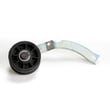
| Squealing | Worn pulley or roller | Inspect belt path and pulley; consider motor pulley WP2200376 |
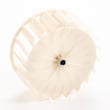
| Loud roaring or vibration | Loose or damaged blower wheel | Inspect blower housing; consider speed queen dryer blower wheel 56000 |
Why it matters
Airflow problems are the number one reason dryers “stop drying” even though they still run. Heat and moisture have to move through the drum and out the exhaust; restrictions increase dry time, raise operating temperatures, and can trigger heat-limit devices.
When parts testing makes sense
If airflow is strong and the dryer still underheats or overheats, electrical testing is the fastest path:
- Use a multimeter to check continuity on thermostats and heater circuits.
- Check the thermistor if cycles end early or temperatures seem erratic.
- Inspect wiring connections for heat damage or looseness.
Last updated: February 2026
How long is the Maytag dryer warranty?
For the Maytag MDE5806AYW dryer, the warranty terms are defined in the “Service & Warranty” section of the MDE5806AYW owner's manual. This model’s manual states that implied warranties (such as merchantability or fitness for a particular purpose) are limited to 1 year (or the shortest period allowed by law).
What you can count on from the warranty section
The warranty language in the manual focuses on how remedies and time limits work, plus what is and is not covered.
- Warranty coverage starts from the purchase date (keep your proof of purchase)
- The manual limits implied warranties to 1 year (or the shortest period allowed by law)
- Warranty remedy is described as product repair under the limited warranty
- Exclusions and limitations vary by state or province
- Service is directed through Maytag customer assistance and authorized servicers
Quick reference: what to check before you call for warranty service
Use this checklist so you have the right information ready.
| What to gather | Why it matters | Where to find it |
|---|---|---|
| Proof of purchase | Confirms warranty start date | Receipt, invoice, delivery record |
| Model and serial number | Identifies the exact unit | Dryer cabinet label |
| Symptom details | Speeds up diagnosis | Notes, photos, error behavior |
| Installation basics | Venting and power issues can mimic failures | Setup and vent path |
Why it matters
Knowing the warranty time limits helps you decide whether to schedule authorized service or move straight to a repair using replacement parts like a dryer control W10756689 when the issue is clearly component-related.
Last updated: February 2026
How to remove front panel of Maytag front load dryer?
On the Maytag MDE5806AYW, the “front panel” is the dryer’s front cabinet panel (not a front-load washer panel). We remove it by disconnecting power, taking off the top and/or lower access panel as needed, then releasing the front panel fasteners and unplugging the door switch wiring before lifting the panel off its tabs.
Safety and prep
- Unplug the dryer or switch off the breaker before opening the cabinet.
- Shut off the gas supply only if you have a gas dryer (MDE5806AYW is typically electric).
- Let the dryer cool completely if it was running.
- Protect hands from sharp sheet-metal edges.
- Confirm cabinet fastener locations for your exact build in the MDE5806AYW owner's manual.
Front panel removal (common Maytag dryer cabinet method)
- Disconnect power.
- Remove the top panel: take out the screws at the back edge, then slide the top back and lift it off.
- Remove the control console fasteners only if they block the front panel screws (some versions do).
- Remove the lower access panel (kick panel) if equipped: release screws or spring clips.
- Remove front panel mounting screws: these are typically at the top corners (under the top) and sometimes along the bottom edge (behind the lower panel).
- Tilt the front panel forward a few inches.
- Disconnect the door switch harness at the connector (do not pull on the wires).
- Lift the front panel up and off the retaining tabs/clips, then set it aside.
What to watch for
| Item | What we do | Why it matters |
|---|---|---|
| Door switch wiring | Unplug at connector | Prevents broken wires and no-start issues |
| Retaining tabs/clips | Lift straight up before pulling away | Prevents bent cabinet tabs |
| Screws by location | Keep grouped | Speeds reassembly and avoids stripped holes |
Why it matters
Removing the front panel correctly gives safe access to common wear items like drum support rollers, the blower area, and the heating circuit; it also prevents damage to the door switch circuit.
If you are opening the cabinet for squealing or thumping, inspect the rollers; a common replacement is the dryer drum support roller WP37001042.
Last updated: February 2026





