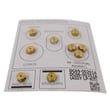
Owner’s manual
 Error Codes



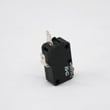
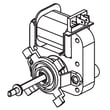
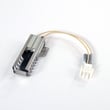


How to reset Samsung oven gas?
To reset the Samsung NX58H9950WS gas slide-in range oven, press OFF/CLEAR to stop the current cycle, then restore normal operation by restarting the oven. If the control is still acting up or showing an information code, disconnect power to the range for at least 30 seconds, then power it back on and try again (steps vary by mode; see the NX58H9950WS owner's manual).
Quick reset options (what to try first)
- Stop and clear the control: press OFF/CLEAR, then reselect Bake/Roast/Broil and press START/SET.
- Power reset (hard reset): turn the range off at the breaker for 30 seconds, then restore power.
- Door-related burner shutoff reset: if the oven burner shut off because the door was left open, close the door to restart the burner.
- Control lock reset: if you see a Lock icon, hold the oven door open and press START/SET for 3 seconds to turn Lock off.
- After an error code: press OFF/CLEAR, restart; if it returns, do the 30-second power reset.
What “reset” fixes (and what it does not)
A reset clears temporary control glitches and stops a stuck cycle, but it will not correct a failed sensor, igniter, or gas supply issue.
| Symptom | Reset step that usually helps | If it keeps happening |
|---|---|---|
| Control beeps and shows an information code | OFF/CLEAR, then 30-second power reset | Check wiring and sensor circuit; service may be needed |
| Oven burner shuts off during cooking | Close the oven door | Verify door is closing fully and latch area is clear |
| Lock icon is on and oven will not heat | START/SET for 3 seconds (door open) | Check door lock switch operation |
| Oven heats but temperature seems off | Use thermostat adjustment steps in the manual | Test the oven temperature sensor |
Parts that commonly relate to “won’t heat” complaints
If the oven still will not ignite after a reset, these model-compatible parts are common suspects:
- Samsung range bake igniter DG94-01012A (no glow or weak ignition)
- Samsung range oven temperature sensor DG32-00002B (temperature errors, overheating codes)
- Samsung range oven control board DE92-02439J (repeated error codes, unresponsive keys)
Why it matters
On gas ranges like the NX58H9950WS, the control board manages ignition timing and safety shutoffs. A proper reset can restore normal logic after an error, but repeated failures usually point to an igniter, sensor, wiring, or control issue.
Last updated: January 2026
Why is my Samsung gas oven not getting hot?
If your Samsung NX58H9950WS gas oven is not getting hot, the most common cause is an ignition or gas-supply issue: the bake igniter may not be drawing enough current to open the gas valve, or the range may be in a control lock or error-code state. Use the checks in the NX58H9950WS owner's manual to pinpoint the failure.
Quick checks we recommend first
- Confirm the oven is not in Control Lock; the display shows a lock icon and the oven will not operate until unlocked.
- Look for an error code; clear it with OFF/CLEAR, then restore power for 30 seconds if it returns.
- Verify the gas supply is on and the range is connected properly.
- Start Bake and watch for ignition: you should hear clicking and see the igniter glow, then the burner should light.
- If the igniter glows weakly or the burner never lights, plan on igniter testing or replacement.
Parts that most often fix “no heat” on a gas oven
In the NX58H9950WS, these parts commonly affect oven heat:
| Symptom | Most likely part | What it does |
|---|---|---|
| No ignition, weak or no glow | Range bake igniter DG94-01012A | Heats up to ignite gas and helps open the gas valve |
| Oven heats erratically or temperature is way off | Samsung range oven temperature sensor DG32-00002B | Tells the control board the oven temperature |
| Igniter glows but burner still will not light | Gas valve or wiring issue | Controls gas flow to the bake burner |
Safe troubleshooting steps (power and gas awareness)
- Turn off power at the breaker before accessing wiring or removing panels.
- If you smell gas, stop and ventilate; do not keep trying to ignite.
- Inspect wiring connectors for heat damage or loose terminals.
- Check burner ports for debris; restricted ports can delay ignition and reduce heat.
Why it matters
A weak igniter can prevent the gas valve from opening fully, so the oven never reaches temperature. Catching it early helps avoid long preheat times, uneven baking, and repeated ignition attempts that stress the ignition system.
Last updated: January 2026
What are common Samsung oven problems?
Common problems we see on the Samsung NX58H9950WS gas slide-in range include the oven not heating or heating unevenly, broil not working correctly, error codes/beeping, and temperature running too hot or too cold. Many of these symptoms trace back to ignition, sensing, airflow, or control issues; use the NX58H9950WS owner's manual troubleshooting and information code chart to narrow it down.
Most common symptoms (and what they usually point to)
- Oven will not heat: bake igniter not glowing/weak, gas supply issue, or a control problem
- Food bakes unevenly: rack position, cookware size/type, foil blocking airflow, or convection fan issue
- Oven temperature inaccurate (too hot/cold): thermostat calibration needed or a failing temperature sensor
- Broil performance is poor: wrong rack position, door not closed during broil, or control settings
- Display beeps and shows an error code: a function error that often clears with a reset, but may return
- Burner flame looks very large/yellow: burner air shutter adjustment or gas supply setup issue
Quick checks we recommend first
- Confirm the cooking mode (Bake vs. Convection Bake vs. Broil) and preheat fully.
- Remove foil from racks or the oven bottom; it can block heat circulation.
- Verify rack placement for the food type (especially for broiling).
- Check power: reset a tripped GFCI outlet or reset the breaker if the display goes blank.
- If an error code appears: press OFF/CLEAR, then restart; if it returns, disconnect power for 30 seconds and restore power.
Parts that commonly solve “no heat” or “temp problems”
| Symptom | Most likely part area | Example model-matched part |
|---|---|---|
| Bake will not ignite | Ignition | Samsung range bake igniter DG94-01012A |
| Oven temp swings or is inaccurate | Temperature sensing | Samsung range oven temperature sensor DG32-00002B |
| Convection bake uneven | Air movement | Samsung range convection fan motor DG31-00014F |
| Random beeping, error codes persist | Electronic control | Samsung range oven control board DE92-02439J |
Why it matters
On a gas range like the NX58H9950WS, a weak igniter can prevent the burner from lighting, and airflow restrictions (foil, rack placement) can make food bake unevenly. Addressing the root cause protects cooking performance and helps prevent repeat failures.
Last updated: January 2026
What is E08 on Samsung oven?
On the Samsung NX58H9950WS gas slide-in range, an “E08” display is treated as an oven heating or temperature-sensing fault; the control is detecting abnormal feedback while trying to heat. We use the NX58H9950WS manual to match the exact code format and follow the model’s recommended checks.
What E08 usually points to
On Samsung gas ranges, heating-related codes are commonly triggered when the oven cannot heat correctly or the temperature feedback is out of range.
- Weak or failed bake ignition (burner does not light reliably)
- Temperature sensor circuit issue (sensor out of range, loose connection)
- Wiring/connectors problem between sensor, igniter circuit, and control
- Control board detecting an abnormal condition and stopping heat
Safe checks you can do first
- Cancel the cycle, let the oven cool, then try Bake at 350°F.
- Confirm the display is on and the clock works; the igniter and control need household power.
- Verify the oven door closes fully and nothing is obstructing it.
- If the oven tries to light but never ignites, stop the cycle and ventilate the area.
| What you observe | What it usually means | What to check next |
|---|---|---|
| No ignition, no heat | Ignition circuit not starting | Bake igniter and wiring |
| Ignites sometimes, long preheat | Weak igniter or gas flow issue | Igniter strength, burner condition |
| Heats but temps are erratic | Temperature feedback problem | Sensor and connections |
Parts that commonly fix heating and sensor faults
These are common model-matched parts to investigate when the oven will not heat or heats inconsistently:
- Samsung range bake igniter DG94-01012A (ignites the bake burner)
- Samsung range oven temperature sensor DG32-00002B (reports oven temperature to the control)
- Samsung range oven control board DE92-02439J (processes sensor input and controls heating)
Why it matters
A gas oven only opens and maintains heat when ignition and temperature feedback are correct. When the control sees abnormal ignition behavior or sensor readings, it stops heating and posts an error to prevent unsafe operation.
Last updated: January 2026