 Installation guide
 Owner’s manual
 Error Codes








What is the life expectancy of a GE dishwasher?
A GE dishwasher typically lasts 10 to 12 years with normal household use. With consistent care (cleaning, correct detergent, and avoiding clogs), many units reach 12 to 15 years before major repairs become more common; see the maintenance guidance in the owner's manual.
Typical lifespan at a glance
| Dishwasher type | Typical life expectancy | What usually ends it |
|---|---|---|
| Standard built-in GE dishwasher (like model GDT605PGM0WW) | 10 to 12 years | Pump/motor wear, leaks, control issues |
| Well-maintained unit | 12 to 15 years | Repeated component failures, corrosion/leaks |
What shortens dishwasher life fastest
- Skipping routine cleaning (interior film, odors, mineral buildup)
- Clogged filter or drain path that forces the pump to work harder
- Overloading racks so spray arms cannot rotate freely
- Using the wrong detergent type or too much detergent
- Hard water scale buildup (heating and wash performance suffer)
Maintenance that extends life (high impact)
We recommend these habits for GE model GDT605PGM0WW:
- Clean and de-odorize the interior periodically using citric acid or a dishwasher cleaner additive (the manual describes this approach).
- Wipe the control panel with a lightly damp cloth and dry thoroughly.
- Use a quality automatic dishwasher detergent and a rinse aid to reduce film and spotting.
- Keep the tub area and door edges clean so seals can do their job.
Why it matters
Most “dishwasher failures” start as performance problems (not draining, not cleaning, not drying) that increase strain on the wash system. Regular care helps the pump, heater, and seals operate under normal load, which is what drives a longer service life.
Last updated: February 2026
Can a clogged drain cause an FTD error?
Yes. On a GE GDT605PGM0WW dishwasher, a clogged drain path can trigger an FTD (drain-related) error because the unit cannot pump water out fast enough. The most common causes are a clogged air gap, disposer connection, filter blockage, or a kinked drain hose; see the owner's manual for your model’s drain and cleaning steps.
What to check first (fast, no tools)
- Cancel the cycle: press and hold Start/Reset for about 3 seconds so the dishwasher begins draining.
- Look for standing water in the tub after it tries to drain.
- Check the sink: if the kitchen sink drains slowly, the dishwasher may not drain well either.
- If you have an air gap, remove the cover and clean out debris.
- If the dishwasher drains into a garbage disposer, run the disposer and confirm the disposer inlet plug was removed.
- Inspect the drain hose behind/under the dishwasher for kinks or crushing.
Drain system checkpoints (where clogs happen)
| Area | What to look for | Typical fix |
|---|---|---|
| Air gap (if installed) | Water backing up, gunk under cap | Clean air gap and cap |
| Disposer connection | Plug still in, food blockage | Remove plug, clear disposer |
| Drain hose | Kinked, pinched, sagging | Re-route and secure hose |
| Filter area | Food/labels blocking filter | Remove and rinse filter |
Why it matters
A restricted drain can leave water in the bottom of the tub, end cycles early, and repeatedly trigger drain errors. Clearing the drain path also helps prevent odors and improves overall wash performance.
If the error returns after clearing clogs
Use the GE electronic dishwasher error codes guide to match the exact display or beeps to the next best troubleshooting step (for example, checking for a drain installation issue such as a missing high drain loop).
Last updated: February 2026
What is the most common problem with a GE dishwasher?
For a GE dishwasher like model GDT605PGM0WW, the most common problems we see are the dishwasher not running, not draining, or not cleaning well. In many cases, the cause is basic: a tripped breaker, power switched off, control lock enabled, or a loading and detergent issue that prevents proper washing.
Most common issues (and what to check first)
- Dishwasher won’t run: check the breaker or fuse, and confirm any wall switch feeding the dishwasher is ON.
- Control panel locked: unlock the controls (steps vary by model).
- Not cleaning or spots/film: confirm detergent quality, rinse aid use, and incoming water temperature.
- Detergent cup not opening: make sure dishes are not blocking the dispenser door.
- Suds in the tub: verify you are using automatic dishwasher detergent only.
Quick troubleshooting for GDT605PGM0WW
Start with these fast checks from the troubleshooting guidance in the owner's manual:
| Symptom | Most likely cause | Best first action |
|---|---|---|
| Won’t start/run | Breaker tripped, power switch OFF | Reset breaker; turn switch ON |
| Lights go out while setting | Too much time between button presses | Touch pads within 30 seconds |
| Spots/film on dishes | Hard water, no rinse aid, low water temp | Use rinse aid; ensure 120°F inlet water |
| Detergent left in cup | Dishes blocking dispenser | Reload so spray arm can flush cup |
| Suds/overflowing foam | Wrong detergent or rinse aid spill | Use dishwasher detergent only; wipe spills |
Cleaning performance problems that look like “something is broken”
A lot of “GE dishwasher not cleaning” complaints come down to wash chemistry and temperature, not a failed part.
- We recommend using a highly rated detergent (the manual calls out Finish Quantum).
- Use a rinse aid to reduce spots and filming.
- Make sure incoming water is at least 120°F (49°C).
- Avoid overloading; proper loading helps spray arms reach the dishes.
For step-by-step help, use our dishwasher not cleaning dishes video.
Why it matters
When a dishwasher won’t run or won’t clean, the fastest fix is usually confirming power, control settings, and loading. Those checks prevent unnecessary part replacement and get your GE GDT605PGM0WW back to normal cycle performance quickly.
Last updated: February 2026
How to tell if a dishwasher control board is bad?
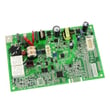
On a GE GDT605PGM0WW dishwasher, a bad control board (or user interface) shows up as controls that do not behave normally: the dishwasher will not start with the door latched, cycles stop unexpectedly, buttons act erratically, or lights and beeps occur without a clear cause. Use the owner's manual troubleshooting checks first.
Quick checks that often mimic a “bad board”
These are common stop conditions the control reacts to.
- Door not fully closed or cycle interrupted; press Start and close the door promptly
- Beeps once every minute; door was left open during operation
- Breaker tripped or fuse blown; restore power
- Wall switch controlling dishwasher power is off (often near the disposer switch)
- Control lock is on; unlock the control panel
- Control responds but never fills; confirm the water valve under the sink is on and the flood float is not stuck
Strong signs the control board or UI is the problem
After the checks above, these patterns point to an electronic control issue.
- No response from any buttons even though power is present
- Random resets, flashing indicators, or beeping with the door closed
- Cycle starts then stops repeatedly without a door-open event
- Multiple symptoms at once (inconsistent lights plus inconsistent button response)
What to do next
Use this quick guide to decide your next step.
| Symptom | Most common cause | Next step |
|---|---|---|
| Start light flashing | Door opened or cycle interrupted | Press Start, close door to resume |
| Beeps every minute | Door left open | Press Start and close door |
| Has power, won’t run | Switch off, breaker, control lock | Restore power, unlock, retry |
| Responds, won’t fill | Valve off, door not latched, float stuck | Turn on valve, latch door, free float |
For fault indications, match any displayed code or light pattern using GE electronic dishwasher error codes.
Why it matters
Control boards are higher-cost repairs; ruling out door, power, and fill problems first prevents unnecessary parts replacement and gets your dishwasher running sooner.
Last updated: February 2026





