 Installation guide
 Owner’s manual
 Error Codes




What is the most common problem with the Frigidaire dishwasher?
On the Frigidaire FFCD2413US2A dishwasher, the most common service issue we see is draining trouble caused by a clog or restriction in the filter area, drain hose, or drain pump. The good news is many “won’t drain” complaints are fixed with cleaning and a quick inspection.
What to check first on model FFCD2413US2A
Start with the items that most often cause slow draining or standing water:
- Cancel the cycle and let the unit run its drain (a cancel typically triggers a short drain routine; see the FFCD2413US2A use & care manual).
- Check the filter area and glass trap for debris (bones, labels, broken glass).
- Inspect the drain hose for kinks or a crushed section under the sink.
- If connected to a disposer, confirm the disposer inlet knockout plug was removed.
- Make sure the sink drain or air gap (if used) is not blocked.
When it’s likely a part problem
If the tub still holds water after you clear restrictions, the issue often shifts from “clog” to “component.” Common suspects include:
- Drain pump not running or humming
- Check valve stuck, allowing backflow
- Drain hose split or internally blocked
- Float or float switch stuck in the “overfill” position
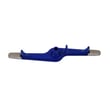
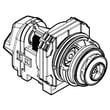
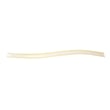
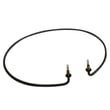
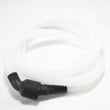
If you’re diagnosing a true drain failure, the most relevant replacement parts for this model are the dishwasher drain hose 807117001 and the drain pump a A00126401.
Quick symptom-to-cause guide
| What you notice | Most common cause | What to do next |
|---|---|---|
| Water left in bottom after cycle | Restriction in filter/glass trap or drain path | Clean trap, check hose routing |
| Humming but not draining | Jammed or failing drain pump | Inspect pump area, consider pump replacement |
| Drains, then water returns | Check valve leaking/backflow | Inspect check valve and drain connection |
| Intermittent draining | Kinked hose or partial clog | Straighten hose, clear blockage |
Why it matters
A dishwasher that cannot drain properly will usually also clean poorly and can develop odor. Fixing the drain path early helps protect the pump and keeps cycle performance consistent.
Last updated: January 2026
How to do a hard reset on a Frigidaire dishwasher?
For the Frigidaire FFCD2413US2A dishwasher, the most reliable “hard reset” is to shut off power at the breaker (or unplug it, if applicable) for about 5 minutes, then restore power. You can also cancel a running cycle by holding START/CANCEL for 3 seconds to force a drain and clear the current selection.
Reset options for FFCD2413US2A
Use the least disruptive option first.
- Cancel and drain (soft reset): Press and hold START/CANCEL for 3 seconds; the dishwasher runs about a 90-second drain, then you can select a new cycle.
- Power reset (hard reset): Turn the dishwasher circuit OFF at the breaker for about 5 minutes, then turn it back ON.
- Control lock check: If the panel seems “dead,” press and hold OPTIONS for 3 seconds to toggle the control lock.
- Resume after door opened: If you opened the door mid-cycle, close it and press START/CANCEL to resume (do this within about 10 minutes).
For button sequences and operating details, we recommend using the FFCD2413US2A use & care manual.
Quick comparison: cancel vs. hard reset
| Action | What it does | When to use it |
|---|---|---|
| Hold START/CANCEL 3 sec | Cancels the cycle and drains water | Stuck cycle, wrong cycle selected, want to restart cleanly |
| Cut power ~5 min | Reboots the control and clears minor glitches | Unresponsive controls, odd behavior after a power flicker |
If the dishwasher still will not respond
After a hard reset, these checks often pinpoint the cause:
- Confirm the door is fully closed and latched; a latch issue can prevent starting.
- Verify the breaker is fully reset (switch OFF then ON).
- If the unit has power but will not run, rule out a control issue with the dishwasher control panel (black) 5304517657 or the dishwasher electronic control board 5304531745.
- If it will not drain after canceling, inspect the drain path and consider the drain pump a A00126401.
Why it matters
A cancel-and-drain clears the current cycle safely, while a true power reset reboots the electronic control. Using the right reset method helps avoid repeat stoppages and can narrow the problem to the door latch, user interface, or control board.
Last updated: January 2026
How to get a Frigidaire dishwasher to drain?
On the Frigidaire FFCD2413US2A dishwasher, we drain the tub by canceling the cycle: press and hold START/CANCEL for about 3 seconds. The dishwasher should run a 90-second drain; if water remains, check for a clog in the filter area, drain hose, or disposer connection.
Quick drain steps (FFCD2413US2A)
- Close the door fully and latch it.
- Press and hold START/CANCEL for 3 seconds.
- Listen for the drain motor; allow the 90-second drain to finish.
- Open the door and check the bottom of the tub.
For control and cycle details, use the FFCD2413US2A use & care manual.
If it still will not drain: what to check
We recommend checking these common drain blockers in order:
- Food disposer inlet plug: if the dishwasher drain hose connects to a disposer, confirm the disposer’s knockout plug was removed.
- Drain hose routing: look for kinks, sharp bends, or a crushed section under the sink.
- High loop/air gap: make sure the drain hose is routed correctly (a proper high loop helps prevent backflow).
- Filter and glass trap area: clear debris that can restrict water flow at the bottom of the tub.
- Drain pump: if the pump hums but does not move water, it may be jammed or failing.
If you suspect a failed pump, the compatible replacement for this model is the drain pump a A00126401.
Helpful specs and checkpoints
| Item to verify | What “good” looks like | What it prevents |
|---|---|---|
| Cancel drain | 90-second drain runs after holding START/CANCEL | Standing water after a stopped cycle |
| Drain hose | No kinks; secure clamp connections | Slow drain, no drain |
| Disposer connection | Knockout plug removed | Immediate no-drain condition |
Why it matters
A dishwasher that cannot drain can leave dirty water in the sump, cause odors, and stop the next cycle from running correctly. Clearing the drain path early often prevents a drain pump replacement.
Last updated: January 2026
How do I clear the loc on my Frigidaire dishwasher?
On the Frigidaire FFCD2413US2A dishwasher, “LOC” means the control lock is on. To clear it, close and latch the door, then press and hold the OPTIONS pad for 3 seconds until the lock indicator light turns off (see the FFCD2413US2A use & care manual).
Steps to turn off “LOC” (control lock)
- Make sure the dishwasher door is fully closed and latched.
- Press and hold OPTIONS for 3 seconds.
- Watch for the lock indicator light to go out.
- Try pressing START/CANCEL to confirm the controls respond.
- If the panel still will not respond, turn off power at the breaker for 1 minute, then restore power and try again.
What “LOC” is (and what it is not)
“LOC” is a safety feature that prevents accidental button presses. It is not a drain error or a wash-cycle failure.
| Display/behavior | What it usually means | What to do |
|---|---|---|
| “LOC” or lock light on | Controls are locked | Hold OPTIONS 3 seconds |
| Buttons beep but won’t start | Door not latched or lock still on | Re-latch door; unlock controls |
| Starts then stops after opening door | Cycle paused by door opening | Close door; press START/CANCEL |
When to suspect a control or latch issue
If “LOC” will not clear even after a power reset, we typically check the door latch and the user interface next.
- Door does not feel like it “clicks” shut
- Dishwasher won’t start unless you push hard on the door
- Lock light flickers or buttons respond intermittently
If the door is not latching consistently, the dishwasher door latch 5304525218 is the correct latch assembly listed for this model.
Why it matters
With the controls locked, the FFCD2413US2A will ignore most button presses, which can look like a dead control panel. Unlocking “LOC” is the fastest first step before deeper troubleshooting.
Last updated: January 2026





