 Owner’s manual



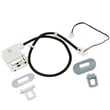
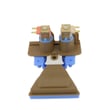
Can I fix an F05 error myself?
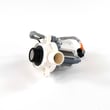
Yes, you can often fix an F05-type drain problem yourself on your Hotpoint HTW240ASK5WS by safely cutting power, checking for a blockage in the drain path, and clearing debris that prevents the washer from pumping water out. If the washer still will not drain, the drain pump is the next most common fix.
Safety first (do this before any checks)
The manual is clear that pressing Power does not disconnect electricity. Before servicing:
- Unplug the washer or switch off the circuit breaker
- Turn off both water supply valves
- Keep a shallow pan and towels ready (draining can be messy)
- Do not run the washer if it is damaged or partially disassembled
For model-specific safety and service cautions, follow the HTW240ASK5WS owner's manual.
Quick DIY checks that solve most drain errors
Work from easiest to most likely:
- Cancel the cycle and try Drain & Spin after redistributing the load
- Check the drain hose for kinks, crushing, or a clogged standpipe
- Confirm the drain hose is not shoved too far down the drain (can cause siphoning or poor drain)
- If water remains, suspect a blocked pump inlet (coins, socks, lint) or a failing pump
- Listen during drain: a loud hum with no water movement points to a blockage or bad pump
When to replace a part
If the drain path is clear and the washer still will not pump out water, replacement is typically the fastest, most reliable repair.
| Symptom | Most likely cause | Common fix |
|---|---|---|
| Hums but won’t drain | Pump jammed or failed | Replace g.e. washer drain pump assembly WH23X28418 |
| Drains slowly | Partial blockage in hose/standpipe | Clear hose and household drain |
| Intermittent drain | Loose connection or failing pump | Inspect wiring, then replace pump if needed |
Why it matters
A washer that cannot drain cannot spin correctly, so clothes come out wetter and the machine may stop mid-cycle. Clearing the drain path protects the pump, reduces odors, and helps the washer complete cycles normally.
Last updated: February 2026
What are common Hotpoint washer problems?
Common problems on the Hotpoint HTW240ASK5WS washer include no drain or weak spin (wet clothes), won’t start conditions tied to the lid safety lock, fill or temperature complaints, leaks, and normal-but-surprising sounds or pauses. Many issues are resolved with basic checks and a few common part replacements.
Most common symptoms and what usually causes them
- Won’t drain / won’t spin: kinked drain hose, clogged pump path, or a failing drain pump.
- Won’t start / won’t agitate: lid not fully closed, lid lock not engaging, or a control reset needed.
- Fill problems / wrong water temperature: faucets not fully open, hoses swapped, or inlet screen debris.
- Excess vibration / banging: unbalanced load, washer not level, or worn suspension components.
- Clicks, swooshing, pauses: often normal operation (shifter engaging, motor reversing, spin pauses).
Quick checks we recommend first (no parts)
- Confirm the washer is plugged in; reset the breaker if needed.
- Open both hot and cold faucets fully; verify hoses are on the correct “H” and “C” valves.
- If water flow is weak, clean the inlet screens at the hose ends and at the washer connections (turn water off first).
- For drain issues, straighten the drain hose; keep the drain outlet under 8 ft (2.44 m) above the floor.
- Reset the electronics: unplug 2 minutes, plug back in, then press Start.
Common parts that fix common problems
| Symptom | Likely part to inspect | Example for this model |
|---|---|---|
| Won’t drain / leaves water | Drain pump | G.e. washer drain pump assembly WH23X28418 |
| Won’t start or stops when lid is up | Lid lock | Washer lid lock WH08X37938 |
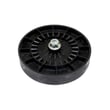
| Weak spin / burning rubber smell | Drive belt | Washer drive belt WH01X27538 |
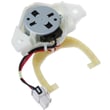
| Shifts oddly, clicking at transitions | Shifter | Washer shifter WH03X30517 |
Why it matters
Catching a drain, fill, or lid-lock problem early prevents repeat cycle cancellations, reduces wear on the drive system, and helps avoid water left sitting in the tub (which can lead to odors).
For model-specific troubleshooting steps and normal sound descriptions, use the HTW240ASK5WS owner's manual.
Last updated: February 2026
What is the life expectancy of a Hotpoint washing machine?
Most Hotpoint washing machines typically last 8 to 12 years with normal household use. For the Hotpoint HTW240ASK5WS washer, lifespan depends most on load size, how often you run it, and basic maintenance like hose replacement and keeping the tub dry between loads (see the HTW240ASK5WS owner's manual).
Typical lifespan ranges
| Usage pattern | What we typically see | What helps most |
|---|---|---|
| Light (1 to 3 loads/week) | 10 to 12 years | Smaller loads, good ventilation |
| Average (4 to 7 loads/week) | 8 to 10 years | Routine cleaning, correct detergent |
| Heavy (multiple loads/day) | 6 to 8 years | Avoid overloading, address issues early |
Maintenance that extends washer life
We recommend these habits because they reduce strain on the drive system, drain pump, and suspension.
- Leave the lid open after washing so moisture can evaporate (helps prevent odor and residue buildup).
- Wipe spills promptly and clean the basket with a soft cloth and mild detergent when needed.
- Replace water supply hoses every 5 years (this is a key maintenance interval for this washer).
- Use proper load sizes; chronic overloading accelerates wear on the belt, clutch, and gear case.
- Keep the washer level to reduce vibration and suspension wear.
- Fix draining problems quickly; running with poor draining can overwork the pump.
Signs it is nearing end of life
These symptoms often indicate higher-cost wear items are involved (drive, spin, or control).
- Loud grinding or repeated squealing during agitation or spin
- Frequent out-of-balance events even with normal loads
- Slow or incomplete draining, or repeated “won’t spin” situations
- Burning smell or intermittent power/control issues
- Visible oil/grease leakage under the washer
Why it matters
A realistic life expectancy helps you decide whether to repair or replace. If your HTW240ASK5WS is already in the 8 to 12 year range, repeated failures in major components (drive system, drain pump, control) usually make a replacement plan more cost-effective.
Last updated: February 2026
What model is my Hotpoint washing machine?
Your Hotpoint washer’s model number is printed on the appliance’s rating label; for the washer shown on this page, the model is HTW240ASK5WS. On most Hotpoint top-load washers, that label is typically found under the lid around the tub opening or on the back of the control area.
Where to look on a Hotpoint top-load washer
Check these common label locations first:
- Under the lid, along the rim of the wash basket opening
- On the underside of the lid
- On the rear panel (upper back of the cabinet)
- Behind the control panel area (varies by design)
- On the inside edge of the cabinet opening (near the lid switch area)
For model-specific label location and identification details, use the HTW240ASK5WS owner's manual.
What to write down (so you get the right parts)
Record the information exactly as shown on the label:
- Model number (example: HTW240ASK5WS)
- Serial number (unique to your washer)
- Brand (Hotpoint)
- Any revision or engineering code if listed
Quick ID checklist
| Item | Why it matters | Example |
|---|---|---|
| Model number | Ensures parts fit your exact design | HTW240ASK5WS |
| Serial number | Helps match production run changes | Varies |
| Brand | Confirms correct parts catalog | Hotpoint |
Why it matters
Hotpoint washers can look similar across multiple model families, but parts like the lid lock, drive belt, drain pump, and control board can differ by model and production run. Using the exact model number prevents ordering the wrong replacement part.
Last updated: February 2026


