Installation guide
 Owner’s manual
 Error Codes



How do I get my Frigidaire out of demo mode?
To take your Frigidaire PLHS67EGSB4 refrigerator out of demo mode, we use the control panel key combination for a few seconds until the display resets and normal cooling resumes. After exiting, confirm the compressor and fans start running and temperatures begin dropping.
Quick steps to exit demo mode
- Press and hold Energy Saver and Lock at the same time.
- Keep holding for 3 to 5 seconds.
- Release when the display changes or resets.
- Wait a few minutes and listen for the compressor or evaporator fan.
- Set temperatures back to your preferred settings if they changed.
What to check after you exit demo mode
Demo mode can leave lights and the display working while cooling stays off. After you turn it off, we recommend these checks:
| What you see | What it usually means | What to do |
|---|---|---|
| Interior lights work but no cooling | Demo mode still on or unit just restarted | Repeat the key press; then wait 5 to 10 minutes |
| Cooling starts but temps are warm | Normal pull-down time | Give it 12 to 24 hours to stabilize |
| Display shows an error | A separate issue is present | Use Frigidaire refrigerator error codes to identify the code |
Why it matters
Demo mode is designed for showroom display; it can disable the sealed system cooling while keeping the controls and lighting active. Turning it off restores normal refrigerator operation so food stays at safe temperatures.
If cooling still does not start
If the display resets but the refrigerator still will not cool:
- Make sure the unit is plugged in and the outlet has power.
- Confirm controls are not set to OFF.
- Check that doors are fully closing and gaskets seal.
- Review operating instructions in the owner's manual.
Last updated: February 2026
What does D1 SP mean on a Frigidaire refrigerator?
On a Frigidaire PLHS67EGSB4 refrigerator, D1 SP points to a problem the control is detecting in the dispenser/ice door (flapper) sensing circuit. In plain terms, the refrigerator thinks the ice door position is wrong (stuck open, not closing fully, or the sensor/switch is not reading correctly).
What to check first (fast, no tools)
- Make sure the ice chute door closes tightly after dispensing.
- Clear any ice cubes or frost blocking the chute.
- Wipe sticky residue around the chute and door seal.
- Power reset: unplug the refrigerator for 2 minutes, then plug it back in (use the safety steps in the owner's manual).
- If the display is flashing or the code returns quickly, treat it as an active fault.
Common causes and the most likely fixes
Most D1 SP issues come from one of these:
| What’s happening | What it usually means | What to do |
|---|---|---|
| Ice door does not fully close | Frost buildup or obstruction | Defrost/clear chute; confirm door swings freely |
| Door closes but code returns | Door switch/sensor not reading | Inspect wiring and switch area; replace failed component if needed |
| Weak/no ice dispensing and odd noises | Dispenser drive or ice path issue | Check ice bucket seating and auger area |
| Water/ice system acting up too | Low water flow can contribute to icing | Replace filter; check inlet valve operation |
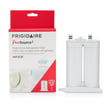
If you also have slow water flow or hollow cubes, replacing the water filter and confirming good inlet valve flow helps prevent repeat icing. For this model, the correct filter is the Frigidaire puresource2 refrigerator water filter WF2CB.
Why it matters
When the ice door (flapper) stays open or is misread as open, warm air enters the freezer. That causes frost buildup, clumping ice, and can reduce cooling performance over time.
Related DIY help
- Use our Frigidaire refrigerator error codes guide to compare other display messages and what they indicate.
Last updated: February 2026
Where is the defrost timer located on a Frigidaire side by side?
On the Frigidaire PLHS67EGSB4 side-by-side refrigerator, defrost is controlled by an electronic defrost control (adaptive defrost) rather than a separate mechanical defrost timer you can locate and turn by hand. Use the owner's manual to identify the control housing and access panels for your unit.
What you should look for on PLHS67EGSB4
Instead of a standalone timer, you typically troubleshoot the defrost system components and the electronic control area.
- Temperature control housing/control console inside the fresh food section (where user controls are)
- Rear lower machine compartment area (where main electrical components are mounted)
- Defrost circuit components at the evaporator (heater, wiring, and defrost thermostat)
Quick checks before you remove panels
Always start with safe, simple steps that confirm a defrost problem.
- Unplug the refrigerator before removing covers or disconnecting wiring
- Look for heavy frost on the freezer back wall (classic defrost failure symptom)
- Confirm the evaporator fan is running when the door switch is held closed
- Check door gaskets for gaps that cause excess frost and long run times
- If you find a frosted evaporator, test the defrost thermostat and heater circuit
Parts that commonly affect defrost performance
If you are diagnosing a “warm refrigerator, frosty freezer” condition, the defrost thermostat is a common failure point.
| Symptom | Most likely area to inspect | What it points to |
|---|---|---|
| Frost blanket on evaporator, weak airflow | Defrost system at evaporator | Defrost thermostat/heater/control issue |
| No heavy frost, but temps drift | Controls/sensors/airflow | Not a timer-style failure |
| Doors hard to close, moisture and frost | Door sealing | Gasket or alignment issue |
Why it matters
Looking for a mechanical timer on PLHS67EGSB4 wastes time and can lead to wrong-part ordering. Focusing on the electronic control area and the evaporator defrost components gets you to the real cause faster.
Last updated: February 2026