 Installation guide
 Owner’s manual
 Error Codes






How do I reset my Kenmore oven control board?
For your Kenmore wall oven model 79047833405, the most reliable “reset” is a power reset: turn the oven’s breaker OFF for 5 minutes, then turn it back ON and reset the clock and any oven functions. This clears many control glitches after a power interruption; see the owner's manual.
Quick reset steps (safe, works for most issues)
- Turn the circuit breaker for the wall oven OFF (the oven is typically hardwired).
- Wait 5 minutes.
- Turn the breaker ON.
- If the display is flashing, set the clock first before trying to bake or broil.
- Test a basic function (Bake at 350°F) to confirm the control responds.
If the control is beeping or showing an “F” error code
The manual guidance for this style of Kenmore control is to clear the fault, then see if it returns.
- Press STOP/CLEAR once to stop the beeping and clear the display.
- Reprogram the oven.
- If the same fault returns, the problem is usually in the control circuit (commonly the electronic control board, wiring, or a sensor).
Common parts involved
| Symptom | Most common cause | Part to check |
|---|---|---|
| Random beeping, F-code returns | Control not processing inputs correctly | Frigidaire wall oven control board 316418556 |
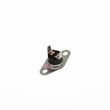
| Oven temperature is way off, overheating, or won’t regulate | Sensor reading out of range | Frigidaire range oven temperature sensor 316217002 |
Why it matters
A power reset restores the control’s normal startup state after a glitch or power interruption. Clearing recurring fault codes helps you separate a one-time event from an ongoing issue that needs a part replacement.
Last updated: February 2026
What are the parts of an electric oven?
An electric wall oven like Kenmore model 79047833405 is built around heating elements, controls, and airflow parts that work together to bake and broil evenly. Common core parts include the bake and broil elements, oven controls, temperature sensor, oven lights, venting, and racks (features vary by model). See the 79047833405 owner's manual for your exact feature set.
Main parts you will find in most electric ovens
- Bake element: provides the primary heat for baking (typically at the bottom of the oven cavity)
- Broil element: provides high, direct heat from the top for broiling
- Electronic oven controls: clock, timer, and cooking function pads
- Oven temperature sensor: tells the control board the oven temperature so it can cycle heat accurately
- Oven vent: routes hot air and moisture out of the cavity
- Oven racks: support cookware and help position food for even cooking
- Oven light and lens: illuminates the cavity; the light often turns on when the door opens
Parts on this model that commonly get replaced
If you are troubleshooting heat, lighting, or temperature accuracy on model 79047833405, these parts are frequent suspects:
- Range oven temperature sensor 316217002 (temperature swings, overheating, underheating)
- Frigidaire wall oven control board 316418556 (dead display, erratic operation, error codes)
- Range oven light bulb 316538904 (light out)
- Range oven light socket 316116400 (bulb burns out quickly, flickering, no power to bulb)
- Frigidaire range bake element 318255401 (no bake heat, slow preheat)
- Range broil element 318255605 (no broil heat)
Quick “what it does” reference
| Part | What it does | Common symptom when it fails |
|---|---|---|
| Bake element | Main baking heat | Oven will not heat in bake, long preheat |
| Broil element | Top high heat | No broil, weak browning |
| Temperature sensor | Regulates temperature | Inaccurate temps, burning or undercooking |
| Control board | Runs oven functions | Display issues, won’t start, random beeping |
| Oven light system | Lights the cavity | Light won’t turn on |
Why it matters
Knowing which part does what helps you troubleshoot faster and order the right replacement. For example, if broil works but bake does not, the bake element or its wiring is a more likely cause than the sensor.
Last updated: February 2026
Why is my Kenmore 79047833405 Elite oven not turning on?
If your Kenmore 79047833405 electric wall oven will not turn on, the most common causes are a power supply issue, the clock not being set after a power interruption, or a control problem. Start with the breaker and display, then verify the controls per the owner's manual.
Quick checks (most fixes start here)
- Set the clock if the display is flashing; the oven will not program until the clock is set.
- Check the house circuit breaker or fuse; reset or fully engage it.
- Confirm the electrical connection is secure at the junction box (wall ovens are hardwired).
- Press STOP/CLEAR to clear an F-code and stop beeping; if the fault returns, note the code.
- Make sure you are selecting a cooking mode (Bake or Broil) and setting a temperature.
What to test next (common failed parts)
If power is good and the controls still will not respond, these parts commonly cause a “dead” or non-starting oven:
| Symptom | Most likely cause | What you’ll notice |
|---|---|---|
| Display dead, no response | Power supply or wiring issue | No lights, no beeps |
| Display on, won’t heat | Temperature sensing or control issue | Mode starts but no heat |
| Random beeping or F-code | Control or sensor fault | Error returns after clearing |
For “display on but no heat,” a failed oven temperature sensor is a frequent cause; for “no response” or repeated faults, the electronic control is a common suspect.
Parts that may be involved
- Frigidaire wall oven control board 316418556 (control and programming)
- Frigidaire range oven temperature sensor 316217002 (temperature feedback to the control)
- Terminal block 5304409888 (power connection point)
Why it matters
A wall oven can appear completely dead from a simple clock reset after a power interruption, but repeated error codes or no control response often points to an electronic control board, sensor, or wiring connection. Checking the basics first prevents unnecessary parts replacement.
Last updated: February 2026
Why is my Kenmore oven not heating up?
If your Kenmore electric wall oven 79047833405 isn’t heating, the most common causes are a failed bake element, a bad oven temperature sensor, or a power/control issue that keeps the heating circuit from energizing. Start with power and control checks, then test the heating components.
Quick checks first (no tools)
- Set the clock after a power interruption; the oven may not program until the clock is set (see the owner's manual).
- Confirm you selected Bake and set a temperature, then press Start.
- Reset the breaker fully (OFF, then ON); a tripped breaker can leave the oven with partial power.
- If an F-code appears, press Stop/Clear to reset; if it returns, record it for troubleshooting.
Parts that most often cause “no heat”
- Bake element: if it’s blistered, cracked, or separated, it won’t heat.
- Oven temperature sensor: a bad reading can prevent normal heating; check/replace the frigidaire range oven temperature sensor 316217002.
- Control or wiring: if the element and sensor test good, check connections and the control; see the frigidaire wall oven control board 316418556.
Basic diagnostic path (safe, practical order)
- Power: verify the display is normal and the breaker is reset.
- Bake vs. broil: try Broil briefly to compare operation.
- Inspect: look for obvious damage at the element and wiring.
- Test (with power off): check continuity of the element and sensor circuit.
Symptom-to-cause guide
| What you notice | Most likely cause | Next step |
|---|---|---|
| Broil works, bake doesn’t | Bake element | Inspect and continuity-test element |
| Heats but temp is way off | Sensor | Check/replace sensor |
| No heat on bake or broil | Power, control, wiring | Reset breaker; then check control/wiring |
Why it matters
Electric ovens heat only when the control receives correct sensor feedback and can deliver full power to the elements. A quick, ordered check prevents replacing the wrong part.
Last updated: February 2026






