 Owner’s manual
 Error Codes
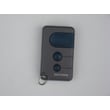

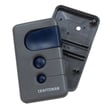
How do I know what model my garage door opener is?
Your garage door opener’s model number is usually printed on a label on the motor unit (the opener head) mounted to the ceiling. For many openers, it’s easiest to spot by opening the light lens/cover and checking underneath; confirm the exact location and label style in the 13953681B owner's manual.
Where to look on the opener
Check these common label locations on the motor unit:
- Under the front light lens (remove or swing down the lens/cover)
- On the side panel of the opener head near the wiring terminals
- On the back panel near the hanging bracket
- On the bottom panel near the learn/program button area
- Inside the light compartment (near the bulb sockets)
How to confirm you found the right “model number”
Garage door opener labels can show several identifiers. Use this quick guide:
| Label item | What it means | Use it for |
|---|---|---|
| Model number | The opener’s exact model ID | Parts lookup, manuals, compatibility |
| Serial number | Unique unit identifier | Service history, support |
| Logic board number | Control board identifier | Board replacement matching |
| Remote model | Handheld transmitter model | Remote programming and replacement |
Why it matters
Using the correct model number helps us match the right Craftsman parts and troubleshooting steps (for example, remote programming and learn button behavior). If you’re diagnosing blinking lights or beeps, the Craftsman error codes guide is the fastest way to narrow down the issue.
Quick safety reminders while checking the label
- Keep hands clear of the rail, trolley, and door springs
- Do not climb on the opener or rail; use a stable ladder
- Keep remotes out of children’s reach
Last updated: January 2026
How to find a compatible garage door opener?
For a Craftsman garage door opener like model 13953681B, compatibility comes down to matching the opener’s radio system and coding method. This model uses a Security+ remote system that pairs through the opener’s orange Learn button (with a yellow indicator light), so your replacement remote or control must support that same Learn-button programming.
What to check on your existing opener (fast checklist)
- Confirm the opener brand and model: Craftsman 13953681B
- Locate the Learn button on the motor unit (this model uses orange)
- Verify the remote technology family: Security+
- Decide what you are replacing: handheld remote, wall control, or keyless entry
- If you are adding a universal remote, confirm it supports Learn-button programming
How compatibility works for this model
The manual for the 13953681B remote system describes pairing by pressing the Learn button on the motor unit, then pressing and holding the remote button until the motor unit light blinks (or you hear clicks if bulbs are not installed). Use the same method to confirm a new remote is truly compatible. See the 13953681B owner's manual for the exact programming steps and safety notes.
Quick compatibility table
| What you’re buying | Must match | What to look for |
|---|---|---|
| Replacement remote | Coding method | Security+ Learn-button programming |
| Universal remote | Supported systems | Lists Security+ and/or Learn-button pairing |
| Smart controller add-on | Opener interface | Compatibility with Craftsman/LiftMaster-style Learn systems |
Why it matters
If the remote/control does not support the correct Security+ Learn-button system, it will not “learn” to your motor unit, even if it looks similar. Matching the coding technology prevents wasted time and avoids unreliable door operation.
Helpful next steps if you’re troubleshooting (not just replacing)
- If the door won’t close or lights blink, check safety sensors and alignment first
- If remotes intermittently fail, replace the coin-cell battery and reprogram
- If you suspect a stored/unknown remote is still paired, erase memory and reprogram
For symptom-based help, use Craftsman error codes to narrow the issue before buying parts.
Last updated: January 2026
Is it worth repairing a 20 year old garage door opener?
In most homes, repairing a 20-year-old garage door opener is not worth it because it is beyond the typical 10 to 15 year lifespan; reliability drops, parts and adjustments become more frequent, and newer openers add stronger safety and convenience features. Use the 13953681B owner's manual to confirm what your Craftsman system supports today.
When repair still makes sense
A repair can be reasonable when the opener is otherwise dependable and the issue is small and isolated.
- The door is balanced and moves smoothly by hand (springs and rollers are in good shape)
- The problem is limited to a remote, battery, or programming
- The opener runs normally but needs a minor adjustment (force or travel)
- You only need to reprogram remotes using the Learn button procedure
If your issue is remote-related, the manual for the Security+ remote describes using the orange Learn button and replacing the lithium coin battery.
Signs replacement is the better choice
These symptoms usually mean you will keep chasing problems even after a repair.
- The motor runs but the door does not move consistently
- The opener reverses, stalls, or struggles through the full travel
- Safety sensors are frequently involved (door will not close reliably)
- You have repeated gear, drive, or logic board issues
- You want modern features (quieter operation, better lighting, smart control)
For troubleshooting patterns and light-flash diagnostics, use Craftsman error codes.
Quick cost and value comparison
| Option | Best for | What you typically get |
|---|---|---|
| Repair | One clear, low-cost failure | Short-term fix; performance depends on overall wear |
| Replace | Multiple symptoms or frequent service | New warranty, updated safety features, better reliability |
Why it matters
A garage door opener is a safety device as much as a convenience item. When an older unit becomes inconsistent, you risk nuisance reversals, unreliable closing, and more frequent adjustments that can interrupt daily use.
Last updated: January 2026





