Installation guide
 Owner’s manual
 Error Codes





How do you clear the error code on a Whirlpool oven?
On the Whirlpool WEG730H0DS0 gas range, you can typically clear an error code by pressing CANCEL to stop the current function and clear the display. If the code returns after clearing, it usually indicates a condition that needs troubleshooting rather than a one-time glitch.
Steps to clear an error code on WEG730H0DS0
- Press CANCEL once to stop the active cycle and clear the message.
- If the display is blank, press any keypad to wake it (Energy Save mode can blank the display).
- If you see Locked or Control Locked, press and hold START for 3 seconds to unlock.
- If you see SAb, press CANCEL to exit Sabbath Mode.
- If the display is flashing after a power interruption, press CANCEL to clear the flashing, then reset the clock.
For control behavior and display messages specific to this model, use the WEG730H0DS0 user manual.
What the display message usually means
| What you see | What it indicates on WEG730H0DS0 | What to do first |
|---|---|---|
| Letter + number (error code) | A fault was detected | Press CANCEL to clear |
| Flashing time | Power loss/interruption | Press CANCEL, then set the clock |
| "Locked" / "Control Locked" | Control lockout is on | Hold START 3 seconds |
| "SAb" | Sabbath Mode is on | Press CANCEL |
When a part may be involved
If the same code comes back after you clear it, focus on the symptom that happens with the code (no heat, won’t start, burner won’t ignite, keys not responding). On this model, one common heat-related failure point is the oven igniter.
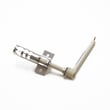
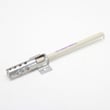
- If the oven burner is not lighting reliably, inspect/replace the range oven burner igniter WPW10333842.
- If the issue seems related to touchpad response, check the parts list for compatible control or keypad components for WEG730H0DS0.
Why it matters
Clearing the code can restore operation when the control is reporting a temporary condition, but a repeating code is the range’s way of preventing poor performance or unsafe operation until the underlying issue is corrected.
Last updated: January 2026
How do I find the model number on my WEG730H0DS0?
For a Whirlpool gas range like model WEG730H0DS0, the model number is printed on the appliance’s rating label, usually around the oven door frame area. Use the full model number exactly as shown to match the correct diagrams, manuals, and parts.
Where to look on the range
Check these common label locations on Whirlpool freestanding ranges:
- Along the oven door frame (open the oven door and look around the front frame)
- On the left or right front frame edge near the door opening
- On the storage drawer frame area (pull the bottom drawer out and look on the frame)
- Behind the control panel area (less common, but possible)
What to write down (and why)
Record the full model number and the serial number from the label. The model number identifies the exact design version of your range.
- Model number: used to select correct part diagrams and compatible parts
- Serial number: helps confirm production details when parts changed during a run
- Any suffixes: letters or extra digits matter for fit
| Label item | Example | Used for |
|---|---|---|
| Model | WEG730H0DS0 | Parts lookup and manuals |
| Serial | (varies) | Production-specific part changes |
Tips to avoid ordering the wrong part
- Match every character exactly (including zeros vs the letter O)
- Use the model number from the label, not from a receipt or listing
- If you are replacing a common item (like an oven light), confirm the part by diagram for your model
If you need a reference for label location and model identification details, use the WEG730H0DS0 owner's manual.
Why it matters
Whirlpool ranges often have multiple versions that look identical; the rating label model number is what ensures parts like an igniter, control, or burner components fit and work correctly.
Last updated: March 2026
What is the average lifespan of WEG730H0DS0?
The average lifespan of a Whirlpool gas range like model WEG730H0DS0 is 15 years. With regular cleaning, proper burner flame adjustment, and timely replacement of wear items (like igniters and bulbs), many ranges reach or exceed that typical service life.
What affects lifespan most
These factors have the biggest impact on how long a gas range lasts:
- Oven and surface burner use frequency (daily cooking shortens wear intervals)
- Keeping burner ports and caps clean to prevent poor ignition and overheating
- Power quality (control boards and displays are sensitive to surges)
- Ventilation and heat exposure around the control area
- Prompt repair of weak ignition, gas odor, or uneven flames
Parts that commonly wear before the range does
Many “end of life” symptoms are actually a single part failure. On WEG730H0DS0, common service items include:
- Range oven igniter WPW10324262 (no-bake or delayed ignition)
- Range oven burner igniter WPW10333842 (weak ignition, burner not lighting)
- Light bulb 8009 (oven light out)
| Symptom | Often points to | Typical fix |
|---|---|---|
| Oven won’t heat | Igniter issue | Replace igniter |
| Clicking but no flame on top | Ignition or burner base issue | Clean, then inspect ignition parts |
| Light out | Bulb | Replace bulb |
Maintenance that extends life
- Clean spills quickly; baked-on residue traps heat and moisture
- Keep burner heads and caps seated correctly after cleaning
- Avoid slamming the oven door; it stresses hinges and door alignment
- Use the self-clean feature as directed in the WEG730H0DS0 owner's manual
Why it matters
Knowing the 15-year benchmark helps you decide whether to repair or refresh key components like igniters, gas valves, or controls, especially when performance drops but the range structure is still solid.
Last updated: March 2026