 Owner’s manual










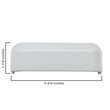
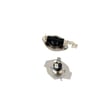
Where is my dryer part number?
On your Whirlpool WED7000DW2 electric dryer, the part number is printed on the part itself (often stamped, molded, or on a sticker). For ordering the correct replacement, we recommend starting with the model and serial tag location shown in the WED7000DW2 owner's manual.
Where to look first (fastest places)
- Model and serial tag: usually on the door opening, door frame, or inside the cabinet opening
- Lint screen housing: check around the lint filter opening and nearby panels
- Back panel area: some components have labels visible from the rear access area
- Inside the front panel: many parts are labeled once the front is opened
- On the part body: look for a sticker or stamped number on items like a motor, switch, or heater
What the numbers mean (so you order the right item)
Many Whirlpool dryer parts show more than one identifier. Use this quick guide:
| What you see on the part | What it’s used for | Example from this model page |
|---|---|---|
| Manufacturer part number | Cross-references and compatibility | W10724237 (heating element) |
| Sears PartsDirect part ID | The catalog identifier on our site | 279838 (heating element) |
Common examples on WED7000DW2
If you are matching a part by what it does, these are common items customers look up by number:
- Heating issue: dryer heating element 279838
- Dryer will not start when door is shut: dryer door switch WP3406107
- Overheating or no heat after a shutdown: dryer high-limit thermostat WP3977767
Why it matters
Using the model number (WED7000DW2) plus the part number prevents ordering a look-alike part that mounts differently, uses different terminals, or has a different temperature rating.
Last updated: February 2026
What's the average lifespan of a Whirlpool dryer?
Most Whirlpool dryers, including the Whirlpool WED7000DW2 electric dryer, typically last 10 to 13 years with normal household use. With consistent maintenance and good airflow, it’s common to reach the upper end of that range (or longer) before major repairs become frequent.
What affects dryer lifespan the most
- Vent airflow: restricted venting overheats the heater circuit and shortens component life.
- Lint control: cleaning the lint screen every load reduces heat stress and drying time.
- Load size: chronic overloading strains the drum support system and drive motor.
- Cycle choices: high heat all the time accelerates wear on thermostats and heating parts.
- Moisture sensor care: residue on sensor bars can cause longer run times.
Maintenance that helps you reach 10 to 13 years
We recommend these habits for the WED7000DW2:
| Task | How often | Why it matters |
|---|---|---|
| Clean lint screen | Every load | Improves airflow and drying performance |
| Clean vent duct to outside | Every 6 to 12 months | Prevents overheating and long dry times |
| Check drum noises (thump/squeal) | Monthly | Catches wear before it damages the drum |
| Wipe moisture sensor bars | Monthly | Helps Auto cycles end correctly |
For model-specific care and cleaning guidance, follow the WED7000DW2 owner's manual.
Parts that commonly wear as a dryer ages
If your dryer is otherwise in good shape, replacing a wear item can extend service life:
- Dryer heating element 279838 if the dryer runs but won’t heat
- Dryer high-limit thermostat WP3977767 if it overheats or cycles heat erratically
- Dryer thermistor WP8577274 if temperatures seem inconsistent
- Dryer repair kit 4392065 if you have squealing, thumping, or poor drum support
Why it matters
A dryer near the end of its average lifespan often shows up as long dry times, overheating, unusual noise, or repeated no-heat issues. Fixing airflow first prevents repeat failures and protects high-cost components like the drive motor and electronic control.
Last updated: February 2026
What are the common problems with Whirlpool dryers?
Common Whirlpool electric dryer problems on model WED7000DW2 fall into a few buckets: it will not start, it runs but will not heat, it tumbles poorly or not at all, it makes unusual noise, or it takes too long to dry. We use the symptoms to narrow the likely part or airflow issue; see the WED7000DW2 owner’s manual for model-specific checks and cycle settings.
Most common symptoms and what they usually point to
- Won’t start: door not fully closed, failed door switch, or a control issue
- No heat or weak heat: heating circuit problem, temperature sensor issue, or restricted venting
- Not tumbling: belt or idler problem, seized drum support, or motor issue
- Loud squeal/rumble: worn rollers, idler pulley, or front bearing surfaces
- Long dry times: lint buildup, crushed vent hose, blocked exterior hood, or blower airflow problem
Quick checks we recommend first (fast, no parts)
- Clean the lint screen and confirm strong airflow at the outside vent.
- Verify the dryer is on the correct cycle and temperature setting.
- Confirm the door closes firmly and the drum light turns off when the door shuts.
- For “no heat”, check the home breaker (electric dryers often use a 2-pole breaker; one side can trip and the dryer still runs).
Common parts involved on WED7000DW2
| Symptom | Commonly involved part | Example part for this model |
|---|---|---|
| Won’t start | Door switch | Dryer door switch WP3406107 |
| No heat | Heating element | Dryer heating element 279838 |
| Long dry times, poor airflow | Blower wheel | Dryer blower wheel WP694089 |
| Squealing, thumping | Idler pulley or wear items | Dryer idler pulley WP691366 |
| Overheats, shuts off | High-limit thermostat | Dryer high-limit thermostat WP3977767 |
Why it matters
Catching the right category of problem early protects clothing, reduces energy use, and prevents repeat failures. For example, restricted venting can cause long dry times and overheating symptoms that look like a bad heater or thermostat.
Related DIY help
If your display shows a code, use our Whirlpool duet dryer error codes guide to match the code to the most likely cause.
Last updated: February 2026









