Installation guide
 Owner’s manual
 Error Codes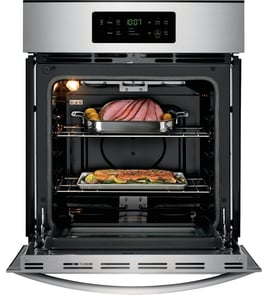





How do I tell how old my Kenmore oven is?
To tell how old your Kenmore wall oven model 79047783403 is, we use the serial number from the model and serial plate and decode it using the format tied to the model prefix (the first three digits). For this model, that prefix is 790, so the serial number format follows the Kenmore 790 family.
We use the model and serial plate because the purchase date is not a reliable way to date an appliance.
- Look for the model and serial plate on the oven frame behind the door opening
- Check along the left or right side trim of the oven front frame
- If the oven is installed tight in the cabinet, use a flashlight and look along the inner frame edges
- Write down the full serial number exactly as shown (letters and numbers)
For plate location details and model-specific references, use the 79047783403 use and care manual.
For Kenmore model numbers that start with 790, the serial number typically contains a date code that identifies the production period (month and year). Once we match the characters in your serial number to the 790 format, we can translate that into an approximate manufacture date.
- Full model number: 79047783403
- Full serial number from the rating plate
- A clear photo of the plate (helpful for avoiding transposed characters)
| Term | What it usually refers to | Best source |
|---|---|---|
| Manufacture date | When the oven was built | Serial number date code |
| Purchase date | When it was bought | Receipt or delivery record |
| Install date | When it was put in the cabinet | Installer paperwork |
Knowing the manufacture date helps us choose the right Kenmore parts and troubleshooting path for your 79047783403 wall oven, especially for items that change over production runs (control panel, temperature sensor, and heating elements).
Last updated: February 2026
How to read Kenmore model numbers?
Kenmore model numbers are built in sections; the first 3 digits identify the manufacturer behind the Kenmore brand, and the remaining digits narrow down the exact product series and feature variations. For your Kenmore wall oven, the model number is 79047783403.
Most Kenmore model numbers follow this pattern:
- Prefix (first 3 digits): manufacturer identifier
- Middle digits: base model or product platform
- Ending digits: version, color, feature package, or production variation
- Serial number: separate from the model number; used to identify the specific unit
For model 79047783403, the 790 prefix is the key piece that points to the manufacturer family used for many Kenmore cooking products.
On Kenmore wall oven model 79047783403, the serial plate is located along the interior side trim and is visible when you open the oven door. Confirming the full model and serial from that plate helps ensure you get the correct parts and installation information.
- Open the oven door fully
- Look along the left or right interior side trim
- Record the model number, serial number, and any lot number/letter shown
- Use that exact information when ordering parts or requesting service
| Item | What it tells us | Used for |
|---|---|---|
| Model number (example: 79047783403) | Design and parts family | Correct replacement parts, manuals |
| Serial number | Your specific unit identity | Production date tracking, service history |
Kenmore often sold multiple wall ovens that look similar but use different bake elements, temperature sensors, control panels, or door glass. Matching the full model number from the serial plate prevents ordering the wrong part and avoids fit or wiring issues.
For model-specific identification details and documentation, use the 79047783403 owner's manual and the 79047783403 installation guide.
Last updated: February 2026
What is the F11 code on a Kenmore wall oven?
On Kenmore wall oven model 79047783403, the F11 code points to a stuck or failing keypad (touchpad) input, which makes the control think a key is being pressed continuously. We start by resetting power; if F11 returns, the touchpad or control interface needs service.
- Turn the oven off at the circuit breaker.
- Wait 5 minutes to fully reset the control.
- Restore power and set the clock.
- Try BAKE and BROIL to see if the oven responds normally.
- If F11 reappears quickly or beeping continues, stop using the oven until it’s repaired.
F11 is almost always tied to the user interface sensing an invalid key signal. Common causes include:
- Moisture or cleaner residue on the keypad area
- A physically stuck key or damaged keypad membrane
- A failing touchpad ribbon connection at the control
- A failing electronic oven control (EOC) that misreads keypad signals
Use the troubleshooting and control descriptions in the 79047783403 owner’s manual.
- If the keypad is wet, let it dry completely and retry.
- If the oven is in a hot, steamy environment, improve ventilation and retest.
- If the code appears during or after cleaning, avoid spraying cleaner directly on the control area.
| Symptom | Most likely issue | Typical fix |
|---|---|---|
| Constant beeping, F11 returns immediately | Stuck key or failed touchpad | Replace touchpad/control panel assembly (model-specific) |
| F11 appears intermittently | Moisture, residue, or loose connection | Dry/clean carefully; check connections during service |
| Other error codes also appear | Control problem | Diagnose EOC and wiring harness |
A stuck-key F11 condition can prevent accurate temperature control and can keep the oven from operating normally. Addressing it quickly helps protect the control panel and keeps baking and broiling reliable.
Last updated: February 2026
What was the size of the Kenmore 79047783403 oven?
For Kenmore model 79047783403, the installation guide lists two possible cabinet widths for this wall oven family: 27-inch or 30-inch. The exact overall dimensions depend on which width version you have; we use the 79047783403 installation guide dimensions chart to match your cutout and clearance.
The installation guide provides product dimension ranges used for fit and clearance. Use these to confirm your cabinet cutout and door swing.
- Cabinet width class: 27-inch or 30-inch wall oven
- Typical overall width: about 27 inches (27-inch class) or 30 inches (30-inch class)
- Typical overall depth: about 24 1/2 inches (varies by configuration)
- Clearance in front of oven: allow at least 21 inches for the door to open
We recommend verifying the width class before ordering trim, a control panel, or planning cabinetry.
- Check the model/serial plate location shown in the 79047783403 owner’s manual
- Measure the front frame width across the face of the oven (not the cabinet opening)
- Compare your measurements to the installation guide’s 27-inch vs 30-inch product dimensions
- If your oven is installed under a cooktop, confirm the under-counter clearances in the guide
| What you’re measuring | What it tells you | Where to verify |
|---|---|---|
| Overall width (face/frame) | 27-inch vs 30-inch model class | Installation guide chart |
| Overall depth | How far the oven projects into the cabinet | Installation guide chart |
| Cutout width/height | Whether it fits your cabinet opening | Installation guide cutout section |
| Door clearance | Whether the door can open safely | Installation notes |
Wall ovens are sold by “27-inch” or “30-inch” class, but the cutout dimensions and clearances are what prevent binding doors, heat buildup, and installation problems. Using the installation guide dimensions keeps your cabinet fit accurate.
Last updated: February 2026
Which Kenmore oven do I have?
If you have a Kenmore wall oven, the fastest way to identify it is to find the model number on the serial plate, then match that model number to the correct parts list and documentation. For this page, the model is Kenmore 79047783403.
We use the model number to match the correct wall oven parts, wiring layout, and control features. On Kenmore wall ovens, the serial plate is typically located where it’s easy to see when the door is open.
- Open the oven door and look along the door frame (front frame area).
- Check the left and right sides of the frame, and the lower front edge.
- Look for labels that say Model, Model No., MOD, or MO.
- Write down the full model number exactly as shown (all digits).
- Use that model number to confirm the correct 79047783403 owner’s manual.
Based on the documentation for this model family, you’re looking at an electric wall oven with common features like electronic oven controls and an oven vent at the center trim.
| What you see | What it usually indicates |
|---|---|
| Electronic oven controls with clock/timer | Standard control style for this Kenmore wall oven series |
| Warm air venting at the center trim | Normal oven vent location for proper air circulation |
| Interior oven light(s) | Some versions have single or dual lights depending on configuration |
If your question is really about confirming the oven size or fit, use the installation instructions for cutout dimensions and notes (including guidance about shims and trim when the cutout height varies). Refer to the 79047783403 installation guide for the exact requirements.
- Measure cabinet cutout height, width, and depth before removal.
- Confirm junction box location and electrical supply routing.
- Follow the guidance for shims if the cutout height is oversized.
- Do not plan for stackable or side-by-side installation.
Kenmore wall ovens can look similar across series, but parts like the control panel, temperature sensor, and bake element are model-specific. Using the exact model number prevents ordering the wrong part and avoids installation issues.
Last updated: February 2026