Owner’s manual
 Error Codes


What is the problem with the LG bottom freezer refrigerator?
On the LG LFC22770ST bottom-mount refrigerator, the most common “problem” customers report is a cooling imbalance: the fresh food section gets too warm while the freezer stays very cold. This usually comes down to airflow restrictions, a fan issue, or a temperature sensing/control problem (not a sealed-system failure).
Most common causes (and what to check first)
- Airflow blocked in the refrigerator section (overpacked shelves, blocked vents, iced-up return vents).
- Evaporator fan not moving air from the freezer to the fresh food section.
- Temperature sensor (thermistor) drifting and sending wrong readings to the control.
- Defrost drainage or frost buildup that restricts airflow over time.
- Water/ice maker related issues (slow ice, no ice, leaks) that look like “cooling problems” but are actually water supply or valve issues.
Quick troubleshooting steps (safe DIY)
- Set temps to typical targets: 37°F fresh food and 0°F freezer.
- Make sure interior vents are clear; leave space around the back wall.
- Listen for the freezer evaporator fan when the door switch is pressed.
- Check for heavy frost on the freezer back panel (a sign of defrost/airflow trouble).
- If you have dispenser or ice issues, confirm household water supply is on and the line is not kinked.
Parts that commonly relate to these symptoms
| Symptom | Likely system | Example part for LFC22770ST |
|---|---|---|
| Fridge warm, freezer cold | Airflow/fan | Refrigerator evaporator fan motor EAU65058315 |
| Temps swing or inaccurate | Sensing | Refrigerator temperature sensor 6500JB2002X |
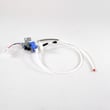
| No ice or leaking | Water supply | LG refrigerator water inlet valve AJU73753101 |
Why it matters
When the freezer stays cold but the refrigerator warms up, food safety becomes the priority. Fixing airflow and sensing issues early also reduces compressor run time and helps prevent repeat icing and temperature swings.
Helpful references
- Use the LFC22770ST owner's manual for temperature settings, vent locations, and operating checks.
- For ice maker symptoms and prevention tips, see how to prevent water dispenser and ice maker problems.
Last updated: January 2026
Why does my LG freezer keep icing up at the bottom?
Ice building up on the bottom of the freezer in your LG LFC22770ST is typically caused by a clogged defrost drain; defrost water cannot flow down to the drain pan, so it refreezes into a sheet of ice. Clearing the drain and fully melting the ice stops the repeat icing.
What’s happening
During defrost, water should run into a drain hole, through a drain tube, and into the pan underneath. When that path is blocked by ice or debris, water backs up and freezes on the freezer floor.
Quick checks and fixes
- Unplug the refrigerator before working in the freezer.
- Remove the freezer drawer and bins to expose the ice sheet.
- Melt the ice using hot towels or a hair dryer on low (keep it moving).
- Locate the drain trough and drain hole near the back under the evaporator cover area.
- Flush the drain hole with hot water using a turkey baster until it drains freely.
- If water still backs up, clean the drain tube from the rear access area.
Parts that commonly relate to this symptom
If the drain won’t clear or keeps re-freezing, these model-matched parts are often involved:
| What you notice | Most common cause | Part to check |
|---|---|---|
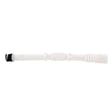
| Ice sheet returns every few days | Drain tube restricted | Refrigerator drain tube 5251JA3003D |
| Frost plus weak cooling | Poor airflow in freezer | Refrigerator evaporator fan motor EAU65058315 |
Why it matters
A blocked drain can cause recurring ice sheets, water leaks, and restricted airflow that makes the compressor run longer.
Helpful reference
Use the LFC22770ST manual for access guidance and component locations before removing covers or panels.
Last updated: January 2026
What is the warranty on LFC22770ST?
LG warranty coverage for the LG LFC22770ST bottom-mount refrigerator is set by LG and varies by component (for example, sealed-system and compressor coverage is typically longer than coverage for bins, drawers, and other wear items). For the exact terms for your unit, use the LFC22770ST owner's manual.
What to check in the warranty section
Use these items to quickly confirm what is covered and for how long.
- Parts vs. labor coverage (they can be different)
- Compressor and sealed-system coverage details
- Coverage start date (purchase date vs. delivery date)
- What documentation is required (proof of purchase, model and serial)
- Exclusions (installation issues, misuse, cosmetic damage)
Common warranty coverage patterns (what to expect)
These are typical patterns for LG refrigerators; your LFC22770ST terms are listed in the manual.
| Component | Typical coverage pattern | Example related part for this model |
|---|---|---|
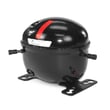
| Compressor / sealed system | Longer coverage than most parts | Refrigerator compressor TCA38091801 |
| Electronic controls | Shorter coverage | Refrigerator electronic control board EBR81182784 |
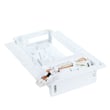
| Ice maker components | Shorter coverage | LG refrigerator ice maker assembly model AEQ72909603 |
| Shelves, bins, drawers | Often limited or treated as wear items | LG refrigerator door bin AAP73051305 |
Before you request warranty service
Having this information ready helps the service process go smoothly.
- Confirm the full model number: LFC22770ST
- Locate the serial number on the rating label
- Write down the issue and when it started (no cooling, no ice, leaking)
- Record current temperatures (fresh food and freezer)
- Keep your proof of purchase available
Why it matters
Warranty terms determine whether you pay for parts, labor, or both. Checking the model-specific warranty language helps you avoid surprises, especially for higher-cost repairs involving the compressor or sealed system.
Last updated: January 2026