 Installation guide
 Owner’s manual
 Error Codes
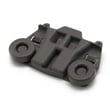





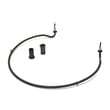
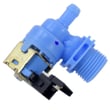

Does a Kenmore dishwasher model 66513933K015 have a filter?
Yes. The Kenmore Elite dishwasher model 66513933K015 uses an ULTRA WASH filtration system with two filters (an upper filter assembly and a lower filter) located at the bottom center of the tub; cleaning them periodically helps maintain peak cleaning performance.
Where the filter is and what it does
The filtration system is designed to keep food soil from being recirculated and to protect the pump.
- Upper filter assembly: helps keep oversized items and fine particles out of the pump
- Lower filter: helps keep food from being recirculated onto dishes
- Location: bottom center of the dishwasher tub
When to clean the filters
Clean the filters when you notice any of the following:
- Visible objects or soil on the upper filter assembly
- Reduced cleaning performance (soil left on dishes)
- Dishes feel gritty after a cycle
- Odors that persist even after running a hot cycle
Basic filter care (safe, quick routine)
Use this simple routine to keep the filtration system working properly.
| Task | What to do | Typical time |
|---|---|---|
| Remove filters | Follow the steps in the 66513933K015 owner's manual | 2 to 5 minutes |
| Clean | Rinse under warm water; use a soft brush if needed | 5 to 10 minutes |
| Reinstall | Lock the upper filter assembly in place before running cycles | 2 to 5 minutes |
Why it matters
A clean filter helps your Kenmore Elite dishwasher maintain strong wash performance, reduces the chance of gritty residue on dishes, and supports proper water flow through the sump and pump.
Last updated: January 2026
How to reset a Kenmore Elite dishwasher model 66513933K015?
To reset the controls on your Kenmore Elite dishwasher model 66513933K015, press CANCEL/DRAIN twice, then reselect your cycle and press START/RESUME. This clears the current cycle and gets the control ready to start fresh (it may drain first). See the 66513933K015 owner's manual for the exact button sequence for your console.
Reset steps (control reset)
- Open the door slightly to pause the cycle; wait for spraying to stop.
- Open the door fully.
- Press CANCEL/DRAIN twice to reset the control.
- Select the new cycle and options.
- Press START/RESUME.
- Close the door promptly so the dishwasher can start (or finish draining).
What you should see after pressing CANCEL/DRAIN
In many cases, the dishwasher will run a short drain to clear water from the bottom before it will restart.
| What happens | What it means | What to do |
|---|---|---|
| Drain pump runs for a short time | Normal cancel and drain | Let it finish, then start a new cycle |
| Lights change and cycle stops | Control accepted the reset | Pick a new cycle and press START/RESUME |
| Unit will not drain | Possible drain restriction or pump issue | Check the drain path and consider the dishwasher drain pump WPW10348269 |
If it still will not reset or start
These checks solve most “won’t reset” complaints on undercounter dishwashers:
- Make sure the door is fully latched; a weak latch can prevent START/RESUME from engaging.
- Wait 2 minutes after CANCEL/DRAIN; some models keep the drain cycle active briefly.
- Check the tub for standing water and clear the filter area if needed.
- Inspect the drain hose for kinks or a blocked high loop/air gap.
- If the dishwasher hums but does not move water, the drain pump or a blockage is likely.
Why it matters
A proper reset clears a stuck cycle and forces the control to reinitialize. If the dishwasher cannot drain during the reset, it often points to a drain-path issue (hose, filter area, or drain pump) rather than a keypad problem.
Last updated: January 2026
What are the common problems with Kenmore dishwashers?
Common problems on the Kenmore Elite 66513933K015 dishwasher include not draining, not starting, poor cleaning, water left in the tub, and long cycle times. Most issues trace back to loading interference, a clogged filter, a kinked drain hose, low incoming water temperature, or a failing pump or valve (see the 66513933K015 owner's manual).
Most common symptoms and what to check first
- Dishwasher does not run: confirm the door is fully closed and latched; press Start/Resume if the light is blinking.
- Water remains in tub or won’t drain: verify the cycle completed; check for drain hose kinks and disposer knockout plug (if connected).
- Detergent remains in dispenser: make sure large items are not blocking the dispenser door; use fresh, lump-free detergent.
- Food soils remain on dishes: confirm proper loading; clean and reinstall the filter; use the right cycle for soil level.
- Cycle runs too long: some cycles can run up to about 3 hours; heated dry and other options add time.
- Suds/foam in tub: only use automatic dishwasher detergent; too much detergent or a missing rinse aid cap can cause problems.
Parts that commonly solve these problems on this model
If basic checks do not fix the issue, these model-matched parts are common culprits:
| Symptom | Likely area | Example model-matched part |
|---|---|---|
| Won’t drain, water left in tub | Drain system | Dishwasher drain pump WPW10348269 |
| Poor cleaning, debris recirculating | Filtration | Dishwasher filter W10872845 |
| Won’t fill or fills slowly | Water supply | Dishwasher water inlet valve W11175771 |
| Poor drying, cool water | Heating circuit | Dishwasher heater W10703867 |
| Leaks at the bottom of the door | Door sealing | Seal WPW10497235 |
Why it matters
Catching the root cause early helps prevent repeat wash failures, standing water odors, and water damage. For example, a dirty filter can cause poor cleaning and drainage complaints at the same time, and low water temperature can extend cycle time while reducing performance.
Quick safety and setup notes
- Turn off power at the breaker before testing electrical parts.
- If the dishwasher may be exposed to freezing temperatures, follow winterizing guidance in the 66513933K015 installation guide.
- For electrical checks, use a meter and proper technique (see how to use a multimeter to test electrical parts video).
Last updated: January 2026









