 Installation guide
 Owner’s manual
 Error Codes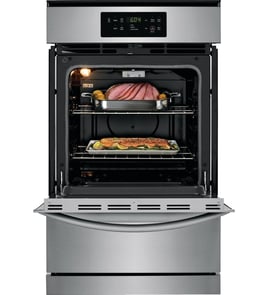



How to reset Maytag wall oven?
To reset your Maytag CWG3600AAB26 gas wall oven, do a power reset at the circuit breaker. When power is restored, “PF” may appear briefly on the display; that indicates a power interruption and confirms the control rebooted.
- Press CANCEL to stop any active cycle.
- Turn the oven circuit breaker OFF (or remove the fuse).
- Wait 60 seconds.
- Turn the breaker ON.
- If “PF” appears, press CANCEL to clear it.
- Set the clock, then test BAKE for 5 minutes.
| Display behavior | Meaning | What to do next |
|---|---|---|
| “PF” shows briefly | Power was interrupted; control restarted | Clear with CANCEL, set clock, test heating |
| Display is on but keys act odd | Temporary control glitch | Repeat the power reset once |
| Display stays blank | No power to the control | Check breaker, house power, then wiring connections |
CWG3600AAB26 uses electronic oven controls; many Maytag models include a control lock feature, but the exact keypad name and sequence vary by model.
- Look for a key labeled Control lock, Lock, or a lock icon
- Press CANCEL once to clear the display
- Try holding the lock-related key for about 3 seconds
- If the door is locked from a cleaning cycle, allow the oven to cool fully
For the exact lock/unlock steps for your control panel, follow the CWG3600AAB26 owner’s manual.
A breaker reset clears many common electronic control issues (power glitches, stuck logic states) without replacing parts. If the oven still will not heat after a reset, the next checks often involve the igniter and control.
Last updated: January 2026
Where is the model number on the Maytag wall oven?
On the Maytag CWG3600AAB26 gas wall oven, we find the model and serial number on the oven frame behind the oven door. Open the door fully and look along the frame (often on the left or right side) for the rating label; confirm details in the CWG3600AAB26 owner's manual.
Check these common label locations on built-in wall ovens like the CWG3600AAB26:
- Oven frame behind the oven door (primary location)
- Left or right vertical frame rail near the door hinges
- Lower frame area near the bottom edge of the opening
- Behind the storage drawer panel (on some installations)
The rating label usually includes:
- Model number (example: CWG3600AAB26)
- Serial number
- Gas type and electrical ratings
- Certification markings
| What you need | Why you need it | When you need it |
|---|---|---|
| Model number | Ensures correct Maytag wall oven parts fit | Ordering parts, checking diagrams |
| Serial number | Identifies production series and revisions | Service calls, warranty questions |
Using the exact model number prevents ordering the wrong igniter, oven control board, or wire harness for your Maytag 24 inch gas built-in oven. Even small model suffix differences can change part compatibility.
Last updated: January 2026
Why is my wall oven not turning on?
If your Maytag CWG3600AAB26 wall oven is completely dead (no display, no response), the most common causes are a tripped breaker/blown fuse, a loose power connection, or the control lock being enabled. This model uses pilotless ignition, so it will not operate during a power failure.
- Reset the circuit breaker fully (OFF, then ON) or replace the household fuse.
- Confirm the oven has power; the display should flash after power is restored.
- Press CANCEL to clear a flashing display after a power loss.
- Check for control lockout: press and hold START for 3 seconds to toggle lock (look for “Loc”).
- Make sure you press START within 1 minute after selecting a function, or the oven cancels the command.
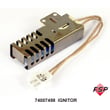
This oven uses an electric glow-bar igniter to light the gas. When you press BAKE, the igniter should glow and the burner can take up to about 60 seconds to light.
- Verify the manual gas shutoff valve is in the open position.
- If the igniter never glows, suspect a failed igniter or a wiring issue.
- If the igniter glows but the burner will not light, stop the cycle and have the gas supply and regulator checked.
Helpful part to consider: oven igniter 74007498
- Loose or burned wiring at the terminal block or harness connections
- Pinched or damaged wires behind the oven (especially after installation)
- Signs of overheating at connectors (discoloration, melted insulation)
Related DIY help: how to use a multimeter to test electrical parts video
| What you see | Most likely cause | What to do |
|---|---|---|
| No display, no beeps | No power to oven | Reset breaker, check fuse, verify outlet power |
| Display on, “Loc” shown | Control lockout enabled | Hold START 3 seconds to unlock |
| Display on, no heat, no igniter glow | Igniter or circuit issue | Inspect wiring; replace igniter if failed |
| Igniter glows, burner does not light | Gas supply/regulator issue | Confirm shutoff valve open; service gas system |
A gas wall oven needs both electricity (controls and igniter) and gas flow. Restoring power and confirming the shutoff valve position solves many “won’t turn on” complaints without replacing parts.
For model-specific operating steps and lockout details, use the CWG3600AAB26 owner’s manual.
Last updated: January 2026





