Installation guide
 Owner’s manual



Do Maytag dishwashers have a 10 year warranty?
Maytag dishwashers can include a 10-year limited parts warranty, but coverage depends on the specific model and what part is being claimed. For the Maytag MDB7749AWM1 dishwasher, the warranty section in the MDB7749AWM1 owner's manual shows a 1-year limited warranty for factory-specified parts and repair labor.
What the MDB7749AWM1 warranty covers (at a glance)
From the warranty text in the manual, coverage includes:
- 1 year from date of purchase for factory-specified parts and repair labor
- Coverage applies when the dishwasher is operated and maintained as instructed
- Service is performed by a Maytag-designated service company
- Valid in the United States or Canada (and generally only in the country of purchase)
Common warranty exclusions to know
The manual also lists items that are typically not covered. Common examples include:
- Service calls to correct installation or to explain how to use the dishwasher
- Replacing or repairing house fuses, or correcting house wiring or plumbing
- Consumable items (the manual calls out things like filters in general appliance coverage)
- Removal and reinstallation if the unit is installed in an inaccessible location or not installed per instructions
Quick comparison: 1-year vs. “10-year” warranty language
| Warranty phrase you may see | What it usually means | What MDB7749AWM1 manual shows |
|---|---|---|
| 1-year limited warranty | Broad basic coverage window | 1 year parts and labor |
| 10-year limited parts warranty | Limited parts only; specific components | Not shown in the excerpted manual warranty |
Why it matters
Warranty terms affect whether a repair is a parts-only claim or parts plus labor. If your MDB7749AWM1 needs a repair such as a drain issue, knowing whether it is warranty-covered helps you decide whether to troubleshoot first or schedule service (for example, a failed dishwasher drain pump WPW10348269 is a common drain-related repair part).
Last updated: February 2026
How to reset Maytag dishwasher control lock?
On the Maytag MDB7749AWM1 dishwasher, Control Lock is turned on or off by pressing and holding Heated Dry for at least 3 seconds until the Control Lock light changes state. This is the correct “reset” for a locked control panel; there typically is not a separate reset button.
How to turn Control Lock off (and back on)
- Press and hold Heated Dry for 3 seconds.
- Watch the Control Lock indicator light; it should turn off when unlocked.
- If you press any pad while locked, the lock light can flash multiple times; that confirms the controls are still locked.
- The dishwasher door can be opened while the controls are locked.
- After unlocking, select a cycle and press START/RESUME to run.
For the exact button layout and indicator behavior on your console, use the MDB7749AWM1 owner's manual.
If it still won’t start after unlocking
These checks solve most “it’s unlocked but won’t run” situations:
- Press START/RESUME, then close the door firmly within 3 seconds.
- Confirm the door is fully closed and latched.
- Make sure a wash cycle is selected.
- Verify the dishwasher has power (breaker on, outlet powered).
- If multiple lights blink and it won’t run, service is typically needed.
Quick symptom guide
| What you see | What it usually means | What to do |
|---|---|---|
| Control Lock light on | Controls disabled | Hold Heated Dry 3 seconds |
| START/RESUME blinking | Cycle paused, door not confirmed | Press START/RESUME and shut door within 3 seconds |
| No lights at all | No power | Check breaker, outlet, wiring |
Why it matters
Control Lock prevents unintended cycle changes during a wash. Unlocking it correctly avoids unnecessary part replacement and helps you confirm whether the issue is a simple control setting or a true power/control problem.
Last updated: February 2026
What are the key features of MDB7749AWM1?
The Maytag MDB7749AWM1 undercounter dishwasher includes practical loading and cleaning features such as a split silverware basket, cup shelf, and cup clips to secure lightweight items; cycle status indicators show when it’s washing and drying. For the complete feature list and option details, use the MDB7749AWM1 owner's manual.
Key features you’ll use most
- Split & Fit utensil basket: separates so you can place sections where they fit best in the lower rack.
- Silverware basket lids: help spacing for better cleaning performance.
- Cup shelf: folds down on either side of the upper rack for cups, stemware, or long utensils.
- Cup clips: hold lightweight plastic items, utensils, and knives in place on the upper rack.
- Cycle indicators: “Washing” lights during the wash portion; “Drying” lights during the dry portion.
Feature and benefit quick table
| Feature | What it does | Why it helps |
|---|---|---|
| Split & Fit utensil basket | Basket splits into sections | More flexible loading for mixed loads |
| Cup shelf | Adds a small upper-rack platform | Improves stability for cups and stemware |
| Cup clips | Clips items between tine and clip | Reduces flipping and poor cleaning |
| Washing/Drying indicators | Shows active cycle stage | Helps you know when it’s safe to open the door |
How to get the best results from these features
- Put lightweight plastics under cup clips to prevent them from turning over.
- Use basket lids for small utensils so spray reaches all sides.
- Fold down the cup shelf only when needed to keep tall items from hitting the upper rack.
- Avoid opening the door during drying; opening the door can turn off certain indicator lights after a short time.
Why it matters
Most “not cleaning” or “not drying” complaints come from loading issues, blocked spray paths, or opening the door mid-cycle. Using the MDB7749AWM1 rack features correctly improves water coverage, keeps items stable, and helps the dishwasher finish the wash and dry stages as designed.
Last updated: February 2026
What are the parts of a Maytag dishwasher?
A Maytag dishwasher like model MDB7749AWM1 is built around a water-fill system, wash (circulation) system, drain system, heating and drying components, and door/rack hardware. These parts work together to fill, spray, filter, heat, and drain water while keeping the door sealed and balanced.
Main dishwasher parts (what they do)
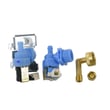
- Water inlet valve: lets water into the tub at the start of a cycle (example: dishwasher water inlet valve W10648041).
- Circulation pump and motor: drives water through the spray system to clean dishes.
- Drain system: pushes used water out through the drain hose (examples: dishwasher drain pump WPW10348269, dishwasher drain hose 8269144A).
- Heating element: heats water and supports drying (example: dishwasher heater element WPW10082892).
- Filtration and sump: traps debris and routes water through the pump area.
- Door system: seals the tub and helps the door open and close smoothly (example: dishwasher door seal W11196317).
- Racks and rack hardware: hold dishes and allow smooth sliding.
Quick “system view” of common components
| System | What’s included | Common symptom when it fails |
|---|---|---|
| Fill | Water inlet valve, float/overfill protection | Won’t fill, fills slowly |
| Wash | Circulation pump/motor, spray arms | Poor cleaning, weak spray |
| Drain | Drain pump, drain hose | Standing water, won’t drain |
| Heat/Dry | Heater element, venting parts | Dishes not dry, cool water |
| Door/Racks | Door seal, hinges/links, racks/stops | Leaks, door drops, rack issues |
How to identify the right part on your dishwasher
We recommend using the model-specific diagrams and part lists in the MDB7749AWM1 owner’s manual. Key tips:
- Match the symptom (leak, no drain, no heat) to the system above.
- Confirm the part name and part ID before ordering.
- Check the model and serial label inside the tub near the door edge.
- If the door rubs or doesn’t align, centering and mounting can affect fit.
Why it matters
Knowing the major systems helps you troubleshoot faster and avoid replacing the wrong component. For example, “won’t drain” often points to the drain pump or drain hose, while “not drying” often points to the heater circuit or venting.
Last updated: February 2026
What is the average lifespan of a Maytag dishwasher?
Most Maytag dishwashers last 10 to 12 years with normal household use and basic care. For your Maytag MDB7749AWM1 undercounter dishwasher, following the maintenance and operating guidance in the MDB7749AWM1 owner's manual helps you reach that typical lifespan.
What affects dishwasher lifespan the most
A dishwasher’s service life is usually determined by heat, water quality, loading habits, and how well it drains.
- Hard water and high iron can stain the tub and increase buildup over time
- Frequent heavy loads and overfilling increase wear on racks, spray action, and seals
- Poor draining (clogs, kinks, or slow pump-out) strains the drain system
- Interrupted cycles and low water temperature can reduce cleaning performance and increase residue
- Leaks or chronic moisture around the door can shorten the life of electrical parts
Simple maintenance that helps it last longer
These habits reduce strain on key parts like the heater, pump, and door seal.
- Scrape off large food soils before loading
- Avoid overfilling; keep spray paths clear
- Run hot water at the sink briefly before starting a cycle (helps the unit heat water faster)
- Use the right amount of detergent; avoid overfilling the dispenser
- Address slow draining early; a failing drain pump can lead to standing water
Common “wear” parts vs. “failure” parts
| What you notice | Often involved | Example part for MDB7749AWM1 |
|---|---|---|
| Water left in tub | Drain system | Dishwasher drain pump WPW10348269 |
| Leaks at the door | Door sealing | Dishwasher door seal W11196317 |
| Poor drying or water not heating well | Heating circuit | Dishwasher heater element WPW10082892 |
Why it matters
Knowing the typical 10 to 12 year lifespan helps you decide whether to maintain and repair your MDB7749AWM1 (often cost-effective for a single failed part) or plan for replacement if multiple major systems are wearing out.
Last updated: February 2026
What is the most common problem with a Maytag dishwasher?
For the Maytag MDB7749AWM1 dishwasher, the most common issues we see are poor cleaning and draining problems. These are usually caused by loading that blocks spray, a dirty filter or spray arms, or a drain path restriction; less often, a failed drain pump or water inlet valve is involved.
Quick checks that fix most complaints
- Confirm the door is fully closed and latched; if the START/RESUME light is blinking, press it and close the door firmly within 3 seconds (normal operation guidance is in the MDB7749AWM1 owner's manual).
- Avoid overloading; keep tall items from blocking the spray arms.
- Clean the filter area and clear debris from the sump.
- If it is not draining well, check and clean the sink drain air gap (if your setup has one).
- Verify the disposer knockout plug was removed (new disposer installs commonly cause “won’t drain”).
When it is a part problem (common symptoms)
| Symptom | Most likely cause | Part to consider for MDB7749AWM1 |
|---|---|---|
| Water left in tub | Drain restriction or failed drain pump | Dishwasher drain pump WPW10348269 |
| Slow drain or leaks at connection | Cracked or loose drain hose | Dishwasher drain hose 8269144A |
| Won’t fill or fills slowly | Water supply issue or inlet valve problem | Dishwasher water inlet valve W10648041 |
| No heat, poor drying | Heater circuit issue | Dishwasher heater element WPW10082892 |
Why it matters
Poor cleaning is often a spray and loading issue, but poor draining can quickly lead to odors, standing water, and repeat cycle failures. Fixing the drain path and basic maintenance first prevents unnecessary part replacement.
Safety and service notes
- Turn off power at the breaker before checking wiring, pumps, or the heater circuit.
- If the unit will not run and multiple lights blink, follow the troubleshooting steps in the MDB7749AWM1 owner's manual and schedule service if directed.
Last updated: February 2026