 Installation guide
 Owner’s manual
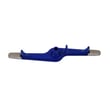


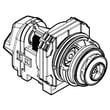


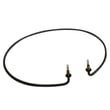
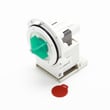
What is the most common problem with the Frigidaire dishwasher?
For the Frigidaire FFCD2413UB1A dishwasher, the most common issue we see is a draining problem that leaves water in the bottom of the tub after the cycle. This is often tied to a restriction in the filter area, drain path, or a drain component that is not moving water out as designed (see the FFCD2413UB1A owner's manual).
- Confirm the cycle fully ended and you did not pause it mid-drain.
- Look for standing water in the tub bottom after the cycle; that points to a drain issue.
- Clean the filter area and remove debris that can block water flow.
- Check the sink/disposer connection for a clog (common after disposer installs).
- Inspect the drain hose routing for kinks, crushing, or a low spot that traps water.
If the drain path is clear but water still remains, the drain pump or a related drain component is a common next suspect.
Common parts involved on FFCD2413UB1A:
- Drain pump a A00126401 (moves water out during drain)
- Dishwasher drain hose 807117001 (carries drain water to the sink/disposer)
- Dishwasher filter 5304532206 (helps prevent debris from reaching the pump)
| Symptom | Most likely area | What we do next |
|---|---|---|
| Water left in bottom after cycle | Drain restriction or drain pump | Clean filter, check hose, then test/replace pump |
| Dishwasher will not start | Door not fully latched, control issue | Verify door closes firmly; check power and cycle selection |
| Poor cleaning | Loading, water temp/pressure, filter | Correct loading, clean filter, verify hot water supply |
A dishwasher that does not drain properly can re-deposit soil, create odors, and strain the pump and motor over time. Restoring normal drain flow is the quickest way to get performance back to normal.
Last updated: January 2026
How do I clear the error code on my Frigidaire dishwasher?
On your Frigidaire FFCD2413UB1A dishwasher, you clear most error codes by canceling the current cycle: press and hold START/CANCEL for 3 seconds with the door latched. The dishwasher will run a 90-second drain, then you can select a new cycle and restart.
- Make sure the door is fully closed and latched.
- Press and hold START/CANCEL for 3 seconds.
- Wait for the 90-second drain to finish.
- Select your desired cycle.
- Press START/CANCEL to start.
For the exact button sequence and indicator-light behavior on this model, follow the FFCD2413UB1A owner’s manual.
This model can lock the controls, which can look like an error or prevent clearing it.
- With the door latched, press and hold OPTIONS for 3 seconds to toggle Control Lock.
- Confirm the lock indicator turns off.
- Then repeat the cancel/reset steps above.
Many recurring codes are caused by a drain or wash issue that the reset will not fix.
| Symptom after reset | What to check first | Common related part |
|---|---|---|
| Water remains in tub | Drain path, hose routing, sink/disposer connection | Dishwasher drain hose 807117001 |
| Poor cleaning, debris | Filter and sump area for buildup | Dishwasher filter 5304532206 |
| Won’t drain, humming | Drain pump operation and blockage | Drain pump a A00126401 |
Canceling the cycle clears the active fault state and forces a drain, which helps protect the kitchen from overflow and lets you restart cleanly. If the same code returns, the dishwasher is detecting the same condition again, so checking the drain and filter saves repeat shutdowns.
Last updated: January 2026
How can I force my Frigidaire dishwasher to drain?
To force a drain on your Frigidaire FFCD2413UB1A dishwasher, press and hold START/CANCEL for about 3 seconds; the unit will run an automatic 90-second drain. This is the correct way to cancel a cycle and pump water out before restarting a new cycle (see the FFCD2413UB1A owner’s manual).
- Press and hold START/CANCEL for 3 seconds.
- Close the door fully so the dishwasher can run the drain.
- Wait for the 90-second drain to finish.
- Select your next cycle and press START/CANCEL to begin.
- If you opened the door mid-cycle, press START/CANCEL and shut the door right away to resume operation.
A forced drain won’t help if water can’t leave the tub. These checks fix most “won’t drain” complaints:
- Make sure the drain hose is not kinked or crushed under the sink.
- Confirm the drain connection enters above the sink trap (high loop) to prevent backflow.
- If connected to a garbage disposer, make sure the disposer’s knockout plug was removed.
- Clean the filter area and remove debris that can block flow.
- If the pump hums but won’t move water, the drain pump may be failing.
| Symptom | Most likely cause | What we do next |
|---|---|---|
| Standing water, no pump sound | Control or door not allowing drain | Re-try START/CANCEL; verify door latches |
| Humming, little or no water movement | Drain pump issue or blockage | Check hose and sump; consider drain pump a A00126401 |
| Drains slowly | Partial clog in hose or sink plumbing | Clear hose/high loop; check sink drain |
Cancel-draining protects the pump and motor by clearing water before you restart a cycle, and it helps prevent dirty water from re-entering the tub through an incorrect drain hose routing.
Last updated: January 2026
How do I know if my Frigidaire dishwasher control board is bad?
If your Frigidaire FFCD2413UB1A dishwasher has power but will not start, ignores button presses, or runs erratically (stopping mid-cycle or changing cycles), the control board is a top suspect after you rule out Control Lock, a door-latch problem, and a basic power reset.
- Clear the cycle: press START/CANCEL, then select a new cycle.
- Turn off Control Lock: hold OPTIONS for 3 seconds with the door latched (lock light goes out).
- Reset power: switch the breaker off for 1 minute, then restore power.
- Confirm the door fully latches; an unlatched door prevents operation.
- Listen for normal activity; this model is quiet, but you should hear brief drain, fill, then wash.
These are most meaningful when the unit has correct power and the door is latched.
| Symptom | What it usually indicates | What to do next |
|---|---|---|
| No response to buttons (not locked) | Control not processing inputs | Inspect harness connections at the control and panel |
| Starts then stops randomly | Control logic or internal power issue | Check for loose connectors, moisture, corrosion |
| Lights on but no fill, wash, or drain | Control not powering loads | Verify water supply and drain path, then suspect control |
| Same abnormal behavior after reset | Persistent control failure | Replace the control board after other causes are eliminated |
- No fill: dishwasher water inlet valve 807047901 can clog or fail.
- No drain or “stuck” cycle: use dishwasher not draining video to check for drain restrictions.
- Overfill protection: dishwasher float switch 154773201 can stop filling if stuck.
A control board replacement is a higher-cost repair. Ruling out Control Lock, door latch, and fill or drain problems first prevents unnecessary parts replacement and restores reliable cycles faster.
For control functions and indicator behavior on FFCD2413UB1A, use the FFCD2413UB1A owner’s manual.
Last updated: January 2026





