Error Codes



How many hours a day should you run a dehumidifier?
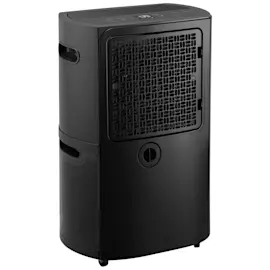
For a Comfort-Aire BHD-501 dehumidifier, we run it as long as needed to hold the room at a comfortable humidity, typically 40% to 50% RH. In many homes that works out to 4 to 12 hours per day, but very damp basements may need longer or continuous operation.
A practical way to choose run time
Instead of picking a fixed number of hours, we set a humidity target and let the unit cycle.
- Start with a 50% RH setting for general comfort.
- If you see musty odors or dampness, lower the target to 45% RH.
- If windows sweat or you have visible condensation, aim for 40% to 45% RH.
- If the air feels too dry (dry skin, static), raise the target to 50% to 55% RH.
- Run longer during rainy weather, after flooding, or when doing laundry indoors.
Typical run-time ranges by space
| Space / condition | Typical run time | Notes |
|---|---|---|
| Bathroom use (after showers) | 1 to 3 hours | Best with door closed and fan off after showering |
| Bedroom / living area | 4 to 8 hours | Often cycles once target RH is reached |
| Damp basement | 8 to 24 hours | May run most of the day in humid seasons |
| After water intrusion | 24 hours | Pair with airflow and frequent bucket checks |
Why it matters
Running long enough to reach and maintain the target humidity prevents mold-friendly conditions, reduces odors, and helps the dehumidifier avoid short-cycling (which can reduce moisture removal efficiency).
If your dehumidifier runs constantly but still feels damp
These checks usually fix the problem:
- Clean the air intake and keep the unit 12 to 18 inches from walls.
- Make sure doors and windows are closed in the area you are drying.
- Verify the bucket is seated correctly and the “full” float is not stuck.
- Confirm the room temperature is not too cold (many units remove less moisture in cool spaces).
- If the fan is weak or noisy, inspect the blower wheel; replace the fan 5900A20007B if it is damaged.
For deeper troubleshooting, use our DIY steps in dehumidifier doesn't remove moisture.
Last updated: February 2026
How much does it cost to run a dehumidifier 24 hours a day?
Running a Comfort-Aire BHD-501 dehumidifier 24 hours a day typically costs about $1.00 to $4.30 per day in the U.S. (most units draw roughly 300 to 700 watts, and most electricity rates land around $0.12 to $0.25 per kWh). Your actual cost depends mainly on wattage, room humidity, and your local kWh rate.
Quick way to calculate your exact daily cost
Use this formula:
- Daily kWh = (Watts ÷ 1000) × 24
- Daily cost = Daily kWh × your $/kWh rate
Example costs (24 hours/day)
| Dehumidifier draw | kWh per day | Cost/day at $0.15/kWh | Cost/day at $0.22/kWh |
|---|---|---|---|
| 300 W | 7.2 | $1.08 | $1.58 |
| 500 W | 12.0 | $1.80 | $2.64 |
| 700 W | 16.8 | $2.52 | $3.70 |
What makes the cost go up or down
These factors change how long the compressor and fan run at full load:
- Humidity level: wetter basements cost more to dry
- Temperature: colder rooms can reduce efficiency and increase run time
- Airflow: dirty filter or blocked intake makes the unit run longer
- Drain setup: frequent bucket fills can interrupt operation
- Coil condition: frost or dirt on the evaporator reduces moisture removal
For performance basics and what “normal” run time looks like, see dehumidifier common questions.
Why it matters
A dehumidifier that runs nonstop can be normal in very damp spaces, but it can also signal restricted airflow, a dirty coil, or a control issue. If your BHD-501 runs constantly and still does not pull water, troubleshooting the moisture-removal system is the fastest way to reduce both humidity and electric cost.
Parts that can relate to long run time (when a repair is needed)
If diagnostics point to a failed control or airflow problem, these model-matched parts are commonly involved:
Last updated: February 2026
How do I find the model number on my BHD-501?
The model number for your Comfort-Aire dehumidifier is printed on the unit’s rating label; on the BHD-501, it’s typically on the back of the cabinet or along a side panel near the power cord entry. Match the label exactly, including dashes.
Where to look on a Comfort-Aire BHD-501
Check these common rating-label locations first:
- Back of the cabinet near the bottom edge
- Side panel near the handle area
- Near the power cord entry point
- Behind the water bucket area (if your unit has a bucket compartment)
- On the base frame near the caster mounts
What to write down (and why)
Copy the information exactly as shown on the label so we can match the correct diagrams and parts for your specific build.
- Model number (example format: BHD-501)
- Serial number (helps identify production run)
- Electrical rating (volts and amps)
- Refrigerant type (useful for service decisions)
Quick label-reading checklist
| Label item | What it’s used for | Tip |
|---|---|---|
| Model number | Correct parts lookup | Include the dash (BHD-501) |
| Serial number | Version identification | Write it exactly, no spaces |
| Electrical rating | Power and safety checks | Match cord and outlet requirements |
| Refrigerant info | Sealed-system service | Keep for technician reference |
If the label is missing or unreadable
Use these practical identifiers to narrow it down:
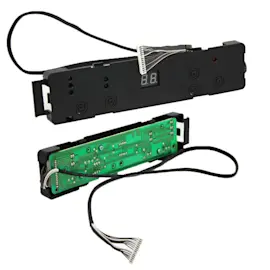
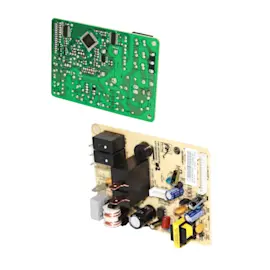
- Compare your control panel layout to the parts list (for example, the dehumidifier control board 6871A10141C and dehumidifier display board 6871A20460A)
- Check whether your unit uses a specific fan style like the fan 5900A20007B
- Match cabinet and base style (such as cabinet 3090A10042A and base 3041A10042A)
Why it matters
Dehumidifiers often have multiple versions that look similar; using the exact model number ensures the right electrical parts (like the power cord) and refrigeration components fit and function correctly.
Last updated: March 2026