 Installation guide
 Owner’s manual
 Error Codes



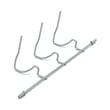
How to put a Frigidaire dishwasher into diagnostic mode?
On the Frigidaire FGID2466QF5A dishwasher, the Use & Care information we have does not list a dedicated diagnostic or service test mode key sequence. If you need to troubleshoot a problem, we recommend using the normal cancel/reset and control-lock functions described in the FGID2466QF5A use & care manual.
These steps are model-appropriate and often resolve “won’t start” or “stuck” behavior.
- Cancel a running cycle: press and hold START/CANCEL for 3 seconds; the dishwasher runs a 90-second drain, then you can select a new cycle.
- Unlock the controls (Child Lock): press and hold DELAY START for 3 seconds to toggle the control lock.
- Power reset: turn off power at the breaker for about 30 seconds, then restore power and try a cycle.
- Door interruption behavior: if the door is opened mid-cycle, press START/CANCEL and close the door within 10 minutes to continue.
On many dishwashers, diagnostic mode is documented only in a tech sheet (often stored behind the toe panel or inside the control area), not in the consumer Use & Care guide. For FGID2466QF5A, we cannot confirm a specific button sequence from the model-specific Use & Care information.
| Symptom | Most common quick check | What it points to |
|---|---|---|
| Won’t start | Controls locked, door not latched | Door latch or UI setting |
| Won’t drain | Kinked drain hose, disposer plug not knocked out | Drain path restriction |
| Leaks | Door not sealing, unit not level | Door seal or installation issue |
If the door will not latch consistently, inspect the strike and latch area; a worn latch can prevent cycles from starting. If replacement is needed, use the model-matched dishwasher door latch 5304525218.
Diagnostic mode can be helpful, but using the correct cancel/reset and lock procedures first often restores normal operation without parts replacement. When a true failure exists, these steps help narrow the issue to the door latch, drain system, or controls.
Last updated: January 2026
What is the most common problem with the Frigidaire dishwasher?
For the Frigidaire FGID2466QF5A dishwasher, the most common service issue we see is a drain-related problem (water left in the bottom of the tub) caused by a clog in the filter/glass trap area, a kinked drain hose, or a weak drain pump. Use the FGID2466QF5A use & care manual to confirm the normal “water in tub” guidance and cleaning steps.
Start with these no-parts steps before replacing anything:
- Cancel the cycle and let the unit run its drain (this model uses a timed drain when you hold START/CANCEL).
- Check the glass trap and filter area for debris (bones, labels, broken glass).
- Verify the drain hose is not kinked and has a proper high loop under the sink.
- If connected to a disposer, make sure the disposer is empty and the inlet knockout plug was removed.
- Run hot water at the sink until it is hot (about 120°F) before starting a cycle.
If the FGID2466QF5A consistently leaves water behind after completing a cycle, these parts are common suspects:
- Dishwasher filter 154283005 (restricted filter can slow drainage and recirculation)
- Drain pump a A00126401 (weak or jammed pump can’t push water out)
- Dishwasher drain hose 807117001 (internal blockage or routing issue)
- Dishwasher check valve 807048001 (can stick and prevent proper drain flow)
| What you notice | Most likely cause | First action |
|---|---|---|
| Water in bottom after cycle | Clog at filter/glass trap, hose kink | Clean filter area; check hose routing |
| Humming but no drain | Pump jam or obstruction | Inspect pump inlet area; clear debris |
| Poor cleaning plus standing water | Filter restriction | Clean or replace filter |
| Intermittent draining | Check valve sticking | Inspect check valve for debris |
Drain problems can also cause odor, redeposit food soils, and longer cycle times because the dishwasher cannot exchange dirty water for clean rinse water efficiently.
Last updated: January 2026
How do I do a hard reset on my Frigidaire dishwasher?
For a hard reset on your Frigidaire FGID2466QF5A dishwasher, we recommend turning off power at the circuit breaker (or unplugging it if accessible) for about 5 minutes, then restoring power. You can also cancel the current cycle by holding START/CANCEL for 3 seconds, as described in the FGID2466QF5A use & care manual.
- Cancel and drain (soft reset): Press and hold START/CANCEL for 3 seconds; the dishwasher runs about a 90-second drain, then you can select a new cycle.
- Hard reset (power reset): Turn OFF the dishwasher’s breaker for 5 minutes, then turn it ON.
- Door-interruption recovery: If you opened the door mid-cycle, press START/CANCEL and close the door promptly (within about 10 minutes) so the unit can resume.
- Check control lock: If buttons won’t respond, unlock by pressing and holding DELAY START for 3 seconds.
- Turn the dishwasher OFF at the household circuit breaker.
- Wait 5 minutes.
- Turn the breaker ON.
- Select a cycle, press START/CANCEL, then close the door to latch.
| Reset method | What it does | When to use it |
|---|---|---|
| START/CANCEL hold (3 sec) | Cancels cycle and drains | Stuck cycle, want to restart cleanly |
| Breaker OFF (5 min) | Reboots the electronic control | Unresponsive keypad, odd behavior |
| DELAY START hold (3 sec) | Locks or unlocks controls | Buttons don’t work but display has power |
Resetting helps clear temporary control glitches and can confirm whether the issue is a one-time interruption or something that needs troubleshooting (door not latching, drain restriction, or a control problem).
- Confirm the door is fully closed and latching; the dishwasher will not start if it senses the door is open.
- Check for a kinked drain hose or a blockage if it will not drain.
- If the console has power but won’t start, verify Control Lock is off and repeat the power reset once.
If you suspect the door is not latching, a compatible replacement is the dishwasher door latch 5304525218.
Last updated: January 2026





