 Installation guide
 Owner’s manual


How do I reset the lid lock on my whirlpool washer?
On the Whirlpool GCAM2792TQ2 commercial washer, a lid lock “reset” is usually a simple power reset plus a proper restart: unplug the washer for about 5 minutes, plug it back in, close the lid fully, then pull out the Cycle Control knob to start a new cycle. For model-specific start/stop steps, use the GCAM2792TQ2 owner’s manual.
Quick reset steps (most common)
- Unplug the washer for 5 minutes (this clears many temporary control glitches).
- Plug the washer back in.
- Close the lid firmly (make sure it is fully seated).
- Select a cycle and pull out the Cycle Control knob to start.
- If the washer was paused, push in the Cycle Control knob to stop, then pull it out again to restart.
If the lid still will not unlock or the washer will not start
These checks focus on common mechanical and electrical causes that mimic a “bad lid lock.”
- Confirm the washer is not mid-cycle; many washers keep the lid locked until the basket stops.
- Make sure the washer is level; excessive tub movement can interfere with lid switch operation.
- Check for a load that is off-balance or overloaded; re-center the basket and redistribute items.
- Inspect the lid strike area for detergent buildup or damage.
- If you suspect a switch problem, testing with a meter is the fastest way to confirm.
| Symptom | What it usually points to | What to do next |
|---|---|---|
| Won’t start, acts like lid is open | Lid switch not closing, lid not fully shut | Re-close lid, check strike alignment, review manual start steps |
| Stops during cycle, then won’t restart | Intermittent lid switch or vibration issue | Level washer, rebalance load, inspect lid area |
| Lid stays locked after cycle ends | Basket not fully stopped or control glitch | Wait for stop, then do the 5-minute power reset |
Why it matters
On the GCAM2792TQ2, the lid switch function is a safety interlock. If the washer does not sense the lid as closed, it can prevent agitation or spin, which looks like a “lid lock” failure even when the lock itself is fine.
Parts that are commonly involved (when it is not just a reset)
If the lid area checks out and resets do not help, the lid switch circuit is a common repair path. For this model, a related electrical part you may see in the parts list is the switch 285671.
Last updated: January 2026
How to fix f4 error code whirlpool washer?
On the Whirlpool GCAM2792TQ2 commercial washer, an “F4” code is most often handled by resetting power and then checking the basics that stop the washer from filling, agitating, or draining correctly (power, lid closed, water supply, and hoses). Use the GCAM2792TQ2 owner's manual for the exact cycle and troubleshooting steps.
Quick reset and basic checks
- Unplug the washer (or disconnect power) for 1 minute, then restore power.
- Confirm the lid is fully closed.
- Verify both hot and cold water faucets are turned on.
- Check inlet and drain hoses for kinks or pinches.
- Advance the timer to the start of a cycle, then pull to start.
If the washer will not fill or fills slowly
Clogged inlet screens and restricted hoses are common causes of fill problems.
- Turn off both water faucets.
- Remove the inlet hoses and check the inlet valve screens for debris.
- Reinstall hoses carefully; tighten by hand, then snug with pliers (do not overtighten).
- If hoses are older, replace inlet hoses every 5 years as preventive maintenance.
Parts that commonly relate to fill issues
| Symptom | What to check | Part that may be involved |
|---|---|---|
| No water entering | Faucets on, screens clear, hose not kinked | Washer water inlet valve WP8578341 |
| Intermittent fill | Loose connections, restricted hose | Hose WP353244 |
If the washer will not drain or spins poorly
- Run a drain and spin setting and listen for the pump.
- Check the drain hose for kinks or a blocked standpipe.
- If the pump hums but does not move water, inspect the pump for obstructions.
Why it matters
On a commercial washer like the Whirlpool GCAM2792TQ2, a fill or drain problem can stop the cycle mid-stream, cause slow spinning, and lead to poor rinsing from excess suds. Correcting the root cause prevents repeat errors and downtime.
Last updated: January 2026
What is the average lifespan of GCAM2792TQ2?
The average lifespan of a Whirlpool commercial washer like model GCAM2792TQ2 is 15 years with normal commercial use and routine maintenance. Consistent loading practices, proper leveling, and fixing small leaks or vibration issues early are what keep this washer running longer.
What affects lifespan most
- Load size and balance: chronic overloading or unbalanced loads accelerate wear on the drive system and suspension.
- Drain performance: slow draining strains the pump and can leave water in the tub.
- Vibration and out-of-level setup: increases wear on the basket, springs, and drive components.
- Water quality and detergent use: excess suds and mineral buildup shorten seal and valve life.
- Preventive maintenance: tightening, cleaning, and inspecting hoses and clamps prevents bigger failures.
Common wear items to watch on this model
If you see symptoms below, these are typical parts that often need attention on top-load commercial washers:
| Symptom | Likely area | Example part available for GCAM2792TQ2 |
|---|---|---|
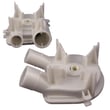
| Won’t drain or drains slowly | Drain system | Washer drain pump WP3363394 |
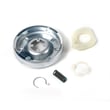
| Loud spin, burning smell, weak spin | Drive system | Clutch 285785 |
| Agitator slips or won’t “ratchet” | Agitation | Agitator dog 80040 |
| Leaking from tub area | Seals and gaskets | Washer tub seal WP8577376 |
Maintenance steps that extend service life
- Keep the washer level and re-check after moving it.
- Use the correct detergent amount; avoid oversudsing.
- Inspect fill and drain hoses for bulges, cracks, or seepage.
- Address new noises early (clutch, drive block, suspension springs).
- Follow the care and use guidance in the GCAM2792TQ2 owner's manual.
Why it matters
Commercial washers are built for heavy use, but most early failures come from vibration, drainage problems, and small leaks that turn into bearing, seal, or drive damage. Catching those issues early is the difference between a quick repair and a major teardown.
Last updated: March 2026





