 Installation guide
 Owner’s manual





How do I get my Kenmore Elite dishwasher out of lock mode?
To take your Kenmore Elite dishwasher model 66512783K311 out of lock mode, press and hold TOP RACK ONLY for 3 seconds until the Locked light turns off. If the controls do not respond, wake the control first, then repeat the 3-second press.
Quick unlock steps (66512783K311)
- Press START/RESUME or CANCEL/DRAIN to wake the control (or open and close the door).
- Press and hold TOP RACK ONLY for 3 seconds.
- Confirm the Locked indicator light turns off.
- Try starting a cycle normally.
- If you press a button while locked, the lock light typically flashes to indicate the panel is still locked.
If it still will not unlock
These checks fix most “stuck in lock mode” complaints on Kenmore Elite dishwashers.
- Door not fully latched: Close the door firmly, then retry the 3-second hold.
- Sleep mode active: Wake the control (START/RESUME, CANCEL/DRAIN, or open/close door), then unlock.
- Keypad not registering: Press and hold the pad steadily; do not tap.
- Control panel moisture: Dry the panel and your hands, then retry.
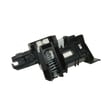
- Latch issue: If the door will not latch consistently, inspect the latch assembly; a failing latch can make the dishwasher act “dead” or unresponsive. Consider the dishwasher door latch WPW10653840.
What “lock mode” does (and does not do)
Control Lock is designed to prevent unintended button presses between cycles.
| Feature | What happens when locked |
|---|---|
| Buttons/pads | Disabled (cycle cannot start) |
| Door | Can still open and close |
| Indicator | “Locked” light stays on |
Why it matters
If Control Lock is on, the dishwasher cannot start, even if power is good and the door is closed. Unlocking first prevents unnecessary part replacement and helps you confirm whether you have a true control or latch problem.
For the exact control descriptions and indicator behavior for your dishwasher, use the 66512783K311 owner's manual.
Last updated: February 2026
How to identify Kenmore dishwasher model?
To identify your Kenmore dishwasher model, we look for the model and serial tag on the inside edge of the door or on the tub frame when the door is open. For your Kenmore Elite dishwasher, the model number format often starts with 665, like 66512783K311.
Where to find the model number on a Kenmore Elite dishwasher
Check these common locations first (in order):
- Inside the door opening on the left or right inner frame
- Along the top edge of the door (visible when the door is open)
- On the tub wall near the door opening
- Behind the toe panel at the bottom front (if the label is missing inside)
- On the side of the cabinet frame (sometimes visible after removing the toe panel)
For diagrams and model-specific documentation, use the 66512783K311 owner’s manual.
What the model number looks like (and why it matters)
Kenmore dishwashers built on the Whirlpool platform commonly use a 3-digit prefix like 665 followed by additional digits and letters. That full model number is what we use to match the correct parts list, installation details, and troubleshooting steps.
Quick check table
| What you see on the tag | What it means | What to do next |
|---|---|---|
| 665.xxxxxxxx or 665XXXXXXXX | Kenmore dishwasher model family | Use the full number to look up parts |
| Serial number (letters and numbers) | Production identifier | Keep it for service records |
| Missing or unreadable tag | Label worn off or damaged | Check paperwork or the manual |
Tips if the label is missing or hard to read
- Wipe the tag gently with a damp cloth; grease and detergent film can hide characters
- Use a flashlight and take a close-up photo; zooming in often reveals faint printing
- Check your purchase receipt or installation paperwork for the full model number
- If you remove the toe panel, turn power off at the breaker first
Why it matters
Using the exact model number (not just “Kenmore Elite”) prevents ordering the wrong dishwasher parts like a door latch, dishrack roller, or water inlet valve, and it helps ensure troubleshooting steps match your control system and cycle design.
Last updated: February 2026
Is there a filter in a Kenmore Ultra Wash dishwasher?
Yes. The Kenmore Elite 66512783K311 Ultra Wash dishwasher uses an ULTRACLEAN removable filter system at the bottom center of the tub, with an upper filter assembly and a lower filter that need regular cleaning to keep wash performance strong (typically monthly). See the 66512783K311 owner’s manual for the exact removal and reinstallation steps.
Where the filter is and what it does
The ULTRACLEAN filtration system is a triple filtration design made up of two removable pieces:
- Upper filter assembly: helps keep oversized items and fine particles out of the pump
- Lower filter: helps keep food from being recirculated back onto dishes
- Location: bottom center of the dishwasher tub
- Maintenance goal: sustain peak cleaning performance and reduce redeposit
How to remove, rinse, and reinstall the filters
We recommend this routine for the 66512783K311:
- Remove the bottom rack for access.
- Turn the upper filter assembly to unlock it (then lift it out).
- Lift out the lower filter.
- Rinse both filters under running water until soils are removed.
- Use a soft brush if you have hard-water deposits or stuck-on debris.
- Reinstall: seat the lower filter under the locating tabs, insert the upper filter, then rotate the upper filter clockwise until it locks.
Quick checklist: correct filter seating
| What you check | What it means |
|---|---|
| Upper filter does not spin freely | It is locked in place |
| Lower filter sits flat under tabs | It is seated correctly |
| No gaps around the filter opening | Water flow stays controlled |
Why it matters
Running cycles with dirty or incorrectly installed filters can reduce cleaning results and can let debris reach the pump area. Keeping the ULTRACLEAN filters clean helps maintain water circulation, spray performance, and overall dishwasher efficiency.
Last updated: February 2026
What are common problems with Kenmore dishwashers?
Common problems we see on the Kenmore Elite 66512783K311 dishwasher include not starting, not filling, not draining, poor cleaning, and poor drying. Many issues come down to the door not latching, a paused cycle (Start/Resume blinking), hard water buildup, or a restriction in the drain path; our 66512783K311 owner's manual walks through these checks.
Most common symptoms (and what they usually point to)
- Dishwasher does not run: door not fully closed and latched, Start/Resume blinking, no power (tripped breaker or blown fuse)
- Will not fill: water supply issue or a failed inlet valve
- Water remains in tub or will not drain: kinked drain hose, disposer knockout plug not removed, drain obstruction, drain pump problem
- Detergent remains in dispenser: dispenser blocked by a large item, tablet not dissolving due to poor spray or low water temperature
- Not drying or cloudy/spotted dishes: rinse aid not used, hard water, incoming water temperature too low
Quick checks we recommend first
- Confirm the door is closed and latched; loading can interfere with the door closing.
- If the Start/Resume light is blinking, press START/RESUME and close the door within 3 seconds.
- Verify power at the dishwasher; check the house breaker or fuse.
- For draining complaints, inspect the drain hose for kinks and check for food clogs in the drain path.
- If connected to a food waste disposer, confirm the knockout plug was removed from the disposer inlet.
- For spotting and poor drying, use rinse aid and confirm incoming hot water is about 120°F (49°C).
Parts that commonly solve these problems
| Symptom | Common part involved | What it does |
|---|---|---|
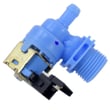
| Won’t fill | Dishwasher water inlet valve W11175771 | Opens to let water into the tub |
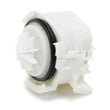
| Won’t drain | Dishwasher drain pump WPW10531320 | Pumps water out through the drain hose |
| Won’t start or stops mid-cycle | Dishwasher door latch WPW10653840 | Confirms the door is shut so the cycle can run |
Why it matters
These symptoms often share the same root causes (door latch, drain restrictions, water temperature, hard water). Doing the quick checks first prevents unnecessary part replacement and helps restore normal wash performance faster.
Last updated: February 2026
Why is the start button not working on my Kenmore Ultra Wash quiet guard?
If the Start/Resume button won’t respond on your Kenmore Elite dishwasher model 66512783K311, the most common causes are Control Lock being enabled, the door not fully latching, or the cycle needing to be resumed after the door was opened. Use the steps in the 66512783K311 owner's manual to confirm the lock and start sequence.
Quick checks that fix most “won’t start” issues
- Make sure the door is closed and latched; a partially latched door can keep the dishwasher from running.
- Look for a Locked indicator; when Control Lock is on, all buttons are disabled.
- If you opened the door for more than a few seconds, press START/RESUME again to continue.
- If the Start/Resume light is blinking, press START/RESUME and close the door within 3 seconds.
- Confirm you actually selected a wash cycle (some models will not start without a cycle selection).
- Check household power: a tripped breaker or blown fuse can leave the control unresponsive.
Control Lock and “sleep mode” reset (model-specific)
Control Lock is designed to prevent accidental button presses between cycles.
| What you see | What it means | What to do |
|---|---|---|
| Locked light on | Controls are disabled | Press and hold TOP RACK ONLY for 3 seconds to unlock |
| Buttons don’t respond after unlocking attempt | Control may be in sleep mode | Press START/RESUME or CANCEL/DRAIN, or open and close the door, then try unlocking again |
When a part is likely involved
If the dishwasher has power but still will not start even with Control Lock off and the door firmly latched, a failed latch switch or control can be the cause.
- Inspect the latch for looseness or misalignment; if it does not “click” firmly, the dishwasher may not recognize the door as closed.
- If the latch feels fine but the unit still will not start, testing the latch circuit is a common next step.
- If the latch is damaged or not engaging, replacing the dishwasher door latch WPW10653840 is a typical repair for start problems.
Why it matters
On 66512783K311, the Start/Resume logic is tied to safety interlocks (door latch) and user protections (Control Lock). Fixing the lock or latch issue restores normal starting and prevents mid-cycle interruptions.
Last updated: February 2026









