Owner’s manual
 Error Codes


How to remove bottom grill from KitchenAid refrigerator?
To remove the bottom grill (base grille) on your KitchenAid KRFF507HPS02 refrigerator, firmly grasp the grille and pull it straight toward you. Open the freezer drawer first so you can reach the brake feet area behind the grille if needed; then snap the grille back on when finished.
Quick steps
- Open the freezer drawer for better access.
- Stand centered in front of the grille.
- Grip the base grille with both hands near the ends.
- Pull straight outward toward you (do not pry upward).
- Set the grille aside on a flat surface to avoid bending it.
- Reinstall by aligning the tabs and pressing until it snaps into place.
What you can do once the grille is off (and why it matters)
Removing the base grille gives access to the adjustable brake feet and the front condenser area. This matters because correct leveling helps doors close properly, and a clean condenser helps the refrigerator cool efficiently.
Common issues and fixes
| What you notice | Likely cause | What to do |
|---|---|---|
| Grille will not budge | It is fully snapped in | Pull straight out with a firm, even tug on both sides |
| Grille feels stuck on one side | One side clip is still engaged | Re-grip closer to the stuck side and pull straight out |
| Doors seem uneven after moving fridge | Brake feet need adjustment | Remove grille and adjust brake feet evenly (clockwise to lower) |
| Dust buildup behind grille | Pet hair or dusty area | Vacuum with a soft brush, then reinstall grille |
Safety and handling tips
- Unplug the refrigerator before cleaning the condenser area.
- Pull straight outward; twisting can crack clips.
- Do not rely on door gasket magnets to hold doors in place if you are doing any hinge or door work.
For model-specific illustrations and the exact “base grille” location, use the KRFF507HPS02 owner's manual.
Last updated: February 2026
What is the bottom compartment of a fridge called?
On the KitchenAid KRFF507HPS02, the bottom compartment is typically the freezer drawer; inside the fresh-food section, the lowest storage areas are usually the crispers (produce drawers) and, on many setups, a pantry drawer. See the KRFF507HPS02 use and care guide for the exact compartment names and locations.
Common “bottom compartment” names (and what they store)
- Freezer drawer: frozen foods; ice storage access on some designs
- Crispers: fruits and vegetables; designed to help manage humidity
- Pantry drawer: deli items, snacks, party trays; often a wide, easy-slide drawer
- Pull out tray: a full-width slide-out shelf for large platters and pizza boxes
Quick ID guide for KRFF507HPS02
| If you mean this area | What it’s called | Typical use |
|---|---|---|
| Very bottom, below both refrigerator doors | Freezer drawer | Frozen food storage |
| Bottom of the refrigerator section (fresh-food side) | Crispers | Produce storage |
| Wide drawer above the freezer area (fresh-food side) | Pantry drawer | Deli and quick-grab items |
Why it matters
Using the right compartment helps food last longer and keeps temperatures and humidity where they belong. For example, crispers are meant for produce, while the freezer drawer is designed for stable freezing and long-term storage.
Related maintenance tip
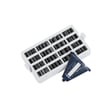
If odors build up in the fresh-food compartment, replacing the air filter can help. This model uses a carbon-style air filter such as the refrigerator air filter W10311524.
Last updated: February 2026
What is the most common problem with a KitchenAid refrigerator?
For the KitchenAid KRFF507HPS02 bottom-mount refrigerator, the most common issues we see are ice maker and water dispensing problems, temperature swings from airflow restrictions, and “it’s running a lot” or new noises that are often normal for a high-efficiency compressor (as described in the KRFF507HPS02 owner's manual).
Most common symptoms and what usually causes them
- Ice maker not making ice or slow ice: water supply restriction, filter overdue, or an ice maker component issue.
- Warm refrigerator section or uneven temps: door left ajar, frequent openings, warm food load, or blocked air vents.
- Refrigerator runs a lot: normal for high-efficiency designs, especially in hot rooms or after loading groceries.
- Unfamiliar noises (pulsating, popping, hissing, whirring): often normal operating sounds during cooling cycles.
- Water leaks or drips: commonly tied to water line connections, filter seating, or drain issues.
Quick checks we recommend first (KRFF507HPS02)
- Confirm doors fully close and nothing blocks them.
- Give it time after changes: after adjusting controls, recheck temps in about 24 hours.
- Check airflow: keep items away from the top, left, rear air vent in the fresh food compartment.
- If controls act odd after a power event: unplug 5 seconds, plug in, then wait 30 seconds before opening doors or touching controls.
- For water and ice issues: replace the filter and purge air from the dispenser.
| Problem area | What you notice | Common next step |
|---|---|---|
| Ice maker / dispenser | No ice, small cubes, slow fill | Replace filter; check inlet valve function |
| Airflow / vents | Too cold in spots, warm in others | Clear vents; avoid overpacking |
| Normal operation | Longer run times, new sounds | Verify temps; allow 24 hours after adjustments |
Parts that commonly relate to these problems
These are model-matched parts customers often replace when symptoms point to a failed component (not just a setting or airflow issue):
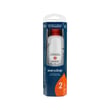
- Refrigerator cartridge wrap assembly EDR2RXD1 (water filter)
- Valve, dual water W11482383 (water inlet valve for ice maker and dispenser)
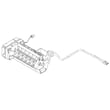
- Assembly, icemaker W11658802 (ice production issues)
- Refrigerator air filter W10311524 (odor control, not cooling)
Why it matters
Most “common problems” are either normal high-efficiency behavior (longer run times and certain sounds) or preventable performance issues (blocked vents, doors not sealing, overdue filters). Fixing those first avoids unnecessary part replacement.
Last updated: February 2026
How to find model number on KitchenAid fridge?
On your KitchenAid KRFF507HPS02 refrigerator, the model number is printed on the rating label located on the inside wall of the fresh food (refrigerator) compartment. Open the refrigerator door and look along the interior side wall for the adhesive label with both model and serial numbers.
Where to look (fast checklist)
- Open the refrigerator (upper) door, not the freezer drawer
- Check the inside wall of the refrigerator compartment
- Look for a silver or white adhesive rating label
- Confirm you see both Model Number and Serial Number on the same label
- Write the numbers down exactly as shown (letters and numbers)
What the label looks like
Most KitchenAid refrigerators use an adhesive rating label that lists the model and serial number together. On major appliances, it is commonly a silver label; on some units it may appear white.
| What you need | Why you need it | Example format |
|---|---|---|
| Model number | Matches the correct parts and diagrams | KRFF507HPS02 |
| Serial number | Helps identify production details for service | Mix of letters and numbers |
Why it matters
Using the exact model number prevents ordering the wrong KitchenAid refrigerator parts (like an ice maker, water filter, door switch, or control board) because small model variations can use different components.
Next step after you find it
Once you have the model number, use it to confirm maintenance items and accessories in the KRFF507HPS02 owner’s manual. For example, this model uses an air filter accessory that corresponds to refrigerator air filter W10311524 when it is time to replace it.
Last updated: February 2026
Why is water collecting in the bottom of my KitchenAid refrigerator?
Water collecting in the bottom of your KitchenAid KRFF507HPS02 refrigerator is usually caused by a defrost drain that’s clogged or frozen, so defrost water can’t flow to the drain pan and instead spills into the fresh food section or freezer drawer area. See the KRFF507HPS02 owner’s manual for the exact access steps for your compartment panels.
Most common causes (and what to check first)
- Clogged defrost drain: Food debris or sludge blocks the drain hole.
- Frozen drain tube: Ice forms in the drain path during the defrost cycle.
- Door not sealing well: Warm, humid air creates excess frost that overwhelms the drain.
- Refrigerator not level: Water may not flow correctly toward the drain.
- Drain pan shifted or cracked: Less common, but can cause water to show up where it shouldn’t.
Quick fix steps we recommend
- Unplug the refrigerator (or switch off power at the breaker).
- Remove items and check for ice on the floor of the compartment where water is pooling.
- Melt ice safely with warm (not boiling) water and towels; avoid sharp tools.
- Clear the drain opening using warm water and a flexible plastic tube or pipe cleaner.
- Confirm door sealing with the paper test; if the paper slides out easily, inspect the gasket.
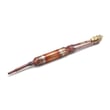
If you find heavy frost or repeated icing, inspect the defrost system components, including the refrigerator defrost heater WP12729128.
Symptoms and likely causes
| What you notice | Most likely cause | What to do next |
|---|---|---|
| Water under crisper drawers | Drain partially clogged | Flush drain with warm water |
| Sheet of ice on freezer floor | Drain frozen | Thaw, then clear drain tube |
| Water after filter change | Air in water line causing dispenser drip | Flush water system per manual |
| Frost plus leaking | Door seal leak or door alignment | Inspect gasket, level unit |
Why it matters
Standing water can refreeze into ice, block airflow, and lead to temperature swings. It can also cause odors and damage shelves, drawers, and flooring if it overflows.
Last updated: February 2026
How to get KitchenAid replacement parts?
For your KitchenAid KRFF507HPS02 bottom-mount refrigerator, we recommend ordering replacement parts by matching your model number and the exact part ID to ensure fit and compatibility. Your model and serial number are located on the inside wall of the refrigerator compartment (see the KRFF507HPS02 owner’s manual).
The fastest way to order the right part
- Find the model and serial number label inside the fresh food compartment.
- Identify the part you need (example: water filter, air filter, ice maker, door gasket).
- Match the part by part ID (best) or manufacturer part number.
- Confirm finish and side-specific parts (left-hand vs right-hand doors).
- Order the part and keep your receipt and packaging until the repair is complete.
Common KRFF507HPS02 parts customers replace
These are frequently ordered items for this model:
| What you need | What it affects | Example part for KRFF507HPS02 |
|---|---|---|
| Water filter | Taste, flow, ice quality | Refrigerator cartridge wrap assembly EDR2RXD1 |
| Air filter | Odors in fresh food section | Refrigerator air filter W10311524 |
| Ice maker assembly | No ice, small cubes, slow production | Assembly, icemaker W11658802 |
| Dual water valve | No water to dispenser or ice maker | Valve, dual water W11482383 |
Tips to avoid ordering the wrong part
- Use the part ID when possible; it is the most precise match.
- For doors and gaskets, verify color and finish (stainless vs black stainless).
- If you are replacing a filter, follow the replacement steps in the KRFF507HPS02 owner’s manual.
- If you are unsure whether a water issue is the filter or the valve, use how to diagnose a faulty refrigerator water inlet valve to narrow it down before ordering.
Why it matters
Using the correct KitchenAid KRFF507HPS02 part helps restore proper cooling, water dispensing, and ice production without repeat repairs. Matching by model number and part ID also reduces returns and downtime.
Last updated: February 2026