


How do I know what model range hood I have?
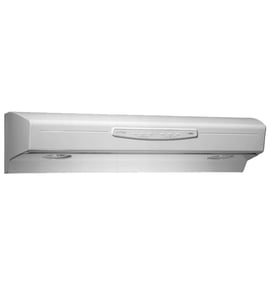
To identify your range hood model, look for the model and serial tag on the hood itself. On KitchenAid range hoods like model KWVU205YBA0, the tag is commonly on the top of the hood, on the underside near the front edge, or behind the grease filter.
Where to look on a range hood
Check these spots in order (most common first):
- Underside of the hood (near the lights, fan, or control area)
- Behind the grease filter (remove the filter and look on the inner frame)
- Top of the hood (you may need a flashlight and step stool)
- Inside the wiring or blower area cover (only if easily accessible)
Quick steps to find the model tag
- Turn the hood lights and fan off.
- If you can, switch off power at the breaker for safety.
- Remove the grease filter and set it aside.
- Look for a sticker or metal plate that lists model and serial.
- Write the model number exactly as shown (letters and numbers matter).
What the label usually looks like
| What you’ll see | Why it helps |
|---|---|
| Model number (example: KWVU205YBA0) | Ensures you get the correct parts and diagrams |
| Serial number | Helps match production version when parts vary |
| Electrical ratings (volts/amps) | Useful for troubleshooting and safe replacement parts |
Why it matters
Using the exact model number prevents ordering the wrong switch, receptacle, or grease filter. Once you have the model, you can match parts by description and ID, such as the grease filter WPW10370046 for this KitchenAid range hood.
Last updated: February 2026
What are the parts of a range hood called?
A range hood is typically made up of the hood body (canopy), a blower (fan) system, controls (switches or an electronic control), lighting, and filters. On KitchenAid model KWVU205YBA0, the most commonly named service parts you will see include switches, a grease filter, and electrical connection parts.
Common range hood part names (and what they do)
- Hood canopy (hood body): The main shell that captures smoke, steam, and grease.
- Blower/fan assembly: Moves air through the hood and into the ducting (or through charcoal filters on recirculating setups).
- Grease filter: Traps grease before it reaches the blower and ductwork.
- Control panel: The area with fan speed and light controls.
- Switches/control: Turn the fan and lights on and off; may include multiple fan speeds.
- Light socket and lamps: Provide cooktop lighting.
Parts you can order for KWVU205YBA0 (examples)
These are common names you may see in the parts list for this model:
Quick guide: “name on the diagram” vs “what you call it”
| What customers often call it | What it’s usually listed as | What it affects |
|---|---|---|
| Fan button | Switch | Fan won’t start, wrong speed |
| Mesh screen | Grease filter | Poor airflow, greasy buildup |
| Light plug/socket | Receptacle or light socket | Lights flicker or won’t turn on |
Why it matters
Using the correct part name helps you match the right diagram and order the right replacement the first time, especially for look-alike items such as multiple switches used for different functions.
For symptom-based help, we recommend starting with range hood fan doesn't work to narrow down whether the issue is a switch, wiring connection, or the blower circuit.
Last updated: February 2026
Does KitchenAid make range hoods?
Yes. KitchenAid makes range hoods, including under-cabinet and built-in styles; your KitchenAid range hood model KWVU205YBA0 is one example, and we support it with model-specific replacement parts.
What this means for KWVU205YBA0 owners
If you have a KitchenAid hood like KWVU205YBA0, you can maintain it the same way you would other major-appliance ventilation products: keep airflow clear, clean the grease filter regularly, and replace worn electrical parts (switches, receptacles) when symptoms show up.
Common maintenance and repair items include:
- Cleaning or replacing the grease filter to keep airflow strong
- Replacing a worn fan or light switch if buttons stop responding
- Checking the light socket/receptacle if lights flicker or fail
- Tightening mounting hardware if you hear vibration or rattling
Parts you can replace on this model
These are examples of KitchenAid KWVU205YBA0 parts we commonly see customers order:
| Symptom or need | Part type | Example part for this model |
|---|---|---|
| Fan or lights won’t toggle reliably | Switch | Switch WPW10240604 |
| Another control not responding | Switch | Switch WPW10370009 |
| Lights not working due to a bad connection | Receptacle | Receptacle W10565470 |
| Poor airflow, grease buildup | Grease filter | Grease filter WPW10370046 |
Why it matters
A properly working KitchenAid range hood helps remove smoke, grease, and odors; keeping the grease filter clean and the controls working protects the fan motor, improves ventilation performance, and reduces noise.
Helpful DIY troubleshooting
If your hood is acting up, these guides walk through the most common causes and fixes:
Last updated: February 2026
How to replace range hood buttons?
On the KitchenAid KWVU205YBA0 range hood, “buttons” are typically part of the control switch assembly. Replacing them usually means shutting off power, removing the control panel cover, transferring wires one at a time to the new switch, then reinstalling the panel and testing fan and lights.
Before you start (safety and prep)
- Turn off power at the breaker; do not rely on the hood switch alone.
- Verify the hood is dead (fan and lights do not run).
- Protect the cooktop with a towel to catch screws.
- Take a quick photo of the wiring before you disconnect anything.
- Use needle-nose pliers for tight spade connectors (pull on the connector, not the wire).
Basic replacement steps (most KWVU205YBA0 control panels)
- Remove the grease filter(s) to access the underside of the hood.
- Remove the screws holding the control panel or switch housing.
- Slide the switch/control assembly out enough to access wiring.
- Move wires from the old switch to the new switch one terminal at a time.
- Reinstall the switch, secure the panel, reinstall filters, then restore power.
Which part is the “button” on this model?
On KWVU205YBA0, the most common button-related replacements are the switches. If your fan or light button is intermittent, stuck, or only works on certain speeds, start with the switch that matches your function.
| Symptom | Most likely part to check | Notes |
|---|---|---|
| Fan won’t change speeds or won’t turn on | Switch WPW10240604 | Common for fan control issues |
| Buttons feel loose or function is inconsistent | Switch WPW10370009 | Used on some control configurations |
| Lights/fan dead and wiring looks heat-damaged | Receptacle W10565470 | Check for discoloration or melting |
Why it matters
A worn switch can cause the fan motor or lights to cut in and out, which reduces ventilation performance and can make the hood seem “dead” even when power is present.
For deeper troubleshooting before replacing parts, use our guide: range hood lights and fan don't work.
Last updated: February 2026
What is a 205 code?
A “205 code” most often refers to the (205) telephone area code, which is assigned to parts of Alabama (including the Birmingham area). It is not a standard error code used by the KitchenAid KWVU205YBA0 range hood.
What it can mean (and what it usually does not)
- Phone area code: (205) is a U.S. area code for Alabama.
- Not a range hood error code: Range hoods like the KitchenAid KWVU205YBA0 typically do not display numbered fault codes the way some ovens or washers do.
- Possible mix-up: People sometimes say “205 code” when they mean a symptom (fan not working, lights out, fan turns on by itself).
If you meant a problem with the KWVU205YBA0 range hood
Start with the most common, fast checks:
- Confirm the hood has power (breaker on, outlet powered if applicable).
- Try each fan speed and the light separately.
- Check for a stuck or intermittent control (a worn switch can act erratically).
- Inspect and clean the grease filter; heavy buildup can affect airflow and performance.
- If the fan or lights are dead, inspect wiring connections at the control and light socket.
Common parts related to “no power” or “controls acting up”
| Symptom | Common suspect | Example part for this model |
|---|---|---|
| Fan or lights do not respond | Control switch | Switch WPW10240604 or switch WPW10370009 |
| Poor airflow, greasy buildup | Grease filter | Grease filter WPW10370046 |
Why it matters
Using the right definition saves time. If “205” is a phone area code, it is unrelated to repair. If you are troubleshooting a fan or light issue, focusing on the switch and airflow parts is the fastest path to a fix.
For step-by-step troubleshooting by symptom, use our DIY guide: range hood doesn't work at all.
Last updated: February 2026