 Owner’s manual
 Error Codes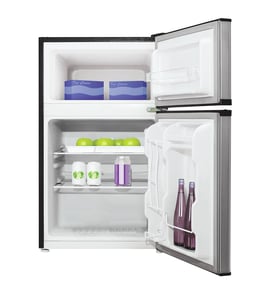



How do I know what water filter to buy for my Samsung refrigerator?
For the Samsung SKR2D13PW compact refrigerator, the correct water filter is the one specified for your exact model and filter location; the fastest way to confirm is to match the filter part number listed in the SKR2D13PW owner's manual. If your unit does not have a water/ice system, it may not use a replaceable water filter at all.
How to identify the right filter (fastest method)
- Check the parts list section in the SKR2D13PW owner's manual for the water filter part number.
- Look inside the fresh food compartment for a filter housing (often upper right, upper left, or near the ceiling).
- Check the rear lower area for an inline filter on the water line (common on some installations).
- If there is no water line connection and no filter housing, your compact refrigerator typically does not use a water filter.
- If you find a filter, write down every character on the label (letters, numbers, and dashes) and match it exactly.
Common Samsung filter families (what the names mean)
Samsung refrigerators often use one of these filter families, but the exact fit depends on the model and housing style:
| Filter family name | Also seen as part number | Typical shape/use |
|---|---|---|
| HAF-CIN | DA29-00020B | Round, twist-in style |
| HAF-QIN | DA97-17376B | Square, push-in style |
| HAFCU1 | DA29-00003G | Round, twist-in style |
Why it matters
Using the exact filter specified for Samsung SKR2D13PW helps prevent leaks, poor water flow, and taste/odor issues; it also ensures the filter seals correctly in the housing.
Helpful related guidance
If your refrigerator has a filter and you want step-by-step replacement tips, use how to replace the water filter in a Samsung refrigerator.
Last updated: January 2026
How to force a Samsung refrigerator into defrost mode?
To force defrost on a Samsung refrigerator like model SKR2D13PW, you typically enter the service mode and select a forced defrost option using a specific button combination. Use the exact steps for your unit in the SKR2D13PW owner's manual to avoid changing other diagnostic settings.
Common forced defrost method (many Samsung models)
These steps work on many Samsung refrigerators with a display panel, but the exact buttons can vary by model.
- Close the doors (or hold the door switch closed if the lights must be off)
- Press and hold Power Freeze and Fridge together for about 8 seconds
- When the display changes (often blanks or beeps), release the buttons
- Use the same buttons to cycle through service options until you reach forced defrost
- Let the defrost cycle run; then exit service mode (often by holding the same two buttons again)
Before you start (quick safety and setup)
- Unplug the refrigerator before removing any panels or touching wiring
- Keep towels handy; defrost can create water runoff
- Do not chip ice with sharp tools; use gentle heat and time
- If you smell burning or hear repeated clicking, stop and unplug the unit
What forced defrost helps diagnose
Forced defrost is mainly a troubleshooting step when cooling performance is affected by frost buildup.
| Symptom | What forced defrost can tell you | Common next check |
|---|---|---|
| Frost-packed evaporator area | Defrost system may not be clearing ice | Defrost heater, sensor, control board |
| Warm fridge, freezer still cool | Airflow may be blocked by ice | Fan operation, vents, frost pattern |
| Clicking and no cooling | Not a defrost issue; compressor start problem possible | Start relay/overload, compressor |
Why it matters
A forced defrost can temporarily restore airflow and cooling, and it helps confirm whether a no-cool or warm-temperature complaint is related to frost buildup versus a compressor or control problem.
Last updated: January 2026
What are the most common issues with SKR2D13PW?
The most common issues we see with the Samsung SKR2D13PW compact refrigerator are warm temperatures, unusual fan noise, and compressor starting problems. These symptoms usually trace back to airflow (fans), power/start components, or control issues; the SKR2D13PW owner's manual helps confirm normal operation and settings.
Common symptoms and what they usually point to
- Not cooling or weak cooling: dirty condenser area, blocked vents, or a failed fan motor
- Rattling, buzzing, or scraping noise: damaged fan blade or fan hitting ice/debris
- Clicks but won’t start: start relay or overload protector cycling
- Intermittent cooling: control board or sensor-related issues
- Door not sealing well: warm air leaks causing longer run times and temperature swings
Parts that commonly relate to these problems
If your symptoms match, these model-specific parts are often involved:
| Symptom | Likely area | Example part for SKR2D13PW |
|---|---|---|
| Fan noise, poor airflow | Condenser fan | Refrigerator condenser fan blade DA31-00010D |
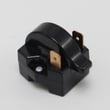
| Clicking, no start | Compressor start circuit | Refrigerator compressor start relay DA35-10013N |
| Clicking, stops quickly | Compressor protection | Refrigerator compressor overload protector DA34-10003D |
| Display or control issues | Electronics | Main pba DA41-00347B |
Quick checks we recommend before replacing parts
- Confirm the temperature control is set correctly and the unit has 24 hours to stabilize.
- Make sure air can circulate; do not pack items tightly against interior vents.
- Clean dust from the condenser area and verify the fan area is clear.
- Listen for a repeating click every few minutes; that pattern often indicates a start/overload issue.
- Check the power source; a loose plug or damaged cord can cause intermittent operation.
Why it matters
Compact refrigerators rely on steady airflow and a healthy compressor start circuit. When airflow is restricted or the start components weaken, the refrigerator runs longer, warms up, and can become noisy.
Last updated: March 2026





