 Owner’s manual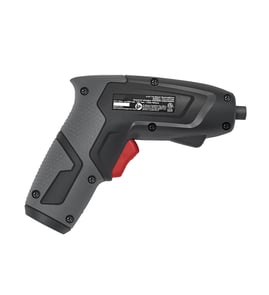

What is a powered screwdriver called?
A powered screwdriver is most commonly called a power screwdriver or cordless screwdriver. For Craftsman model 315111810, it is a single speed reversible cordless screwdriver designed to drive screws with a 1/4-inch hex bit and an adjustable torque clutch (to help prevent stripped screw heads).
Common names you will see
- Power screwdriver
- Cordless screwdriver
- Electric screwdriver
- Rechargeable screwdriver
- Single-speed reversible screwdriver
How it differs from a drill/driver
A power screwdriver is built mainly for driving screws, not drilling holes. The Craftsman 315111810 is a good example because it uses a 1/4-inch collet for hex bits and has a torque adjustment cap to control tightening force.
| Tool name | Primary job | Typical features |
|---|---|---|
| Power screwdriver | Drive screws | 1/4-inch hex collet, torque clutch, compact size |
| Drill/driver | Drill holes and drive screws | Keyless chuck, higher speed, higher torque |
| Impact driver | Drive long/large fasteners | Impact mechanism, very high torque, louder operation |
Why the name matters when buying bits and using it safely
Using the right term helps you match the right accessories and expectations. This model accepts 1/4-inch hex bits and uses a forward/reverse switch with a center lock position, so choosing standard hex-shank screwdriver bits is the best fit.
Quick tips for using a power screwdriver (like model 315111810)
- Use 1/4-inch hex screwdriver bits and insert the bit fully into the collet.
- Start with a low torque setting; increase torque only if the screw stalls.
- Use the center position (lock) when changing bits.
- When driving into walls, hold only the insulated handle and avoid hidden wiring.
- Unplug the charger after the batteries are fully charged to reduce long-term battery wear.
For the exact operating features and specifications (including speed, voltage, and charge time), use the owner's manual.
Last updated: February 2026
What is a good torque for a cordless screwdriver?
A good torque depends on the screw size and the material. For the Craftsman 315111810 single speed reversible cordless screwdriver, start at the lowest clutch setting and increase only until the screw seats firmly; this helps prevent stripped heads, damaged threads, or cracked workpieces (see the owner's manual).
Recommended torque approach (practical settings)
Because this model uses an adjustable torque clutch, the “right” torque is the lowest setting that reliably drives the fastener without slipping.
- Start low for small screws (#4 to #8) and soft materials (drywall, pine, plastic)
- Increase gradually for larger screws (#10 and up) or denser wood (oak, maple)
- Stop increasing as soon as the screw seats flush without cam-out
- If the clutch never slips and you keep stripping heads, you are set too high
- If the clutch slips before the screw seats, step up one setting at a time
What this means for model 315111810
This Craftsman 315111810 is a 2.4 V DC cordless screwdriver with a single-speed reversible drive and an adjustable torque clutch. It is designed for light-duty driving where clutch control matters more than chasing a specific Nm number.
| Task | Typical clutch goal | What you should see |
|---|---|---|
| Cabinet hardware, outlet covers | Very low | Clutch slips before damage if over-tightened |
| General household screws into softwood | Low to medium | Screw seats flush with minimal cam-out |
| Longer screws into hardwood | Medium to high (as needed) | Steady drive; clutch may chatter near the end |
Why it matters
Using the lowest effective torque protects screw heads, threads, and the work surface. It also reduces battery drain and helps you get more consistent results with a single-speed tool.
Quick safety and setup reminders
- Lock the trigger before changing bits (center the forward/reverse switch)
- Use 1/4-inch hex bits fully seated in the collet
- If you notice weak driving power, fully recharge before adjusting torque higher
Last updated: February 2026
Where can I buy Craftsman replacement parts?
You can buy replacement parts for your Craftsman 315111810 single speed reversible cordless screwdriver through Sears PartsDirect by matching the exact model number and then ordering the correct service parts listed for that tool. For part identification and safety notes, use the owner's manual.
What parts are typically available for model 315111810
The manual for this model calls out a short list of service parts that owners commonly replace:
- Battery pack
- Battery charger
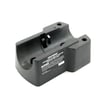
- Charging stand
- Owner’s manual (for diagrams, part list, and safety instructions)
How to make sure you order the right part
Use this checklist before you place an order so you do not end up with a similar looking, incompatible part.
- Confirm the model number is 315111810 (not a close variant)
- Identify the failed item (battery pack vs. charger vs. stand)
- Check the part number in the parts list section of the manual
- Match connector style and voltage class for the charger and battery system
- Replace with identical Craftsman replacement parts when servicing
Common part numbers shown in the manual
These are the part numbers referenced in the model 315111810 documentation.
| Item | What it does | Part number (from manual) |
|---|---|---|
| Battery pack | Powers the cordless screwdriver | 974277-003 |
| Battery charger | Charges the battery pack | 999555-001 |
| Charging stand | Holds tool/battery for charging | 974385-002 |
Why it matters
Cordless tools are sensitive to battery chemistry and charger output. Using the correct, identical replacement parts helps prevent poor runtime, charging failures, and avoidable damage to the tool’s motor housing and battery terminals.
Last updated: February 2026
How to use a rechargeable screwdriver?
To use a rechargeable screwdriver like the Craftsman 315111810, charge it fully, install a 1/4-inch bit, set the forward/reverse switch for the direction you need, then squeeze the trigger to drive or remove screws. Use the built-in light for tight spaces and keep the tool on the charging stand between jobs.
Before you start: charge it correctly
The 315111810 ships in a low-charge state; we recommend charging it for at least 3 hours before first use. Typical charge time is 3 to 5 hours, and the battery reaches its best performance after several use and recharge cycles.
- Place the forward/reverse switch in the center (lock) position
- Set the tool into the charging stand (it must be in the stand to charge)
- Plug the charger into the stand input jack
- Let it charge until you are ready to use it
- Store the screwdriver in the stand so it is topped off for the next project
For model-specific safety notes and operating details, follow the steps in the owner's manual.
Basic operation steps (driving and removing screws)
- Insert a 1/4-inch hex-shank bit into the collet
- Select direction: forward to drive screws, reverse to back them out
- Keep steady pressure in line with the screw to prevent cam-out and stripped heads
- Squeeze the trigger to run the motor (single-speed)
- Use the light when working in cabinets, corners, or other low-visibility areas
Quick specs for this model
| Item | Craftsman 315111810 typical spec |
|---|---|
| Collet size | 1/4 in. |
| Motor | 2.4 V DC |
| No-load speed | 165 RPM |
| Drive type | Single speed, reversible |
| Charge rate | 3 to 5 hours |
Using the charging stand and bit storage
The charging stand is designed for storage convenience and includes bit storage for two bits.
- Mount the stand near an electrical outlet
- If wall-mounting, drill two pilot holes 2-3/8 inches apart and use the provided anchors and screws
- Keep your most-used bits (commonly Phillips and flat) in the stand so they are always with the tool
Why it matters
Correct charging and proper alignment while driving screws helps prevent stripped screw heads, reduces wear on the bit and collet, and improves battery life and run time on a cordless screwdriver.
Last updated: February 2026
What is the difference between a power screwdriver and a regular screwdriver?
A regular screwdriver is hand-powered, so you control speed and torque entirely with your wrist. A power screwdriver like the Craftsman 315111810 uses a motor to drive screws faster and more consistently; this model is single-speed, reversible (165 RPM no-load) and uses 1/4-inch hex bits.
Key differences that matter in real use
- Power source: Manual hand force vs. 2.4V DC motor (315111810)
- Speed: Manual varies by user vs. consistent drive speed (315111810 is 165 RPM no-load)
- Torque control: Hand feel vs. adjustable torque clutch to help avoid stripping screw heads
- Direction control: Manual repositioning vs. forward/reverse switch with a center lock position
- Bit system: Many manuals use fixed tips vs. 1/4-inch hex collet for quick bit changes
Quick comparison
| Feature | Regular screwdriver | Craftsman 315111810 power screwdriver |
|---|---|---|
| Best for | Occasional screws, delicate feel | Repetitive driving, consistent results |
| Speed | Slow to moderate | Single-speed motor drive |
| Torque control | Your wrist and technique | Adjustable clutch (tightening power) |
| Bit changes | Slower (varies by type) | Fast 1/4-inch hex bit insertion |
| Reverse | Manual technique | Built-in forward/reverse switch |
Why it matters
Using a power screwdriver helps when you have lots of screws to drive or you want more consistent results. On the 315111810, the adjustable clutch is especially useful because it lets us match torque to the job and reduce damage to screw heads, threads, or the workpiece.
Tips for choosing the right tool
- Use a manual screwdriver for very small fasteners, delicate plastics, or when you need maximum feel.
- Use the 315111810 power screwdriver for assembly work, cabinet hardware, and repetitive driving.
- Start with a low clutch setting, then increase torque only as needed.
- Lock the trigger (center position) before inserting or removing bits.
- Stick with 1/4-inch hex bits for proper fit in the collet.
For model-specific operating details (bit insertion, clutch adjustment, switch lock), follow the owner's manual.
Last updated: February 2026